Website

Your website, connected to your CRM

Paste one line of code on your site, whoever built it. Every form someone sends becomes a contact and a lead, and you see visits, sources and conversion rate without cookies.

30-day free trial. $0 today, card required. Cancel before day 30 and you pay nothing.

Forms become leads

Website in LoonStack CRM: Forms become leads. Sample data in LoonStack CRM.

What you can do with Website

Forms become leads

Each form on your site creates or updates a contact, adds a deal in the first stage of your pipeline (you can turn that off), puts the answers on the contact's timeline and tells your team. Your form keeps working exactly as before.

  • New contacts and deals from forms
  • Answers on the timeline
  • Passwords and card numbers never sent

Visits without cookies

See visitors, page views, top pages, where visitors come from, phones versus computers and your conversion rate. A visitor is a daily hash that cannot be traced back or followed across days.

  • 7, 30 or 90 days, or your own dates
  • Sources like Google search and Google Business Profile
  • Leads by source
Visits without cookies. Sample data in LoonStack CRM.

Fits the website you have now

The code works on WordPress, Wix, Squarespace, Webflow, Shopify, GoDaddy or a custom site. Forms in other tools, like Tally, Jotform, Typeform or Google Forms, connect with their own private link.

  • One line of code
  • Only your own website address is accepted
  • Spam caught and kept 30 days
Fits the website you have now. Sample data in LoonStack CRM.

See it in action

Website, step by step, in screenshots of the real app with a made-up sample business. Use the buttons to move through it.

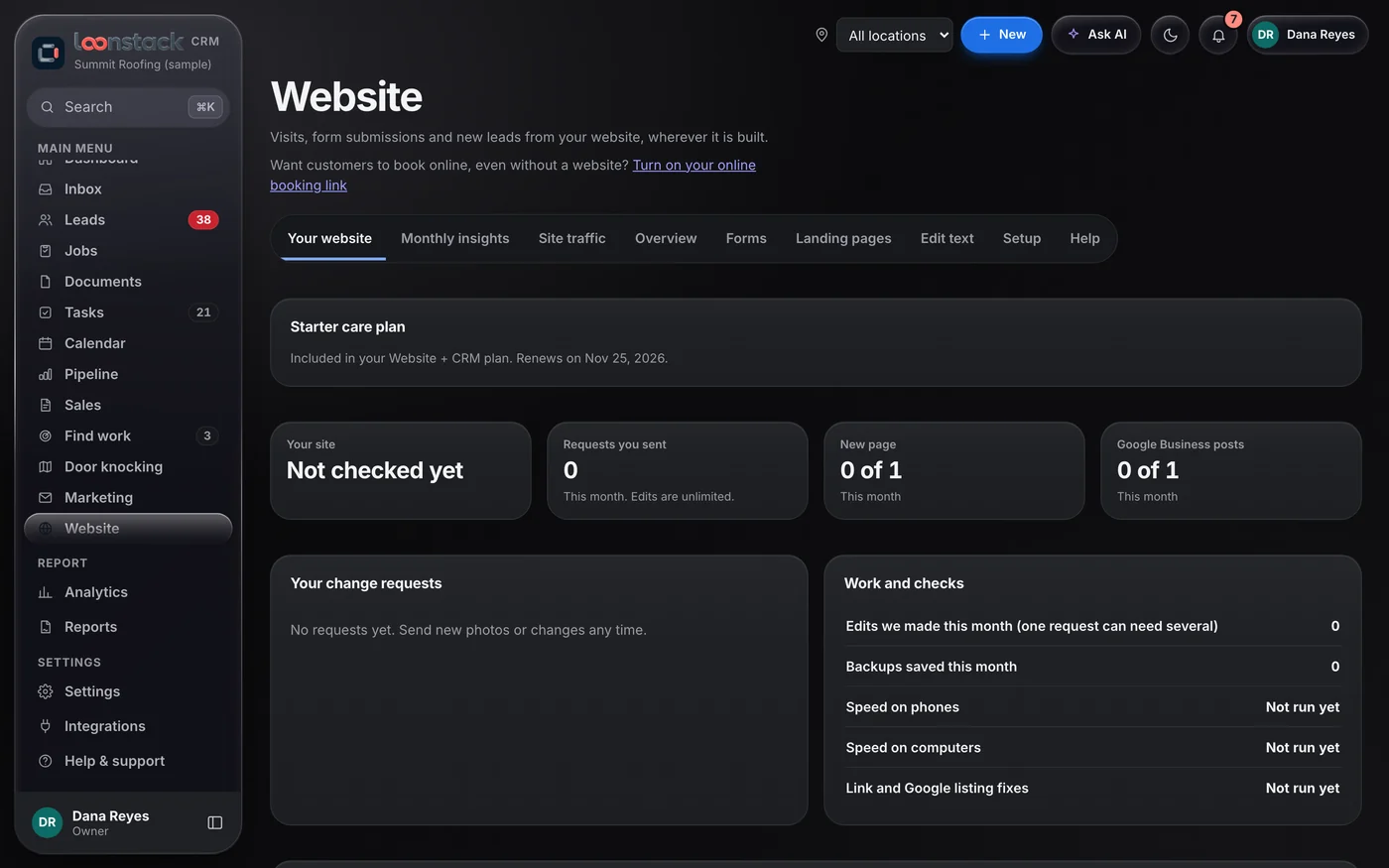
  1. Website overview: visitors, submissions, new leads and conversion rate.
    Step 1 of 3 Website overview: visitors, submissions, new leads and conversion rate.
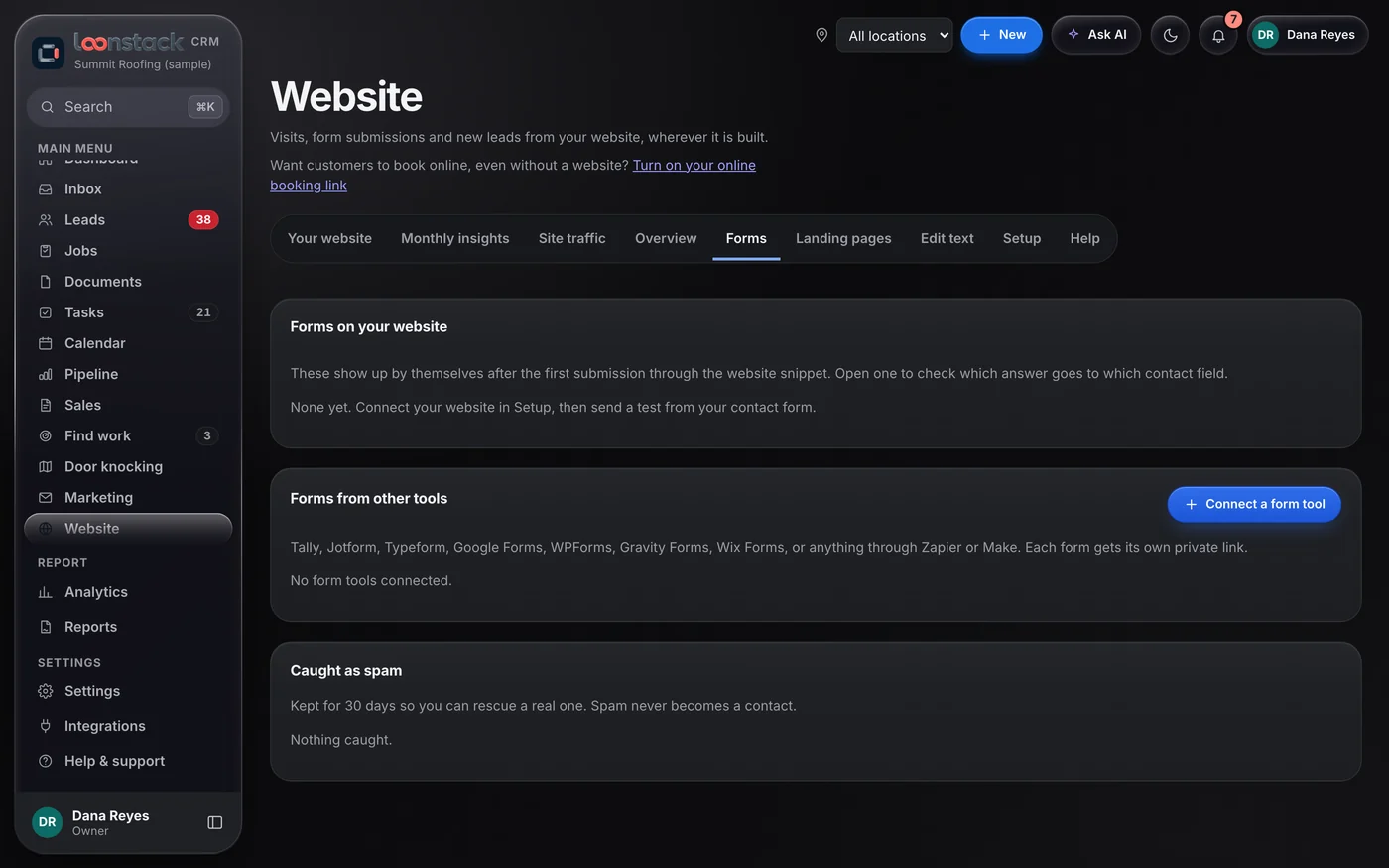
  2. Forms on your website and forms from other tools.
    Step 2 of 3 Forms on your website and forms from other tools.
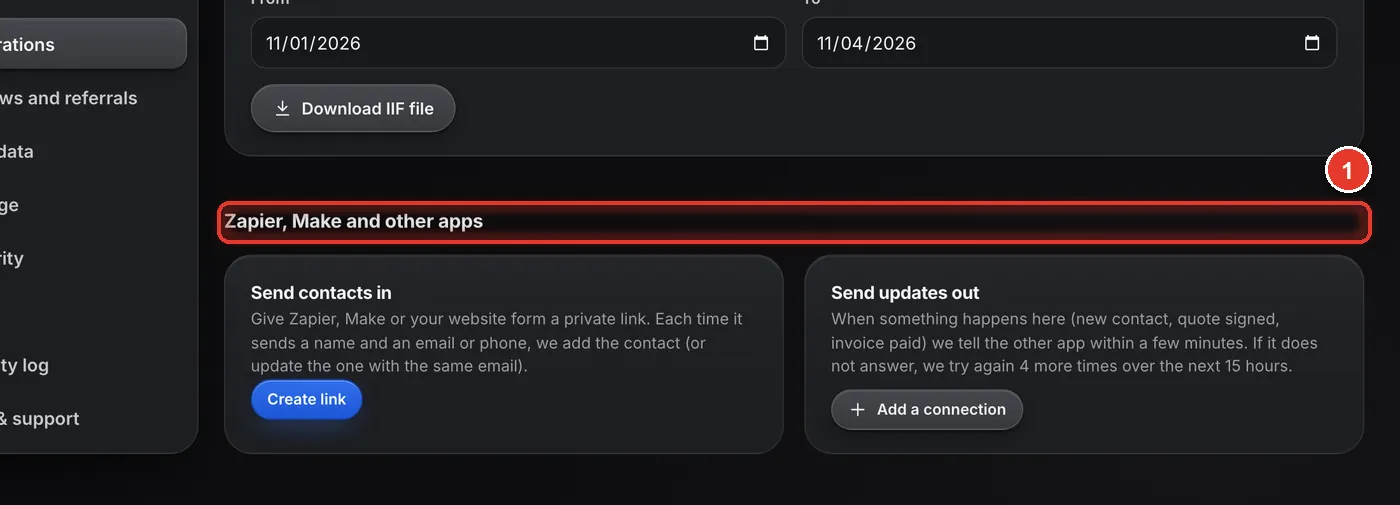
  3. Zapier, Make and other apps for anything else.
    Step 3 of 3 Zapier, Make and other apps for anything else.

Website in the how-to guide, step by step

Why it helps

  • No lead left in an inbox

    Website forms land in the CRM as contacts and deals.

  • Know what brings work

    Sources and leads by source show where customers find you.

  • Private by design

    Visits are counted without cookies, and sensitive fields are never sent.

Everything in Website

Every plan includes every line below.

  • See that your site is connected

    Once your site sends its first visit or form, Website shows a card with your address, a Connected tag, when we last heard from it, and your visitors and page views for the dates you picked. Until then it says your site is not sending anything yet and points you to Setup.

  • Monthly website insights for care plan customers

    Websites with a LoonStack care plan see Monthly insights when they sign in: visitors, pages, how people found you, phone or computer, where visitors are, forms, phone taps and chats, against last month and last year, plus a monthly PDF report. Add the CRM any time and keep everything.

  • Date ranges and compare

    Pick a period from presets such as This week, Last 30 days, This quarter or Year to date, or choose days on a calendar. The numbers, charts and trend tags compare it with the period before, or the same dates a year earlier.

  • One line of code

    For any site builder.

  • Forms become contacts

    Created or updated, with the answers on the timeline.

  • Deal per new lead

    In the first stage; can be turned off.

  • Visits and page views

    Top pages and phones versus computers.

  • Where visitors come from

    Search, ads, social, email and other sites.

  • Conversion rate

    Form submissions per 100 visitors.

  • No cookies

    Daily visitor hash that cannot be followed across days.

  • Other form tools

    Tally, Jotform, Typeform, Google Forms and more.

  • Spam filter

    Spam is kept 30 days so you can rescue a real one.

  • Sensitive fields skipped

    Passwords, card numbers and file uploads are never sent.

Website is in every plan

Plans differ only in how many people can sign in. Month to month, no setup fee.

LoonStack CRM Solo

30-day free trial

$69/month

1 user

Every feature included, Website too.

Start free trial of Solo

$0 today. Card required. 30-day free trial, then $69 a month, renewing automatically until you cancel. Cancel before day 30 in Billing and you pay nothing. To add a second person, switch to Crew in Billing.

LoonStack CRM Crew

Best for teams of 2 to 10

$129/month

Up to 10 users

Every feature included, Website too.

Start free trial of Crew

$0 today. Card required. 30-day free trial, then $129 a month, renewing automatically until you cancel. Cancel before day 30 in Billing and you pay nothing. We remind you 7, 3 and 1 day before the trial ends.

LoonStack CRM Company

30-day free trial

$199/month

Unlimited users

Every feature included, Website too.

Start free trial of Company

$0 today. Card required. 30-day free trial, then $199 a month, renewing automatically until you cancel. Cancel before day 30 in Billing and you pay nothing. We remind you 7, 3 and 1 day before the trial ends.

Switch between Solo, Crew and Company anytime from Billing in the CRM. Full pricing, website bundles and terms

See Website with your business in it

Every plan has every feature. 30-day free trial, $0 today. Cancel before day 30 and you pay nothing.

Questions first? Email [email protected] or request a call. A written reply usually comes within one business day.