
LoonStack CRM Solo
Just you$69/month
1 user
Every feature included.
Start free trial of Solo
$0 today. Then $69 a month. To add a second person, switch to Crew in Billing.

Everything by email: [email protected]
For cleaning, HVAC, plumbing, roofing and other local service businesses. Every web form becomes a lead with a next step, the AI receptionist can answer chats and texts while you are on a job, and quotes nobody answered get reminders until the customer replies. The price stays flat whether you send ten quotes a month or two hundred.
The customer system for local service businesses, like cleaners, HVAC and plumbing companies, roofers and body shops.
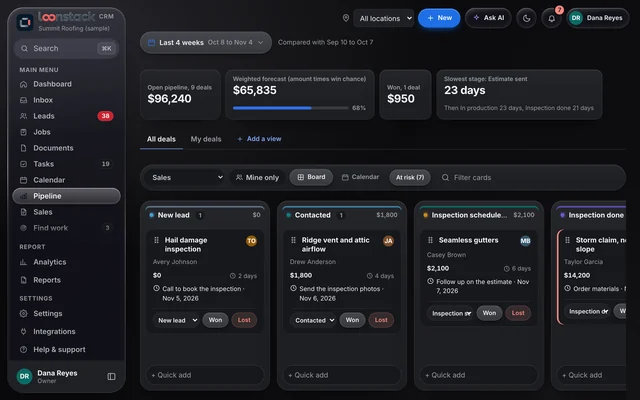
It keeps every customer, quote, appointment, text and invoice on one timeline, follows up on leads, quotes and overdue invoices for you, and takes payments through the processor you already use.
You decide what goes out. Every plan has every feature, and plans differ only by how many people can sign in.
Ready-made setups for cleaning, HVAC, plumbing, roofing, electrical, landscaping, pest control, pool service, auto and more. See all trades.
Most lost jobs are lost in the gaps: a missed call, a quote nobody chased, an invoice nobody sent. Here is what we fix.
See the tools that come set up for your kind of business, with pictures of the real app.
Pick one above to see its tools here.
Quotes, dispatch, work orders and online invoices.
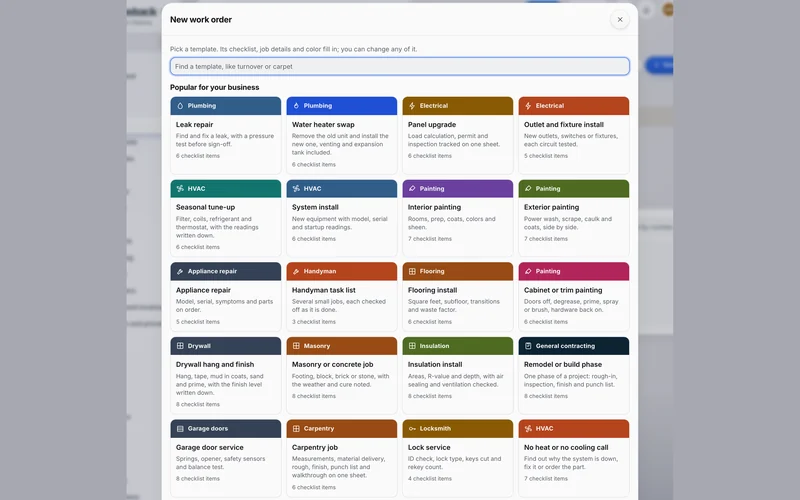 Work order templates for your tradePick the trade on a new work order and its checklist and job details fill in: Leak repair, Water heater swap, Panel upgrade, Seasonal tune-up. Change any of it to match how your crew works.
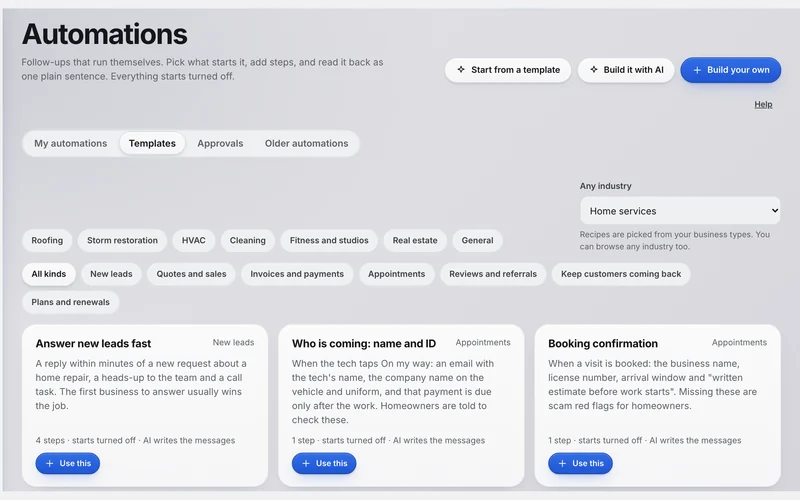 Follow-ups written for home tradesReady-made automations like "Spring AC tune-up", "Six-month check-up" and "Permit approved: schedule the work". Copy one, change the words, turn it on. They all start turned off.
Inspections, estimates, change orders and production.
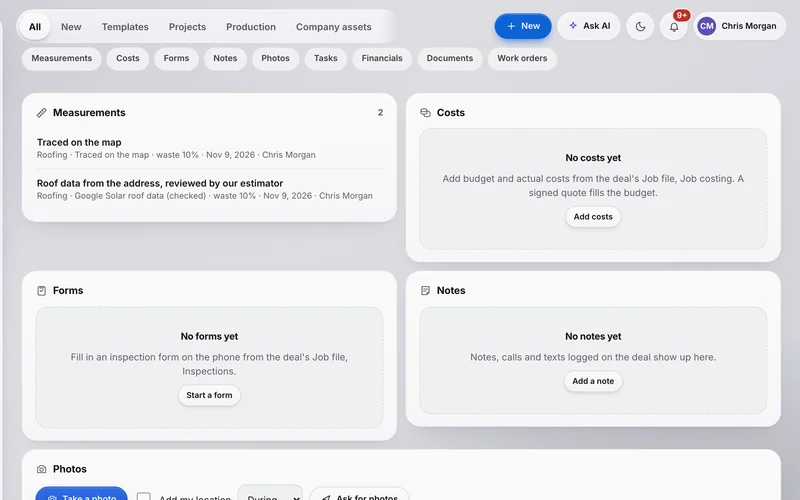 Measure the roof from the officeType the address and LoonStack fills in roof area, pitch and facets from Google's roof data, at no extra cost. Or trace the roof on a free aerial photo and it adds up the eaves, rakes, ridges, hips and valleys. Check the numbers before you order.
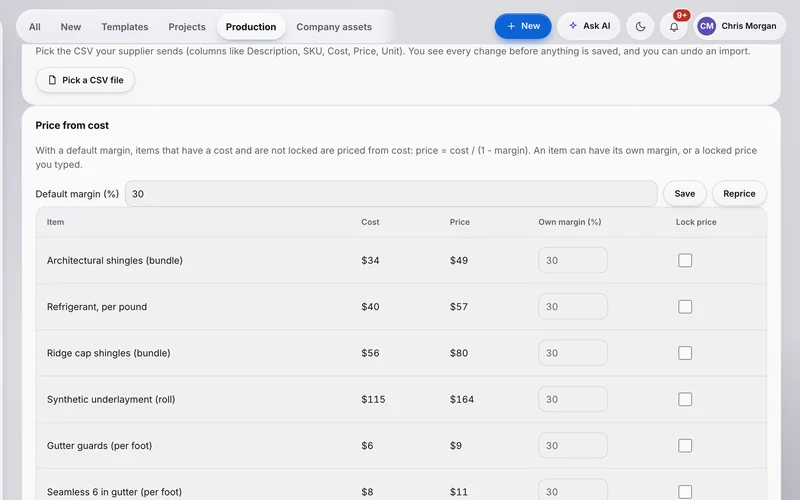 Your supplier's prices, your marginUpload your supplier's price list and see what changed before you apply it. Items get priced from cost at your margin. Type the total you want on a quote and LoonStack spreads the markup to hit it, never below cost.
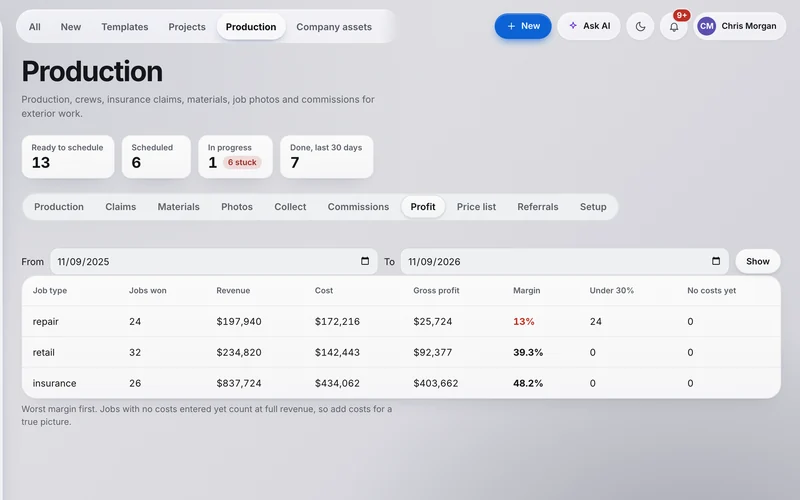 Profit by job typeWon jobs grouped by type, with revenue, cost, gross profit and margin. The worst ones are at the top, so you see which jobs aren't paying.
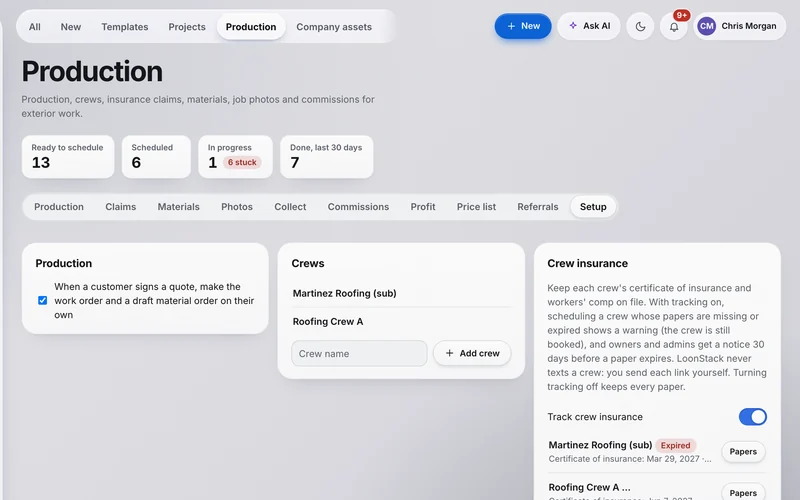 Crews with their papers in orderKeep each crew's insurance, workers' comp and license with the expiration dates. Book a crew with expired papers and you get a warning, and you hear about it 30 days before anything runs out.
Recurring visits, crews, invoices and seasonal campaigns.
Work order templates for your tradePick the trade on a new work order and its checklist and job details fill in: Maintenance visit, Landscape install, Tree work. Change any of it to match how your crew works.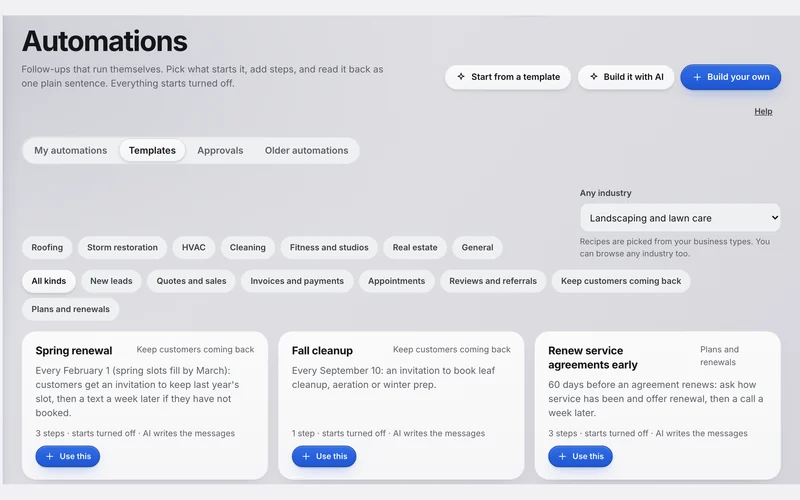 Follow-ups written for lawn and landscape crewsReady-made automations like "Spring renewal", "Fall cleanup" and "End of season thank-you". Copy one, change the words, turn it on. They all start turned off.
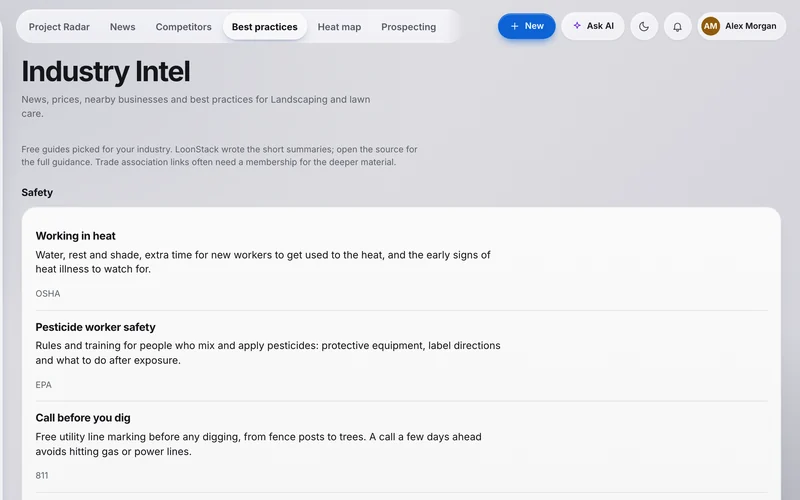 Guides and news for your tradeIndustry Intel picks free guides for lawn and landscape crews, like Working in heat (OSHA) and Pesticide worker safety (EPA), each with a short summary, plus trade headlines.
Online booking, time clock and automatic follow-ups.
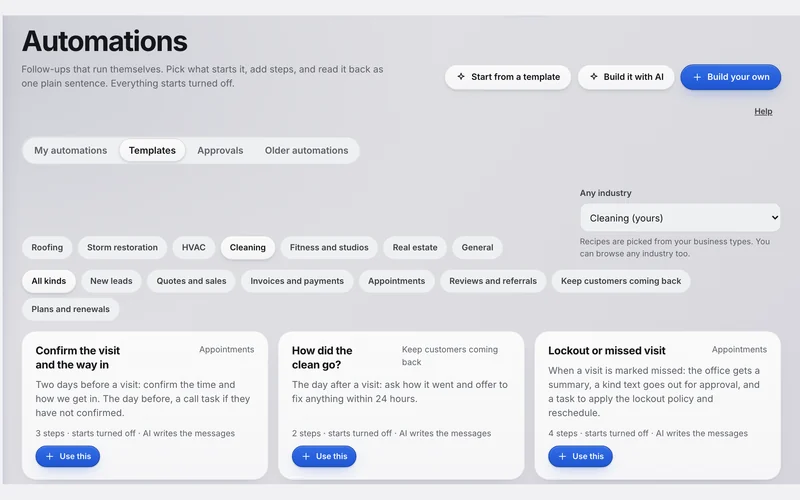 Follow-ups written for cleaning teamsReady-made automations like "Confirm the visit and the way in", "How did the clean go?" and "Turn a first clean into a regular one". Copy one, change the words, turn it on. They all start turned off.
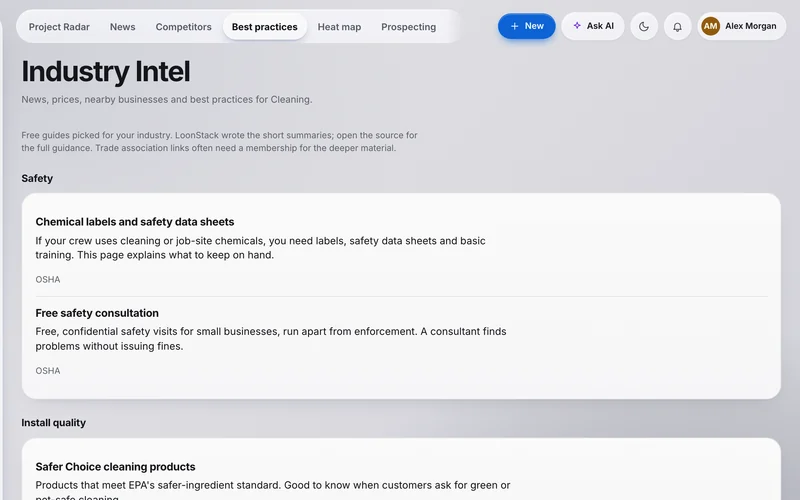 Guides and news for your tradeIndustry Intel picks free guides for cleaning teams, like Chemical labels and safety data sheets (OSHA) and Free safety consultation (OSHA), each with a short summary, plus trade headlines.
Dispatch, treatment records and renewals.
Work order templates for your tradePick the trade on a new work order and its checklist and job details fill in: Pest treatment. Change any of it to match how your crew works.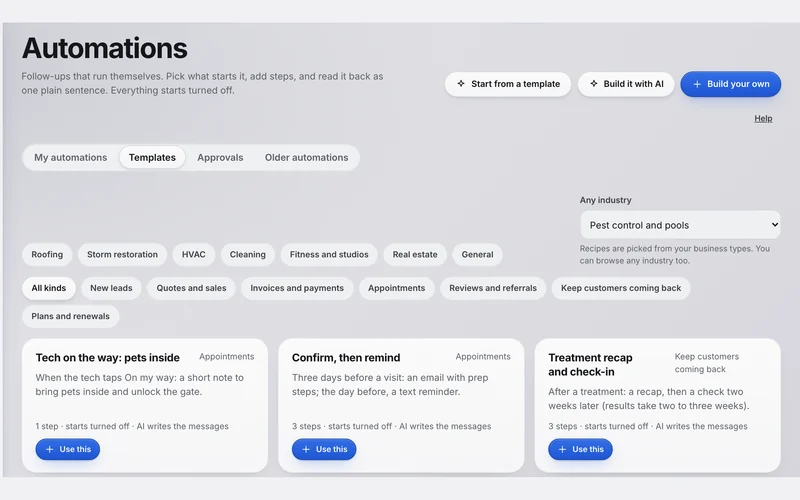 Follow-ups written for pest control prosReady-made automations like "Tech on the way: pets inside" and "Missed route visit". Copy one, change the words, turn it on. They all start turned off.
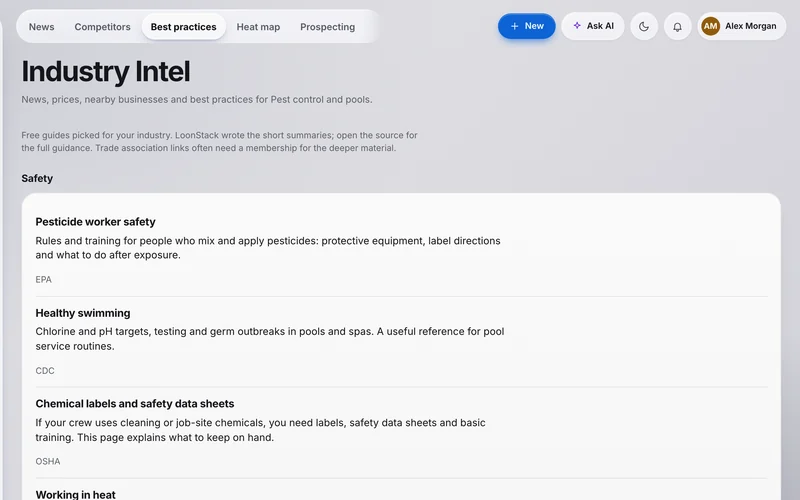 Guides and news for your tradeIndustry Intel picks free guides for pest control pros, like Pesticide worker safety (EPA), each with a short summary, plus trade headlines.
Dispatch, water readings and renewals.
Work order templates for your tradePick the trade on a new work order and its checklist and job details fill in: Pool service visit. Change any of it to match how your crew works.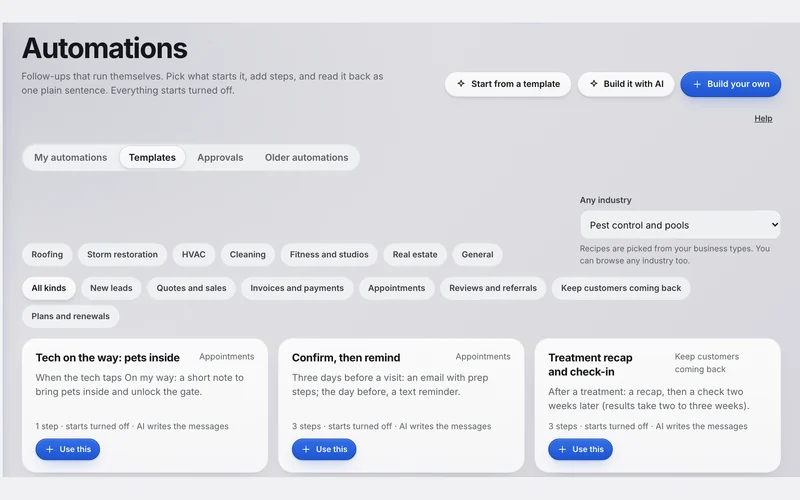 Follow-ups written for pool service prosReady-made automations like "Pool opening season" and "Missed route visit". Copy one, change the words, turn it on. They all start turned off.
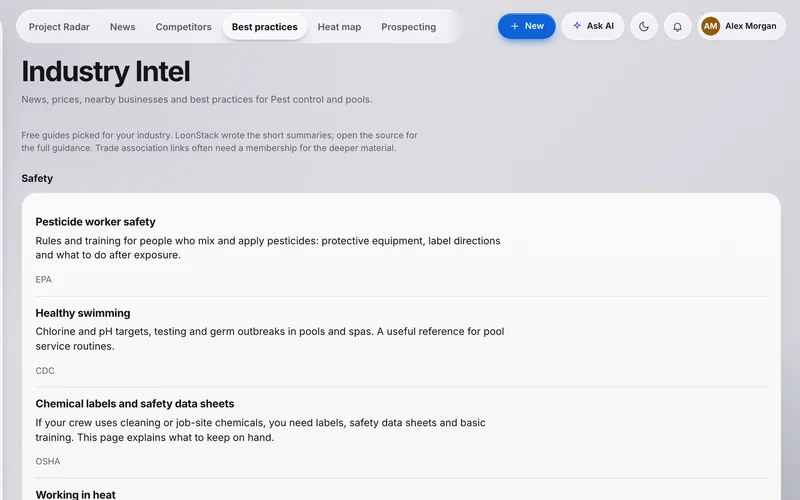 Guides and news for your tradeIndustry Intel picks free guides for pool service pros, like Healthy swimming (CDC), each with a short summary, plus trade headlines.
Quotes, crews, time clock and invoices.
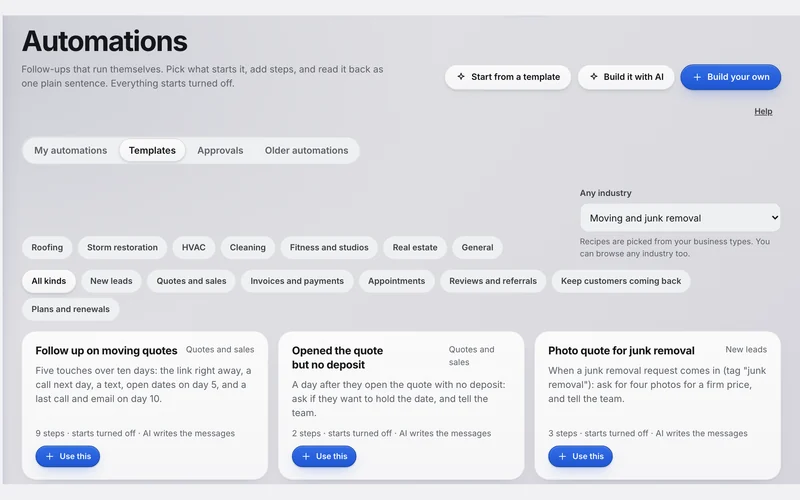 Follow-ups written for movers and haulersReady-made automations like "Opened the quote but no deposit", "Photo quote for junk removal" and "Moving day checklist". Copy one, change the words, turn it on. They all start turned off.
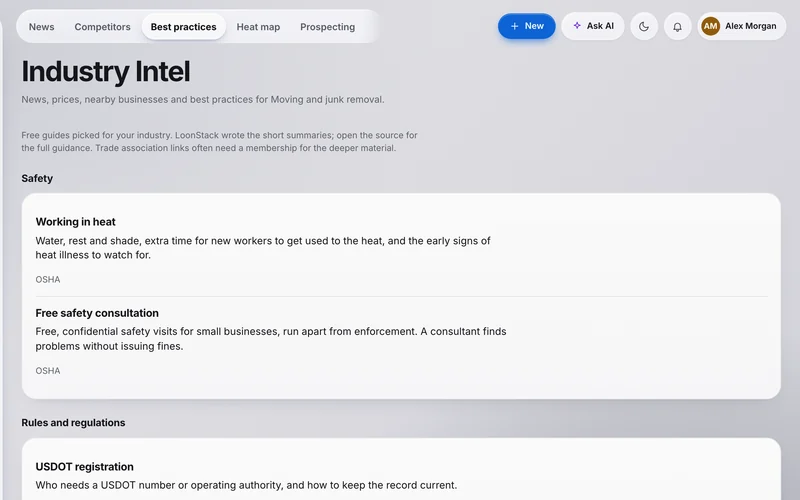 Guides and news for your tradeIndustry Intel picks free guides for movers and haulers, like Working in heat (OSHA) and Free safety consultation (OSHA), each with a short summary, plus trade headlines.
Vehicle records, quotes and service reminders.
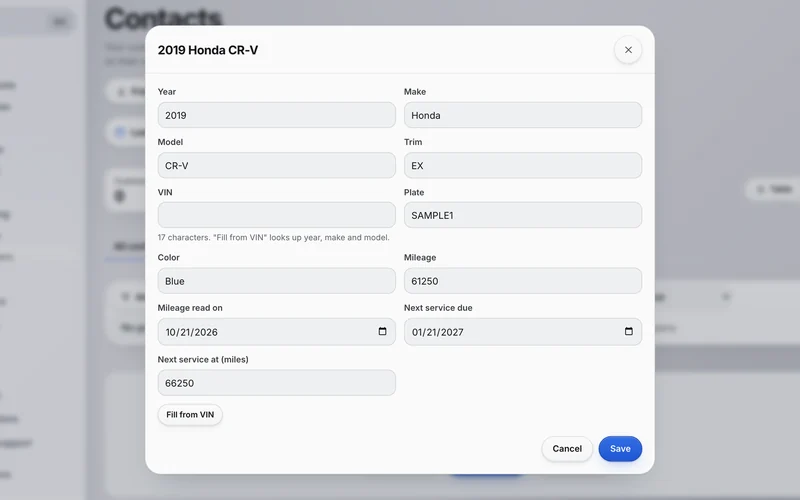 Every car on fileAdd the vehicle to the customer: year, make, model, VIN and plate. Fill from VIN looks up the year, make and model. Set the mileage and the next service, and LoonStack makes the reminder task.
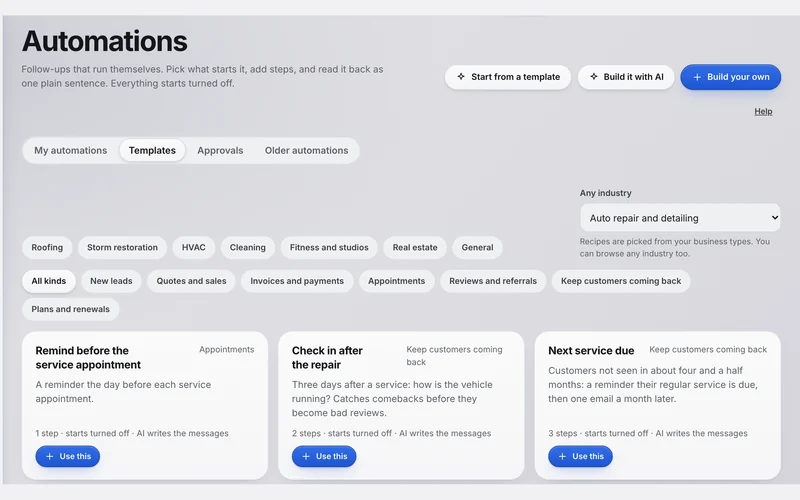 Follow-ups written for auto shopsReady-made automations like "Next service due", "Declined work follow-up" and "Check in after the repair". Copy one, change the words, turn it on. They all start turned off.
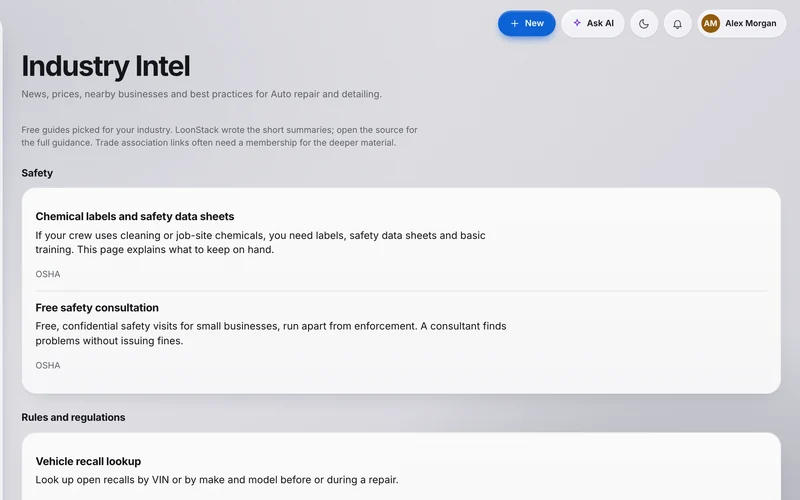 Guides and news for your tradeIndustry Intel picks free guides for auto shops, like Chemical labels and safety data sheets (OSHA) and Free safety consultation (OSHA), each with a short summary, plus trade headlines.
Dispatch, vehicles, status texts and invoices.
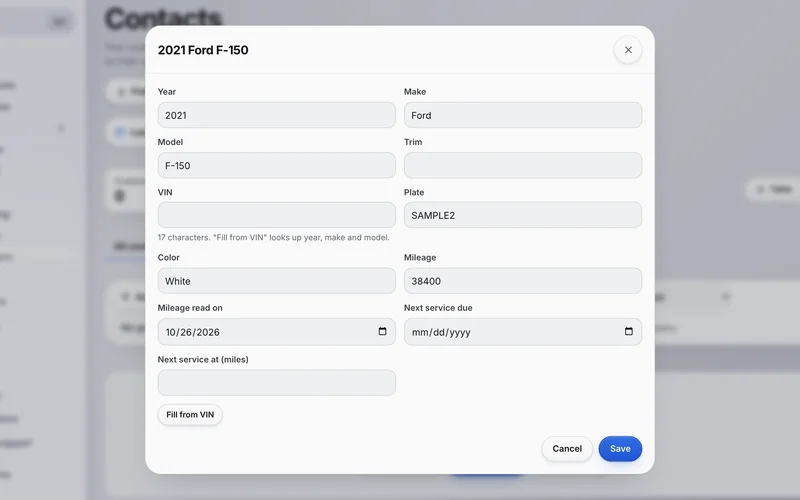 The vehicle on every callKeep each customer's vehicles with VIN, plate and color. Fill from VIN looks up the year, make and model, and mileage is logged with the date it was read.
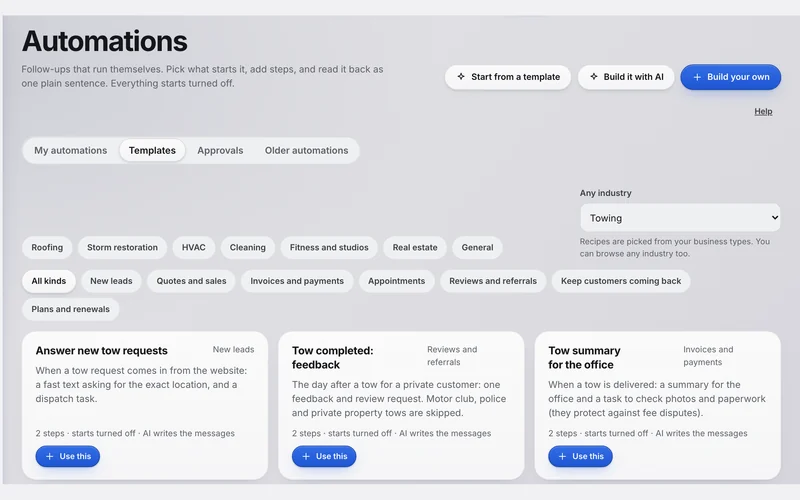 Follow-ups written for towingReady-made automations like "Answer new tow requests", "Tow summary for the office" and "Impound notices and lien timeline". Copy one, change the words, turn it on. They all start turned off.
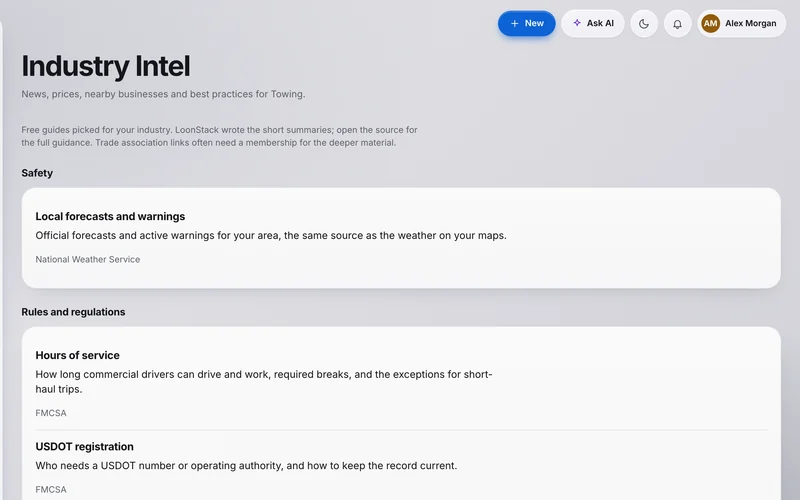 Guides and news for your tradeIndustry Intel picks free guides for towing, like Hours of service (FMCSA) and Local forecasts and warnings (National Weather Service), each with a short summary, plus trade headlines.
Booking, recall reminders, waitlist and forms.
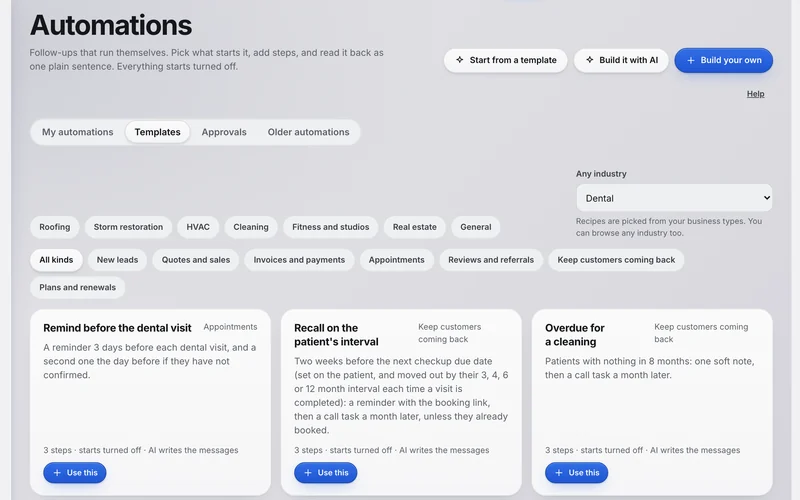 Follow-ups written for dental officesReady-made automations like "Recall on the patient's interval", "Overdue for a cleaning" and "Welcome new patients". Copy one, change the words, turn it on. They all start turned off.
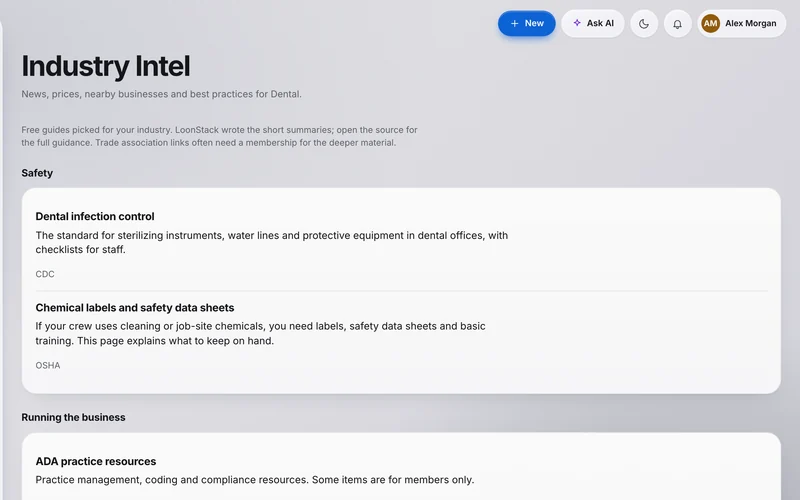 Guides and news for your tradeIndustry Intel picks free guides for dental offices, like Dental infection control (CDC) and ADA practice resources, each with a short summary, plus trade headlines.
Booking policies, visit packs, waitlist and forms.
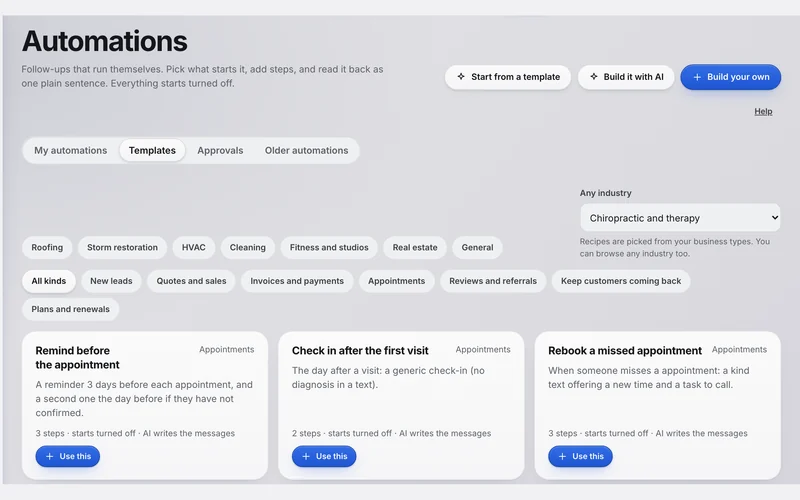 Follow-ups written for chiropractors and therapistsReady-made automations like "Check in after the first visit", "Regular patient missed two weeks" and "Dropped out of a care plan". Copy one, change the words, turn it on. They all start turned off.
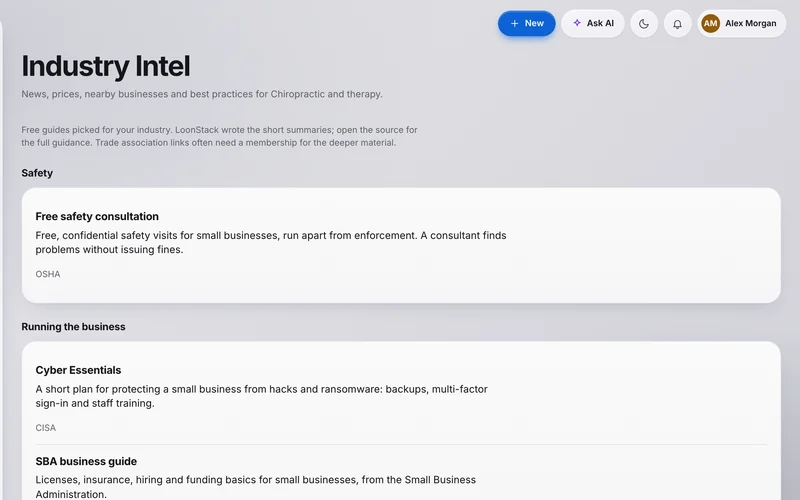 Guides and news for your tradeIndustry Intel picks free guides for chiropractors and therapists, like Free safety consultation (OSHA) and Cyber Essentials (CISA), each with a short summary, plus trade headlines.
Packages, gift cards, consent forms and booking.
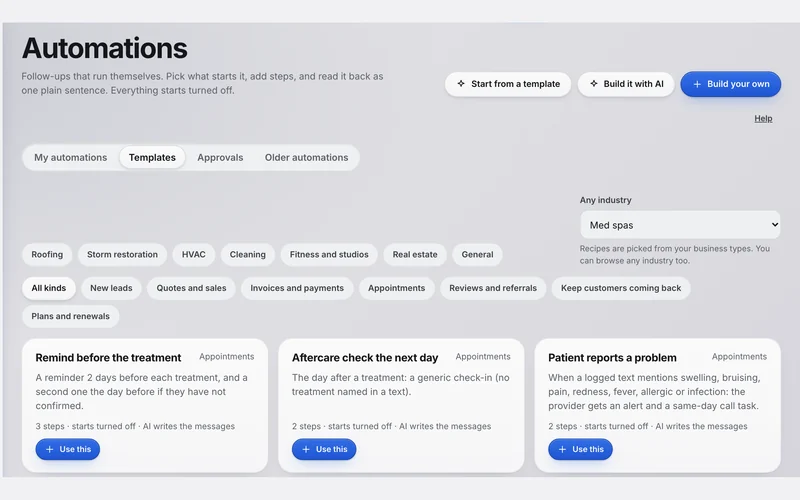 Follow-ups written for med spasReady-made automations like "Aftercare check the next day", "Patient reports a problem" and "Results check at 2 weeks, rebook at 12". Copy one, change the words, turn it on. They all start turned off.
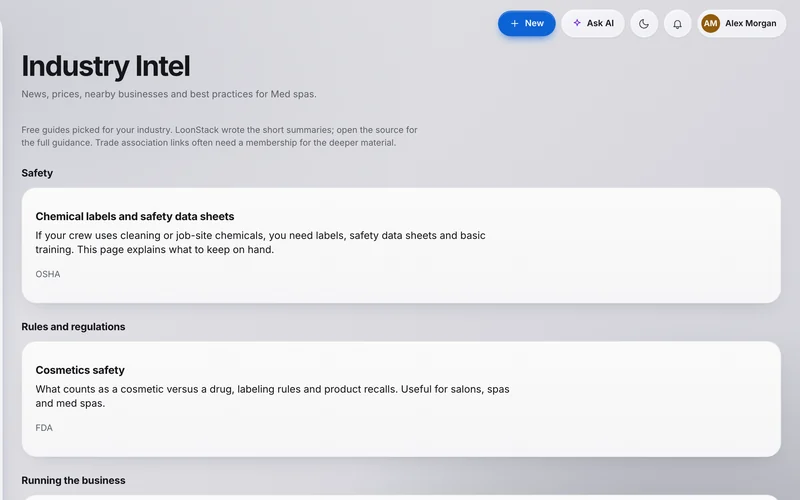 Guides and news for your tradeIndustry Intel picks free guides for med spas, like Cosmetics safety (FDA) and Chemical labels and safety data sheets (OSHA), each with a short summary, plus trade headlines.
Waitlist, gift cards, booking policies and tips.
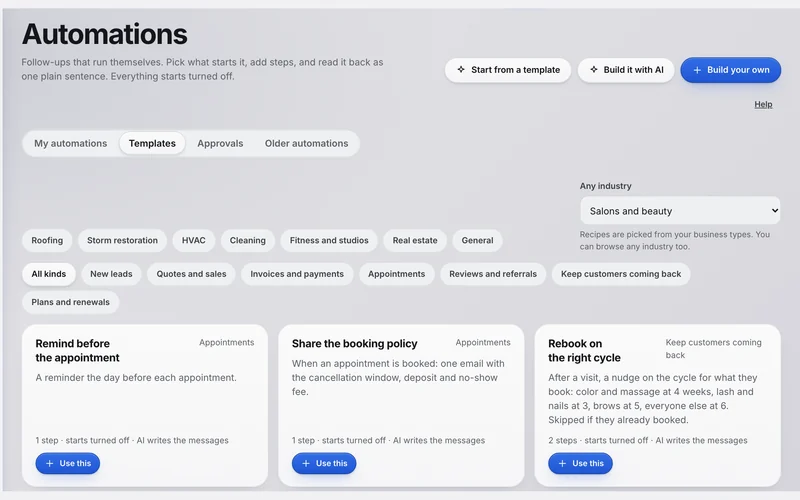 Follow-ups written for salons and barbersReady-made automations like "Share the booking policy", "Rebook on the right cycle" and "Sixty days since a visit". Copy one, change the words, turn it on. They all start turned off.
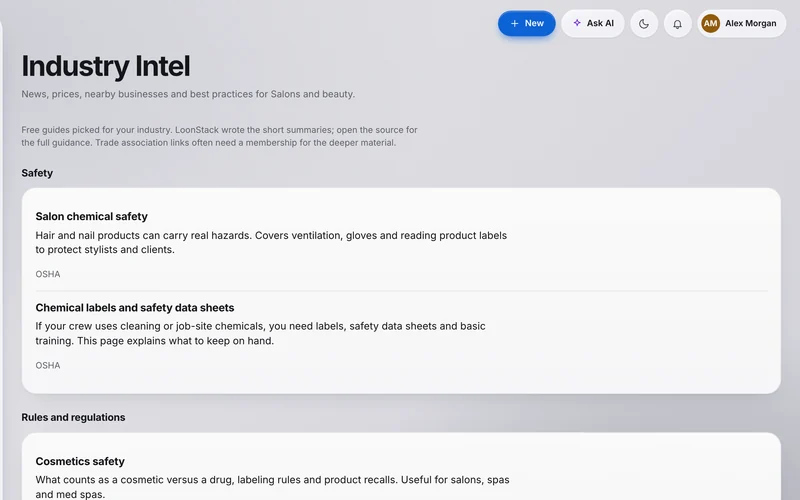 Guides and news for your tradeIndustry Intel picks free guides for salons and barbers, like Salon chemical safety (OSHA) and Chemical labels and safety data sheets (OSHA), each with a short summary, plus trade headlines.
Class packs, memberships, waivers and waitlist.
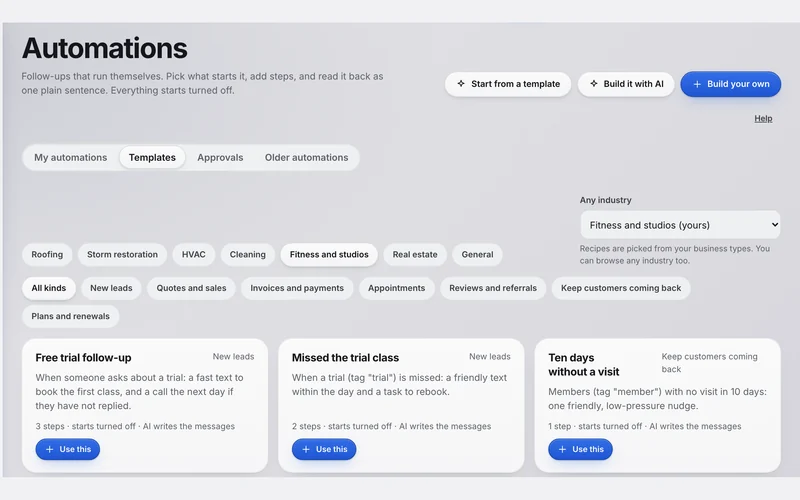 Follow-ups written for gyms and studiosReady-made automations like "Free trial follow-up", "Member has not come in for two weeks" and "Trial ends in two days". Copy one, change the words, turn it on. They all start turned off.
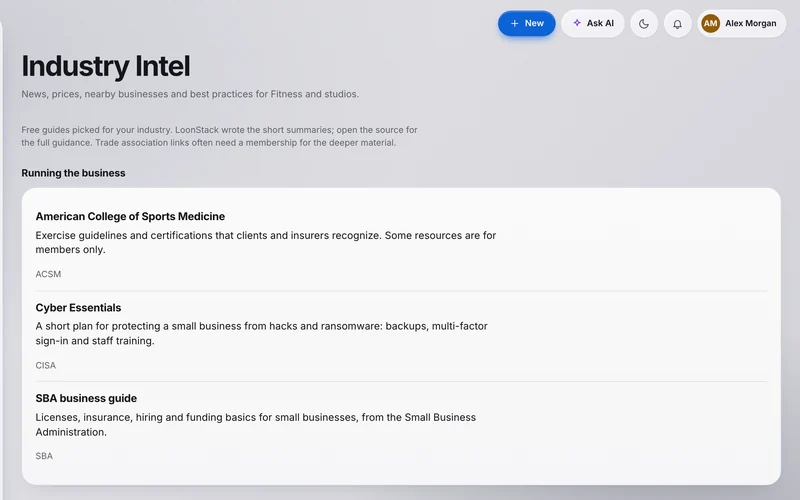 Guides and news for your tradeIndustry Intel picks free guides for gyms and studios, like American College of Sports Medicine and Cyber Essentials (CISA), each with a short summary, plus trade headlines.
Pet records, shot reminders, booking and forms.
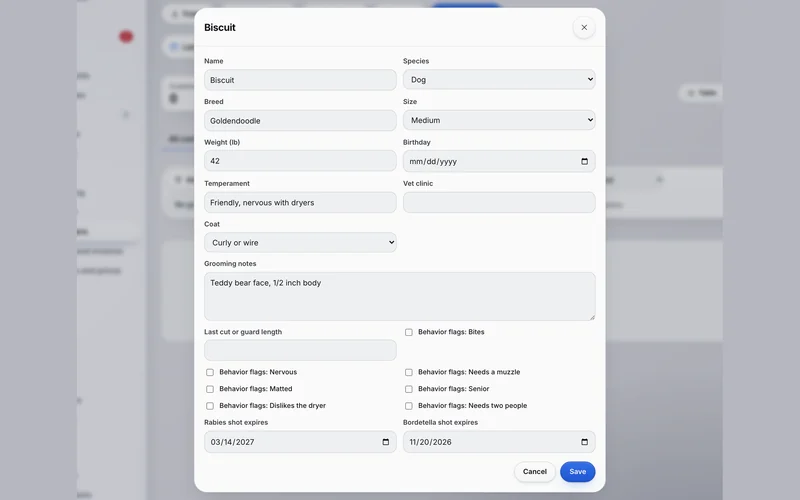 Every pet on fileBreed, size, coat, temperament and grooming notes on each pet. Groomers also get rabies and Bordetella expiration dates, and LoonStack makes a reminder task for each.
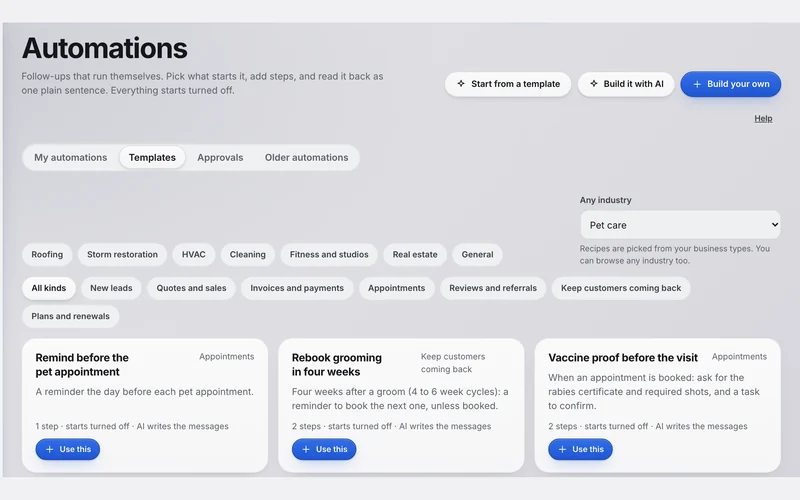 Follow-ups written for groomers and pet careReady-made automations like "Rebook grooming in four weeks", "Vaccine proof before the visit" and "Vaccine due for each pet". Copy one, change the words, turn it on. They all start turned off.
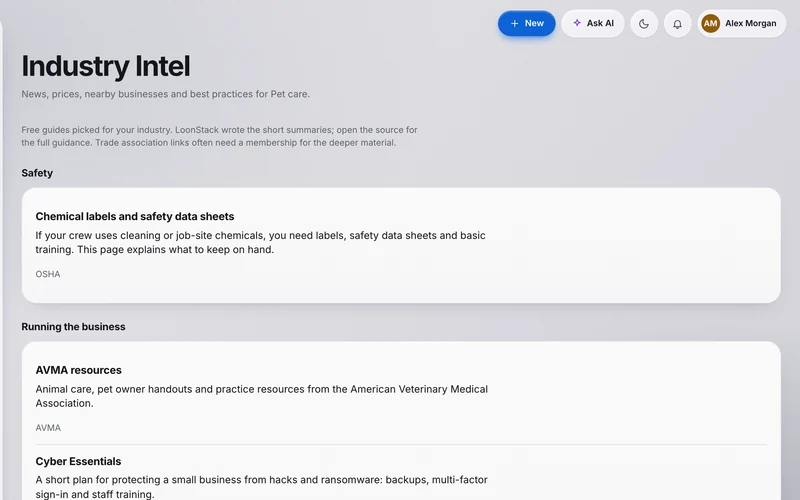 Guides and news for your tradeIndustry Intel picks free guides for groomers and pet care, like AVMA resources and Chemical labels and safety data sheets (OSHA), each with a short summary, plus trade headlines.
Lead follow-up, texting and signed forms.
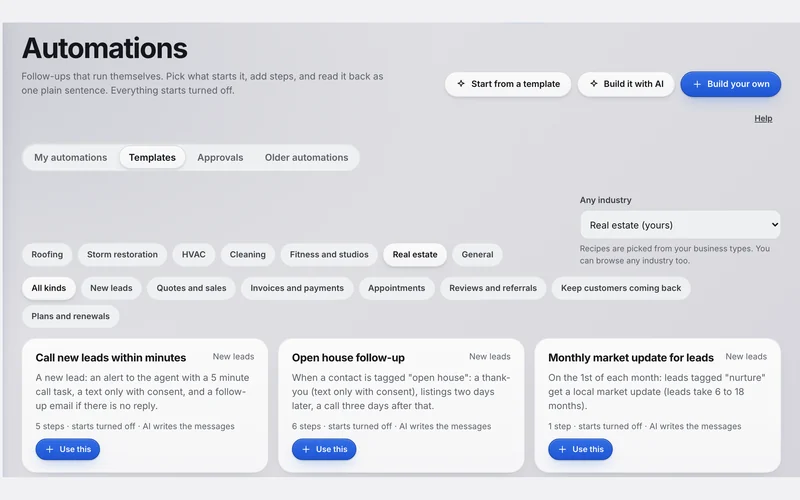 Follow-ups written for agents and property managersReady-made automations like "Call new leads within minutes", "Open house follow-up" and "Home anniversary". Copy one, change the words, turn it on. They all start turned off.
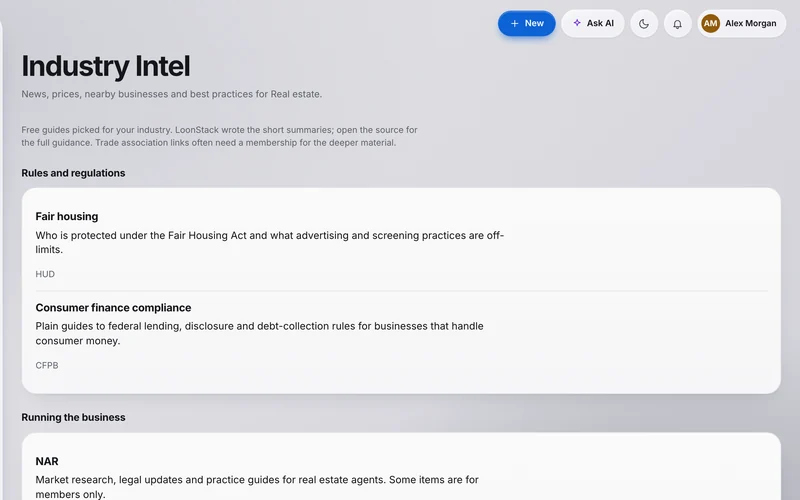 Guides and news for your tradeIndustry Intel picks free guides for agents and property managers, like Fair housing (HUD) and Consumer finance compliance (CFPB), each with a short summary, plus trade headlines.
Intake forms, billable time and follow-ups.
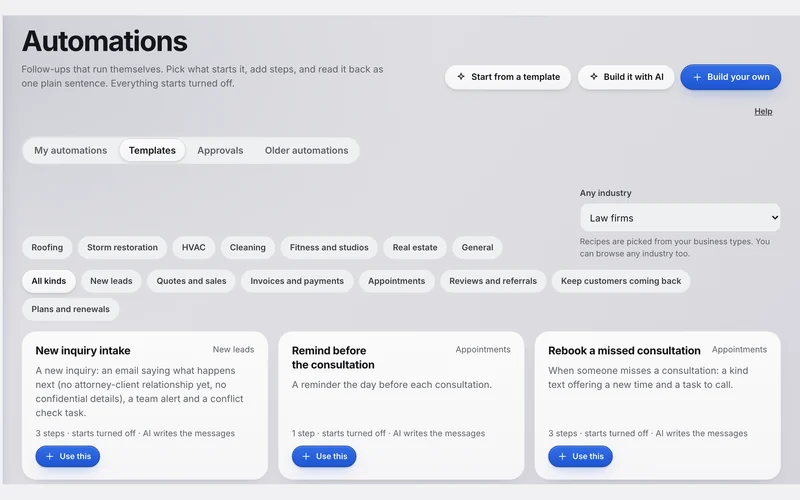 Follow-ups written for law firmsReady-made automations like "New inquiry intake", "Engagement letter not signed" and "Monthly status touch". Copy one, change the words, turn it on. They all start turned off.
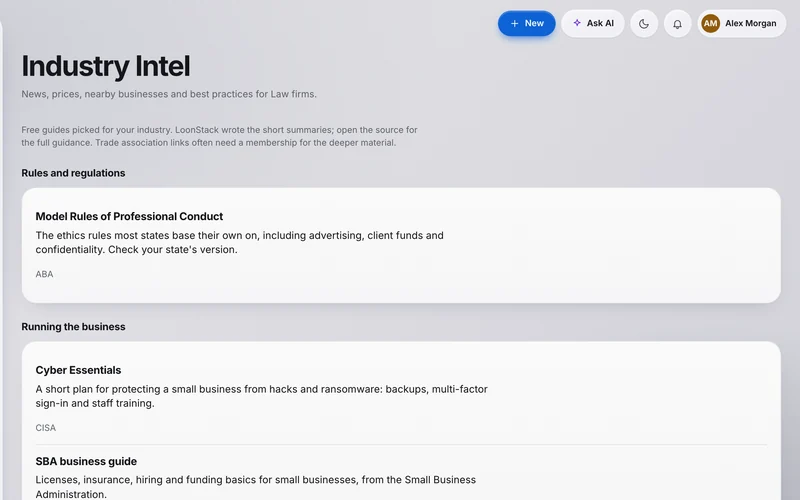 Guides and news for your tradeIndustry Intel picks free guides for law firms, like Model Rules of Professional Conduct (ABA) and Cyber Essentials (CISA), each with a short summary, plus trade headlines.
Organizers, document follow-ups and billable time.
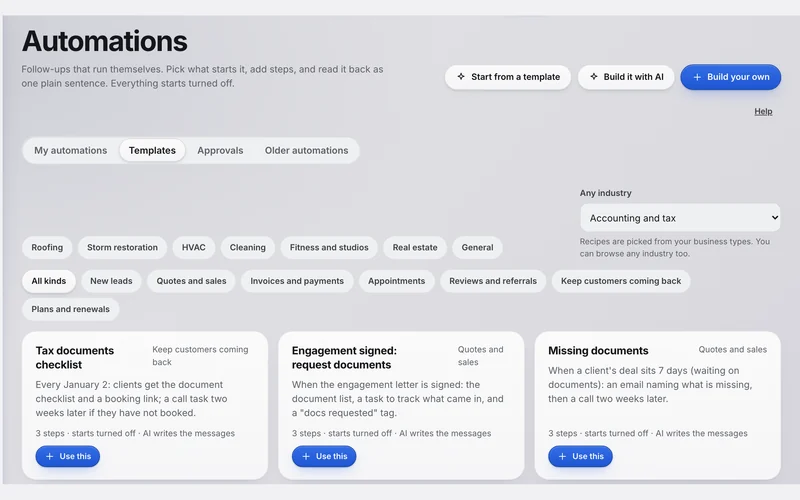 Follow-ups written for accountantsReady-made automations like "Tax documents checklist", "Missing documents" and "Estimated tax due". Copy one, change the words, turn it on. They all start turned off.
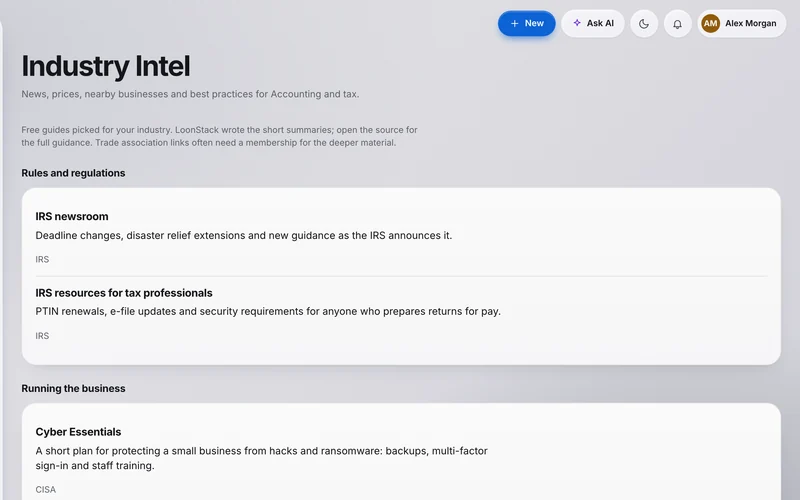 Guides and news for your tradeIndustry Intel picks free guides for accountants, like IRS newsroom and IRS resources for tax professionals, each with a short summary, plus trade headlines.
Automations, forms and follow-ups.
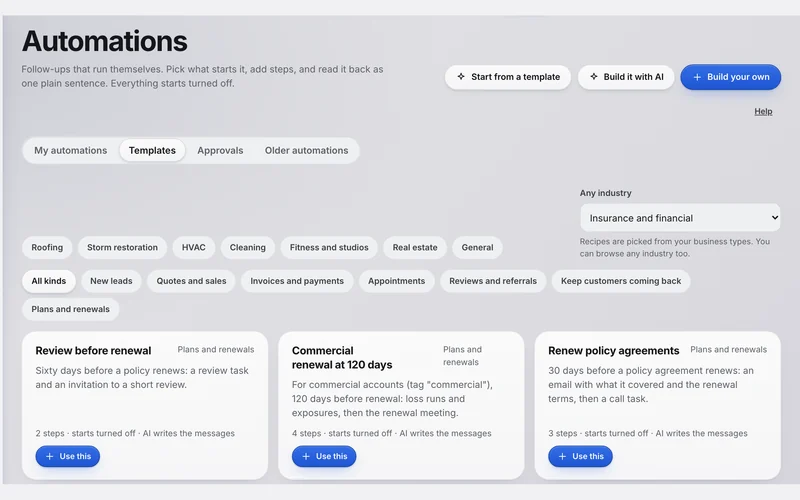 Follow-ups written for agents and plannersReady-made automations like "Review before renewal", "Commercial renewal at 120 days" and "Yearly review". Copy one, change the words, turn it on. They all start turned off.
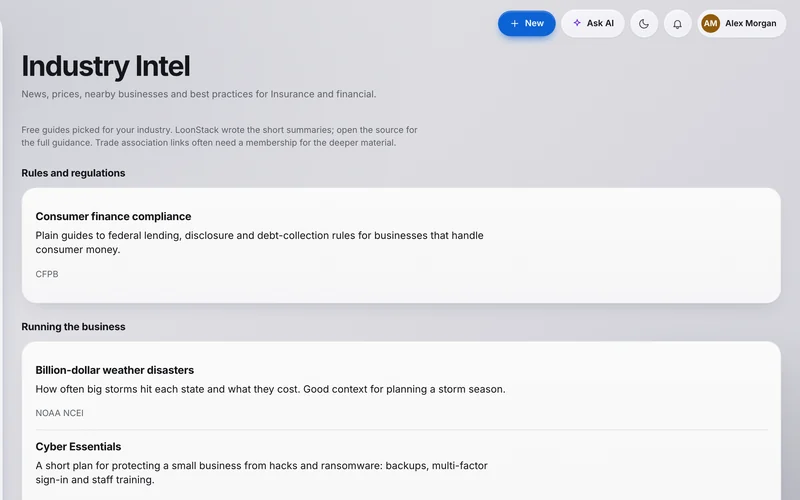 Guides and news for your tradeIndustry Intel picks free guides for agents and planners, like Consumer finance compliance (CFPB) and Billion-dollar weather disasters (NOAA), each with a short summary, plus trade headlines.
Packages, deposits, questionnaires and contracts.
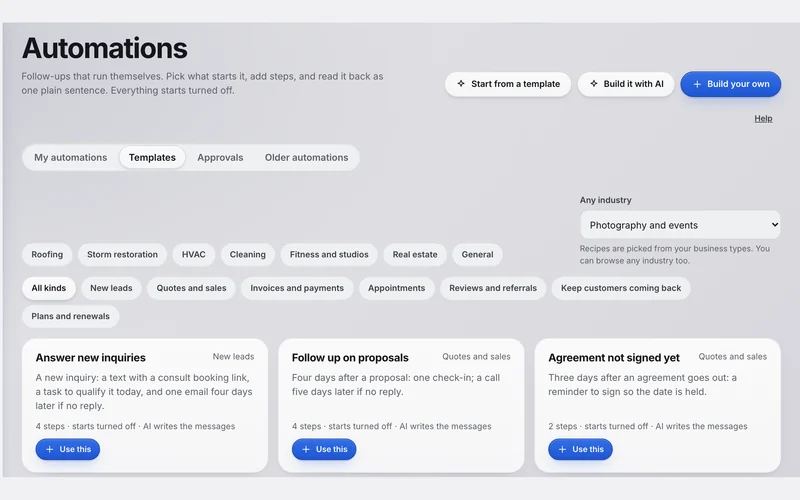 Follow-ups written for photographers and event prosReady-made automations like "Agreement not signed yet", "Planning questionnaire at 90 days" and "Final details two days before". Copy one, change the words, turn it on. They all start turned off.
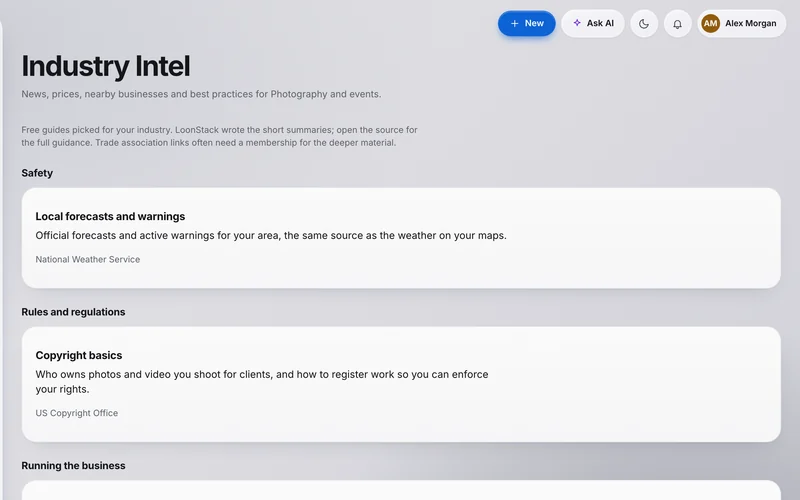 Guides and news for your tradeIndustry Intel picks free guides for photographers and event pros, like Copyright basics (US Copyright Office) and Local forecasts and warnings (National Weather Service), each with a short summary, plus trade headlines.
Custom orders, gift cards and campaigns.
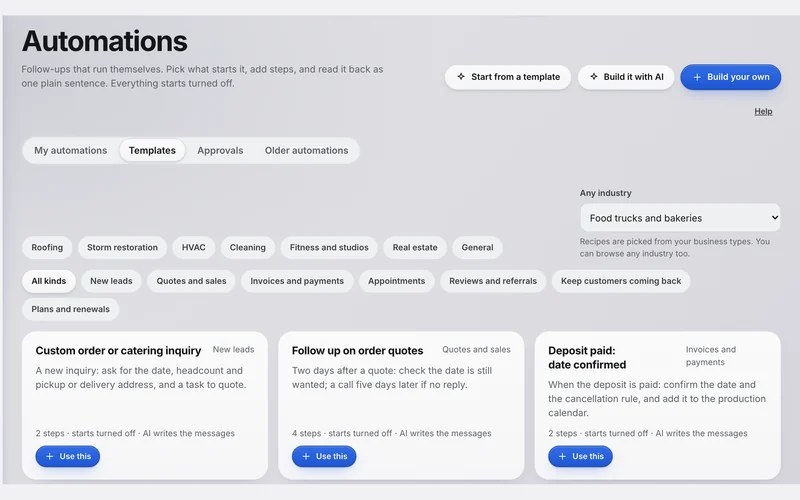 Follow-ups written for bakeries and food trucksReady-made automations like "Custom order or catering inquiry", "Confirmed for tomorrow" and "Thanksgiving pre-orders". Copy one, change the words, turn it on. They all start turned off.
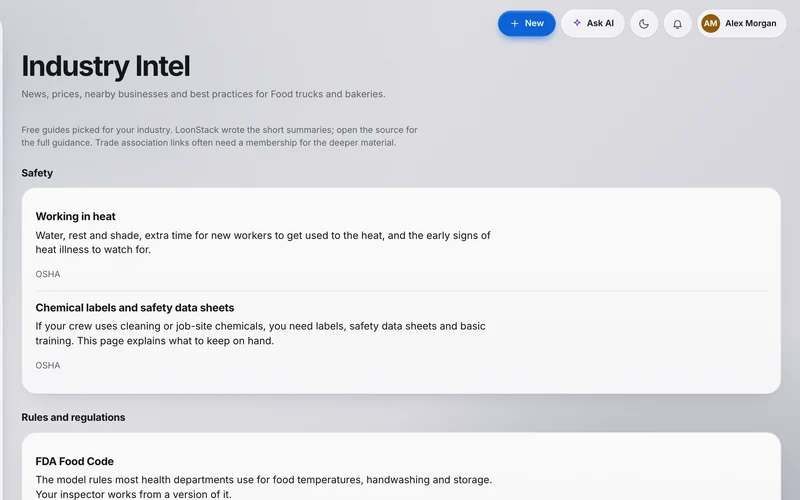 Guides and news for your tradeIndustry Intel picks free guides for bakeries and food trucks, like Working in heat (OSHA) and Chemical labels and safety data sheets (OSHA), each with a short summary, plus trade headlines.
Student records, lesson packs and waivers.
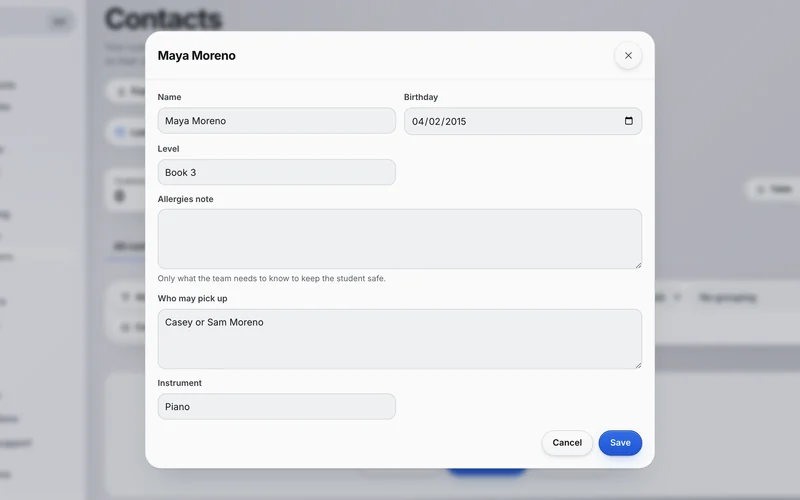 Every student on fileName, birthday, level and who may pick up, on the parent's record. Music teachers add the instrument, swim schools the swim level and martial arts the belt and the date it was earned.
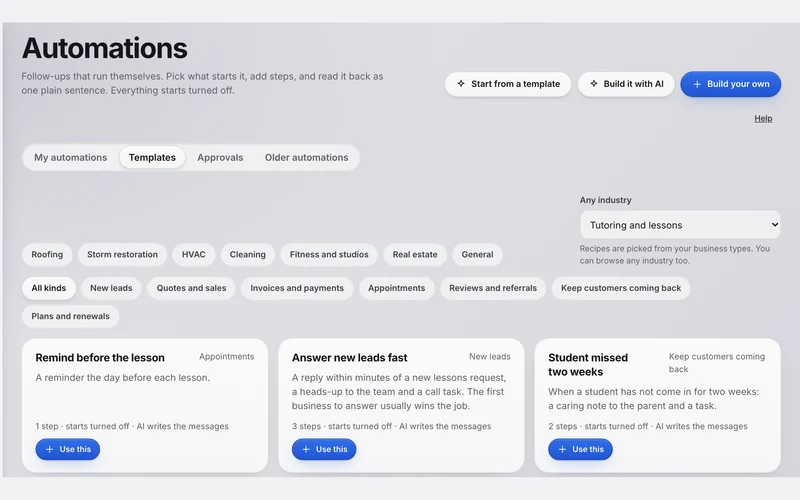 Follow-ups written for tutors and lesson studiosReady-made automations like "Student missed two weeks", "Monthly progress note" and "Package running low". Copy one, change the words, turn it on. They all start turned off.
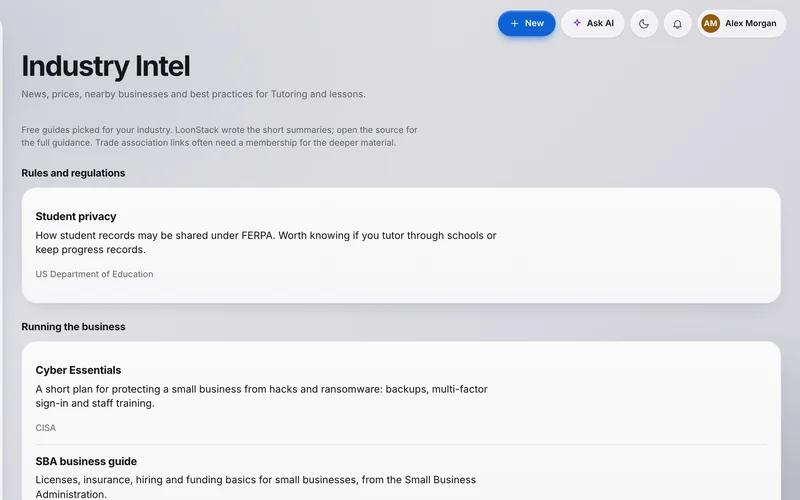 Guides and news for your tradeIndustry Intel picks free guides for tutors and lesson studios, like Student privacy (US Department of Education) and Cyber Essentials (CISA), each with a short summary, plus trade headlines.
Estimates, change orders, crews and progress billing.
Your supplier's prices, your marginUpload your supplier's price list and see what changed before you apply it. Items get priced from cost at your margin. Type the total you want on a quote and LoonStack spreads the markup to hit it, never below cost.Profit by job typeWon jobs grouped by type, with revenue, cost, gross profit and margin. The worst ones are at the top, so you see which jobs aren't paying.Crews with their papers in orderKeep each crew's insurance, workers' comp and license with the expiration dates. Book a crew with expired papers and you get a warning, and you hear about it 30 days before anything runs out.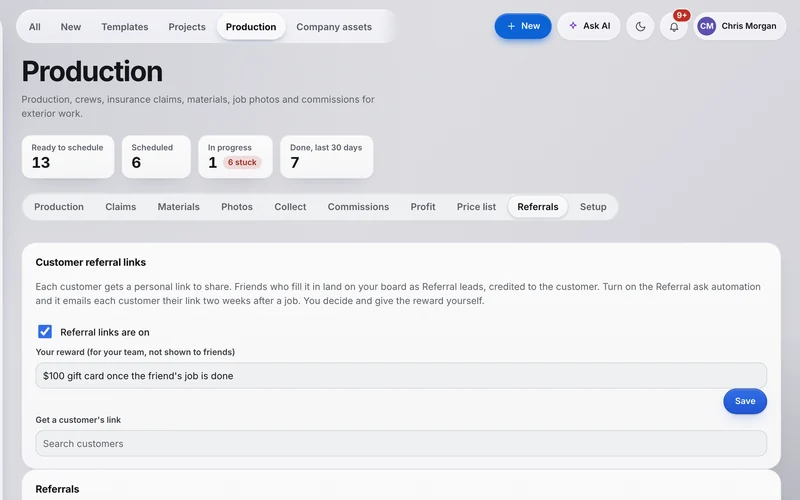 A referral link for every customerTurn it on and every customer gets their own link. When a friend fills it in, they land in your pipeline and you get a task to thank the customer who sent them.
Quotes by material and height, crews and deposits.
Measure the roof from the officeType the address and LoonStack fills in roof area, pitch and facets from Google's roof data, at no extra cost. Or trace the roof on a free aerial photo and it adds up the eaves, rakes, ridges, hips and valleys. Check the numbers before you order.Your supplier's prices, your marginUpload your supplier's price list and see what changed before you apply it. Items get priced from cost at your margin. Type the total you want on a quote and LoonStack spreads the markup to hit it, never below cost.Profit by job typeWon jobs grouped by type, with revenue, cost, gross profit and margin. The worst ones are at the top, so you see which jobs aren't paying.Crews with their papers in orderKeep each crew's insurance, workers' comp and license with the expiration dates. Book a crew with expired papers and you get a warning, and you hear about it 30 days before anything runs out.System quotes, dispatch and maintenance reminders.
Work order templates for your tradePick the trade on a new work order and its checklist and job details fill in: Seasonal tune-up with readings, System install. Change any of it to match how your crew works.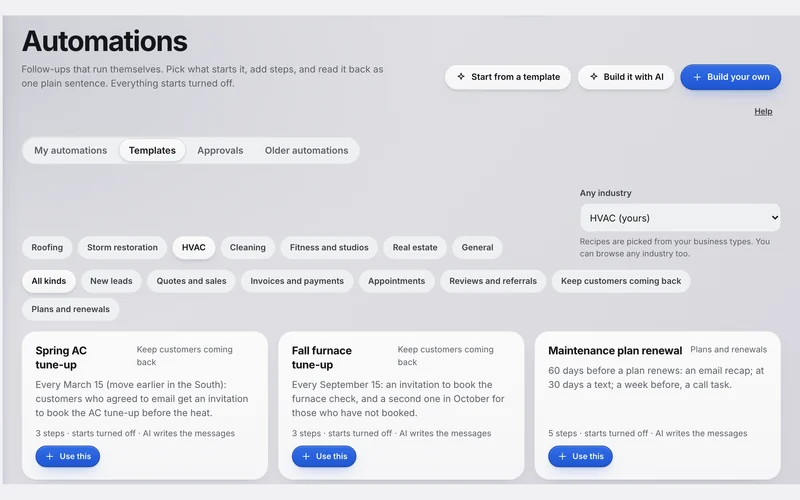 Follow-ups written for HVACReady-made automations like "Spring AC tune-up", "Fall furnace tune-up" and "Maintenance plan renewal". Copy one, change the words, turn it on. They all start turned off.
Service calls, on-site quotes and fast invoices.
Work order templates for your tradePick the trade on a new work order and its checklist and job details fill in: Leak repair, Water heater swap. Change any of it to match how your crew works.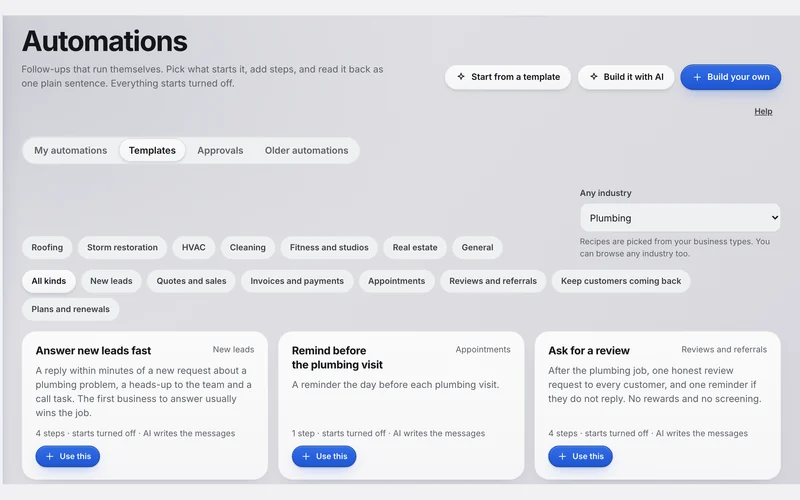 Follow-ups written for plumbersReady-made automations like "Is everything still working?", "Six-month check-up" and "Answer new leads fast". Copy one, change the words, turn it on. They all start turned off.
Bids, site visits, signed contracts and progress billing.
Work order templates for your tradePick the trade on a new work order and its checklist and job details fill in: Panel upgrade, Outlet and fixture install. Change any of it to match how your crew works.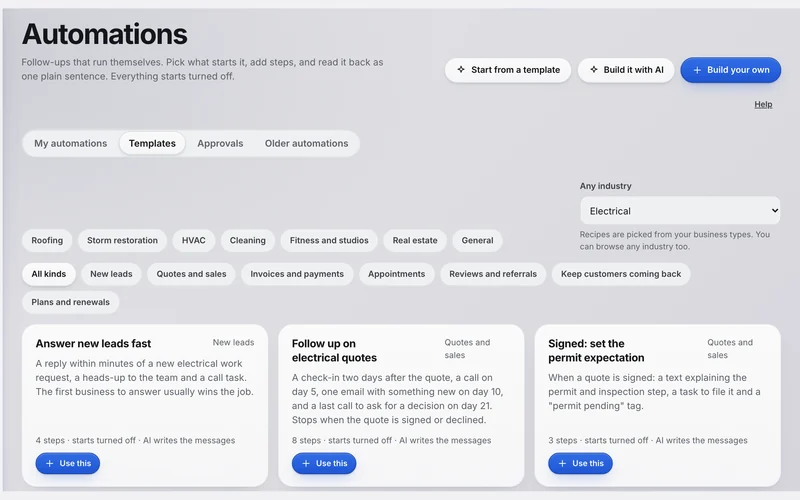 Follow-ups written for electriciansReady-made automations like "Permit approved: schedule the work", "Book the permit inspection" and "Yearly generator and safety check". Copy one, change the words, turn it on. They all start turned off.
Claims, adjuster meetings, supplements and production.
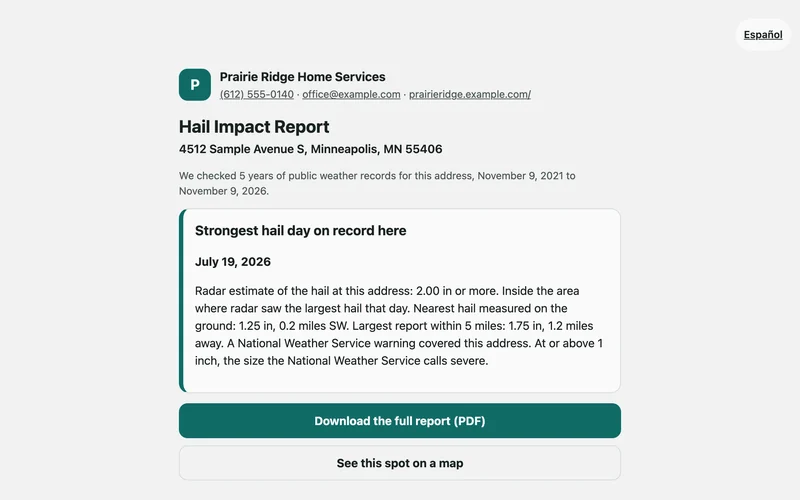 Hail Impact ReportsMake a report for the house you're standing at, with your logo, phone and license on it: hail size, distance from the storm core and the likely date of loss. It uses free NOAA and National Weather Service records, so there's no data subscription and no limit.
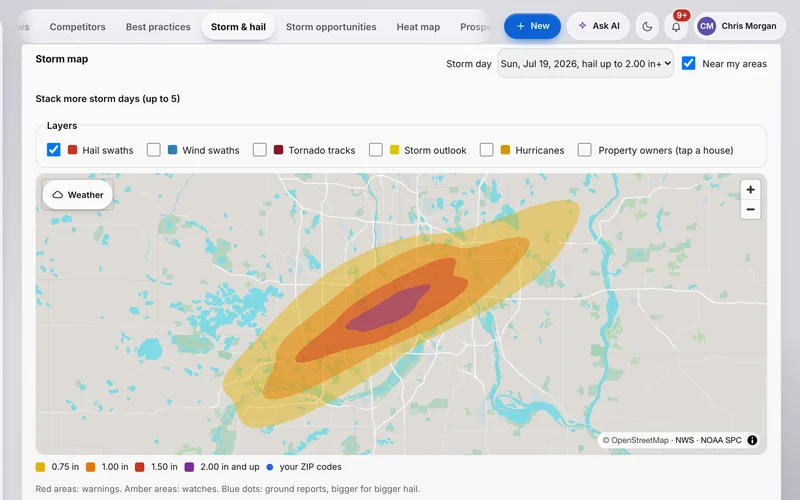 Storm layers on one mapHail swaths, wind swaths, tornado tracks, storm outlooks and hurricanes, each with its own switch. Stack up to 5 storm days and the areas hit more than once show darker.
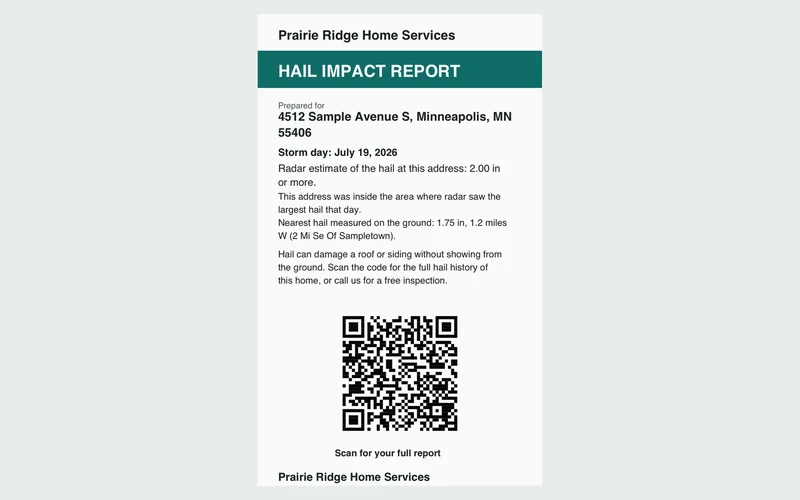 Door hangers with a QR codePick a hail day and a minimum hail size. You get one printable page per address, each with that home's hail and a QR code to its own report. Up to 500 addresses at a time.
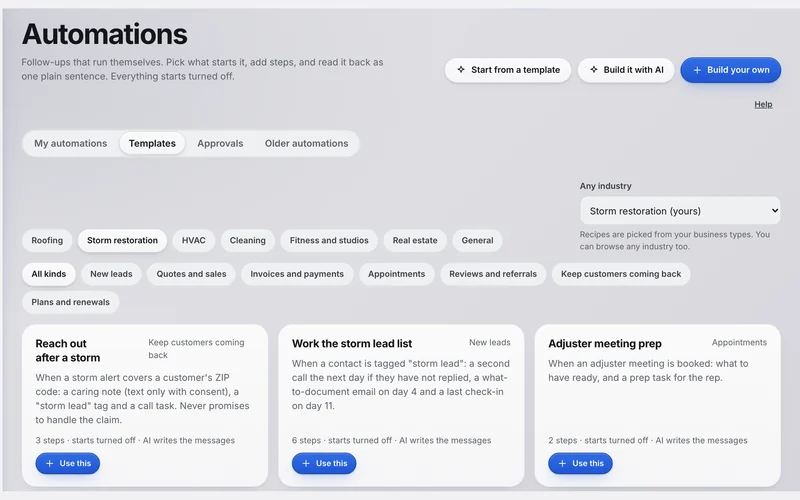 Follow-ups written for storm workReady-made automations like "Reach out after a storm", "Carrier scope received: check it" and "Depreciation released: close the file". Copy one, change the words, turn it on. They all start turned off.
Quotes, dispatch, status texts and invoices.
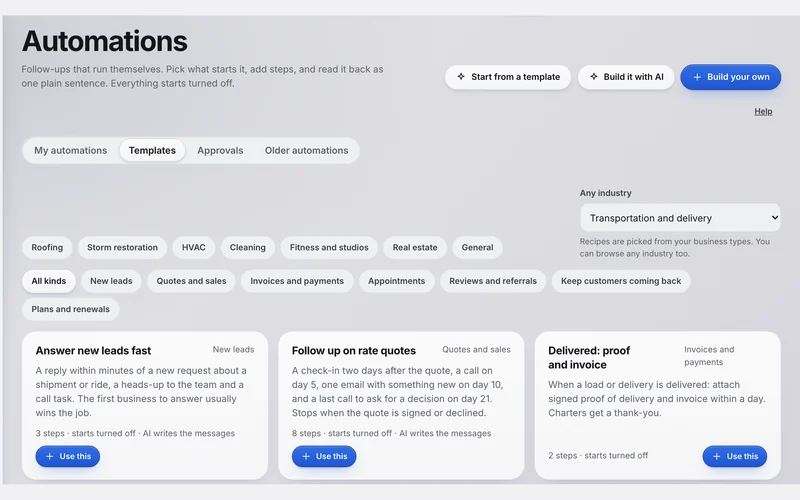 Follow-ups written for trucking and deliveryReady-made automations like "Delivered: proof and invoice", "Trip tomorrow" and "Quiet shipper accounts". Copy one, change the words, turn it on. They all start turned off.
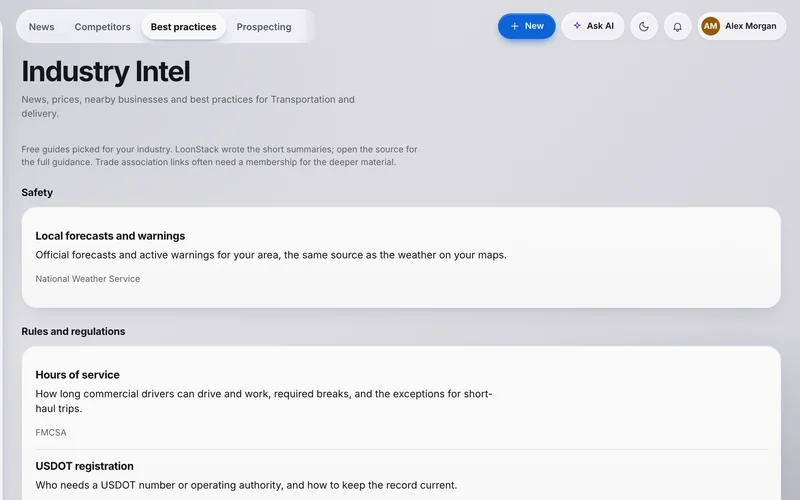 Guides and news for your tradeIndustry Intel picks free guides for trucking and delivery, like Hours of service (FMCSA) and Local forecasts and warnings (National Weather Service), each with a short summary, plus trade headlines.
Proposals, agreements, deposits and recurring billing.
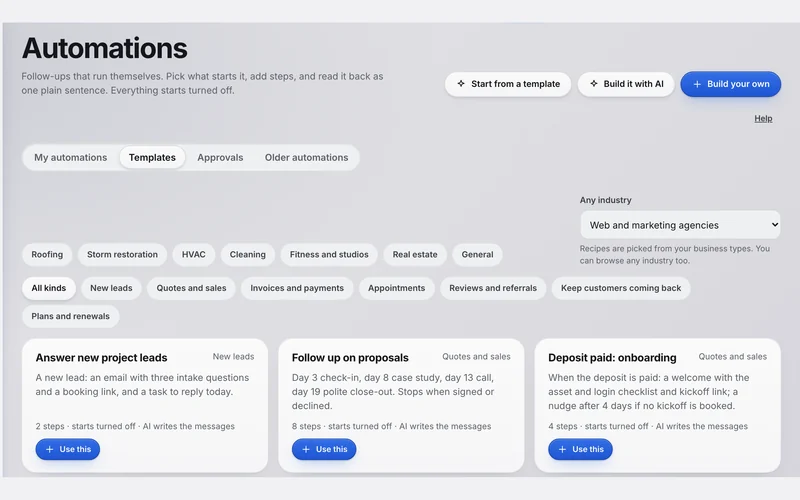 Follow-ups written for web and IT shopsReady-made automations like "Deposit paid: onboarding", "Invoice opened but not paid" and "Waiting on the client". Copy one, change the words, turn it on. They all start turned off.
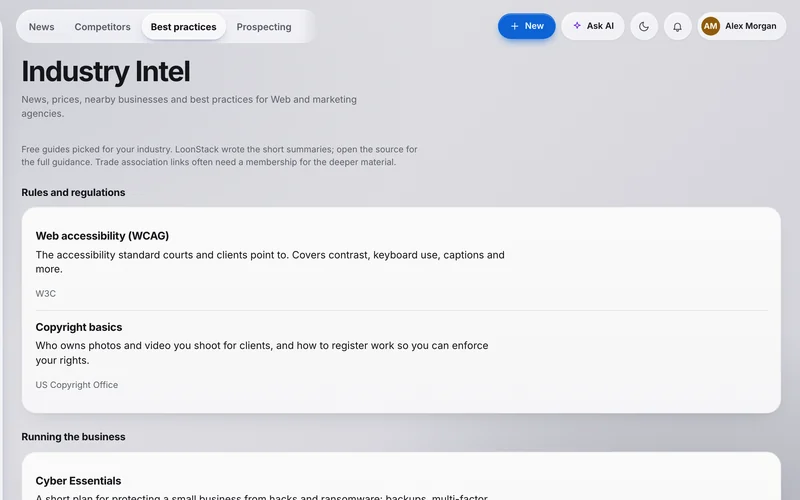 Guides and news for your tradeIndustry Intel picks free guides for web and IT shops, like Web accessibility, WCAG (W3C) and Copyright basics (US Copyright Office), each with a short summary, plus trade headlines.
Four steps, all on every plan. Each name below is a part of the app you will see in the menu.
Setup takes about 10 minutes, with no calls or screen shares, and every step can be skipped and finished later. Your customer list comes over from a CSV, Excel or vCard file, with the columns matched for you.
That is the short version. See every feature or read the how-to guide.
Plans differ only in how many people can sign in. Month to month, no setup fee.
How many people on your team? Just you: Solo, $69 a month. 2 to 10 people: Crew, $129. 11 or more: Company, $199 with no limit on users. A team of 11 or 12 pays $199 a month, because Crew stops at 10.
LoonStack CRM Solo
Just you$69/month
1 user
Every feature included.
$0 today. Then $69 a month. To add a second person, switch to Crew in Billing.
LoonStack CRM Crew
Best for teams of 2 to 10$129/month
Up to 10 users
Every feature included.
$0 today. Then $129 a month.
LoonStack CRM Company
Teams of 11 or more$199/month
Unlimited users
Every feature included.
$0 today. Then $199 a month.
How the trial works. 30-day free trial on every plan, $0 today, card required. After day 30 your plan renews automatically every month until you cancel. Cancel before day 30 in Billing and you pay nothing, and we remind you 7, 3 and 1 day before the trial ends. One free trial per business: the details are in the questions below. Need a website too? See website and CRM bundles.
Still unsure? Email [email protected] for a written answer.
Nobody sets it up by hand, and there are no calls, meetings or screen shares. After checkout your CRM is created automatically and the owner gets a sign-in link by email. A setup guide takes about 10 minutes and every step can be skipped and finished later, including texting and email. The how-to guide covers every part, and support is by email, so you get written answers you can come back to.
With a website bundle, the business name, contact details, address and services you give on the website project form fill in your CRM for you.
Yes, for meetings and site visits you record in the app or paste in, and for voicemails and calls answered by your AI receptionist. LoonStack AI turns them into text with nothing to set up, and every call and meeting is kept in a Calls and meetings list you can search by a word that was said. A call from your own cell phone shows up when you log it. The AI drafts a follow-up email or text from it and suggests next steps, each with a button to create the task, draft the message, call or schedule. Drafts are never sent for you. Record only with everyone's OK. See Meetings.
Yes. There are 261 ready-made automations across 29 industries, 8 to 10 for each, such as a storm check-in and claim-approved message for roofers, a six-month recall for dentists and a rebooking nudge for salons. Pick one, and it is copied as your own, turned off. A text or email can be written by LoonStack AI and held for your approval before it goes out, and Test run shows what would happen without sending anything. You can also describe one in your own words with Build it with AI. See Automations.
No. Deleted customer records go to Recently deleted, and after 30 days they stay there as Archived for owners and admins to restore. Each customer's Full history and Documents keep every version of what was sent and signed, and Download everything gives you all of it in one ZIP. Only an owner or admin can remove a record for good, with a written reason that is logged. See Contacts.
The account becomes read-only so you can still look at everything, and owners and admins see an Export all your data button on Billing. It downloads one ZIP with every record as CSV, transcripts and your uploaded files (meeting audio and quote and invoice PDFs are not included). We email you when you cancel and again 7 days and 1 day before deletion. After that the records are permanently deleted.
Yes, if you let it. Ask AI can open any page or record you ask for, and with your permission can do work such as adding a task, sending a quote, recording a payment or turning an automation on. It is off for everyone until an owner or admin sets each person to Ask before each action or Act without asking. It can only do what that person is allowed to do, risky steps ask once, and multi-step plans have Stop and Undo (sends and payments cannot be undone).
Each contact has a text consent status: opted in, opted out or unknown, with how and when they agreed. Replying STOP opts them out, START opts them back in, and marketing and bulk texts go only to people who opted in. Your booking and quote pages have an unchecked consent box, and a CSV import can carry consent columns.
Yes. Documents is a library with folders, tags, search inside the words, and versions. Contracts are locked once signed, can be sent for e-signature, and remind you before they renew. You choose per document whether AI may read it, and contracts are never shown to customers. Storage is 10 GB on Solo, 25 GB on Crew and 50 GB on Company. See Agreements.
Yes. Most screens have a date button with presets such as This week, Last 30 days and Year to date, a calendar for any custom range, and a compare choice (the previous period, or the same dates a year earlier).
Yes. When you add a person you pick their role, such as Office, Field crew, Read only or a custom role like Manager, and separately switch on admin access if you want them to run settings, the team and exports as well. Only owners and admins can give it, only the owner can take it away from an admin, and admins can never change the owner or billing. See Settings.
Yes. Everyone picks their own color theme and light or dark mode from Appearance: 23 themes, or your own color from sliders or a hex code. LoonStack keeps text readable on whatever you pick. Owners and admins can also set the business colors that the team can use. See Settings.
Yes, your contacts. Export them from your old tool as a CSV, Excel or vCard file and upload it in the setup guide; LoonStack matches the columns for you, skips people you already have and lets you undo the import. The Switch to LoonStack page has export steps for 157 products, including Jobber and HubSpot. Jobs, invoices and notes import too.
LoonStack never charges for texts. You connect a texting account you already have or open one with a supported provider, and that provider bills you directly. To text US customers from a regular local number, carriers require a one-time business registration, which you complete on your provider's website. The steps are on the Texts page and in the setup guide, and you can start without texting.
Yes. Gmail, Yahoo, iCloud, Zoho and most other mailboxes connect today, using a one-time code from your email provider; the how-to guide shows where to find it. Outlook.com, Hotmail and Microsoft 365 do not work yet, and Proton Mail is not supported. One-click sign-in with Google and Microsoft is waiting on their approval. See Settings.
Yes. AI is included at no extra charge and works from day one, with nothing to set up. LoonStack AI runs on our own model, with cloud backups. If you prefer, you can connect your own key from Anthropic, OpenAI or Google in Settings. Drafts never go out until a person presses send. The AI receptionist is the one feature that answers customers by itself, and only on the channels you turn on.
Customers pay through your own payment account, so the money goes straight to you and LoonStack adds no fees. Sixteen processors are built in, including Stripe, Square, PayPal, Helcim, Clover and QuickBooks Payments. Another processor works too: paste its payment link and record those payments from the invoice. See Invoices.
Yes. Crew covers up to 10 people and Company has no limit on users, and both have every feature. A team of 11 or 12 is on Company at $199 a month. Techs get a Field crew role and a day view with a column per person, and dispatch sends the on-my-way text. You can switch between plans anytime from Billing. Each person signs in with their own email, with a built-in role (Owner, Admin, Office, Field crew or Read only) or one you make.
You do. Download every contact, deal, quote, invoice and appointment any time from Settings, Your data, as CSV or JSON. Each business's records are kept separate, and every request is checked against the business you are signed in to. Your payment and texting keys, and your AI key if you add one, are stored encrypted and never shown again. There is no session recording, no ad trackers and no analytics scripts inside the CRM. LoonStack runs on Cloudflare's network with a Postgres database hosted by Neon. Read the Privacy Policy and the list of subprocessors.
The 30-day free trial is explained under the plans: $0 today, and you pay nothing if you cancel before day 30.
One free trial per business: if the same card, email address or phone number already had a LoonStack free trial in the last 24 months, or the email is at a domain a LoonStack business has verified, the plan starts without a trial and the first month is charged right away.
Website + CRM bundles get the same 30-day free trial on the monthly plan. The website first half is charged at checkout so website work starts right away, and canceling the trial does not refund it. The first half is refunded in full if you cancel the website project before we start your full build (see the Terms of Service).
Cancel from Billing in the CRM. During the free trial you are never charged, and everything works until the trial ends. After the trial, you keep full access until the end of the month you paid for; monthly plans are not refunded for part of a month, but charges made by mistake are refunded in full. Either way, the account is then read-only for 30 days so you can export everything. Then your data is deleted, and we email you a reminder 7 days before.
If a payment fails, you get 7 days of full access with a banner while you update your card. After that the account is read-only until it is paid. Details, including website bundles, are in the Refund Policy.
What LoonStack CRM includes, next to running separate tools or a typical CRM. Only facts we checked.
| What you get | LoonStack CRM | Separate toolsa booking app, an invoicing app, a texting app and an email tool | Typical CRMthe 5 CRMs on our pricing page, checked Oct 13, 2026 |
|---|---|---|---|
| Customers, quotes, bookings, texts and invoices on one timeline | Yes. One timeline per contact | No. Each app keeps its own records | Varies. Depends on the product and the plan |
| Users included in the price | Yes. 1 on Solo ($69), up to 10 on Crew ($129), unlimited on Company ($199) | Varies. Each app is billed on its own | Varies. 1 user in the plan we compared at 4 of the 5 checked; unlimited at 1 |
| Required onboarding or setup fee | Yes. None | Varies. Set by each app | Varies. $1,500 required at 1 of the 5 checked; none listed at the other 4 |
| Contract | Yes. Month to month | Varies. Set by each app | Varies. Annual at 1 of the 5 checked; month to month or no long-term contract at 3; not listed at 1 |
| Free trial | Yes. 30 days, $0 today, card required | Varies. Set by each app | Varies. 14 days at 3 of the 5 checked; none listed at 1; length not stated at 1 |
| Payments through your own processor | Yes. 16 processors, LoonStack adds no fees | Varies. Set up in each app that takes payments | Varies. Not checked |
| Leave with all of your data | Yes. CSV or JSON any time, plus 30 days after canceling | Varies. Exported app by app | Varies. Not checked |
Yes. IncludedVaries. Varies or partlyNo. Not included
The 5 CRMs are HubSpot, Jobber, Thryv, Housecall Pro and GoHighLevel, from each company's own pricing page or terms. Prices and sources are in the price comparison.
Answer a few short questions and we build a read-only copy of LoonStack CRM with sample data for your kind of business and your city, then email you the link. No sales pitch.
Rather just start? Pick a plan and start your 30-day free trial. Form not showing? Open the demo request form, or email [email protected].