Texts

Text customers from the number they already know

Connect your own Twilio, Telnyx, Plivo, Vonage, Bandwidth or SignalWire number. Replies land in one inbox and on the contact's timeline, and STOP is honored for you.

30-day free trial. $0 today, card required. Cancel before day 30 and you pay nothing.

One inbox for every conversation

Texts in LoonStack CRM: One inbox for every conversation. Sample data in LoonStack CRM.

What you can do with Texts

One inbox for every conversation

Every text with a customer shows up in Texts and on their contact. Filter by All, Unread and Archived, and use templates for the messages you send most.

  • Replies in one place
  • On the contact's timeline too
  • Templates for common replies

Your provider, your number, your bill

Paste your provider details and your texting number, then send a real test text to your own phone. LoonStack never charges for texts. Your provider bills you directly.

  • Six providers built in
  • A real test text before customers
  • No per-message fee from LoonStack
Your provider, your number, your bill. Sample data in LoonStack CRM.
6
texting providers built in
$0
per text from LoonStack

Quiet hours and opt-outs handled

Automatic texts wait for the hours you set. If someone texts STOP, the conversation is marked and you cannot text them until they reply START.

  • Sending hours for automatic texts
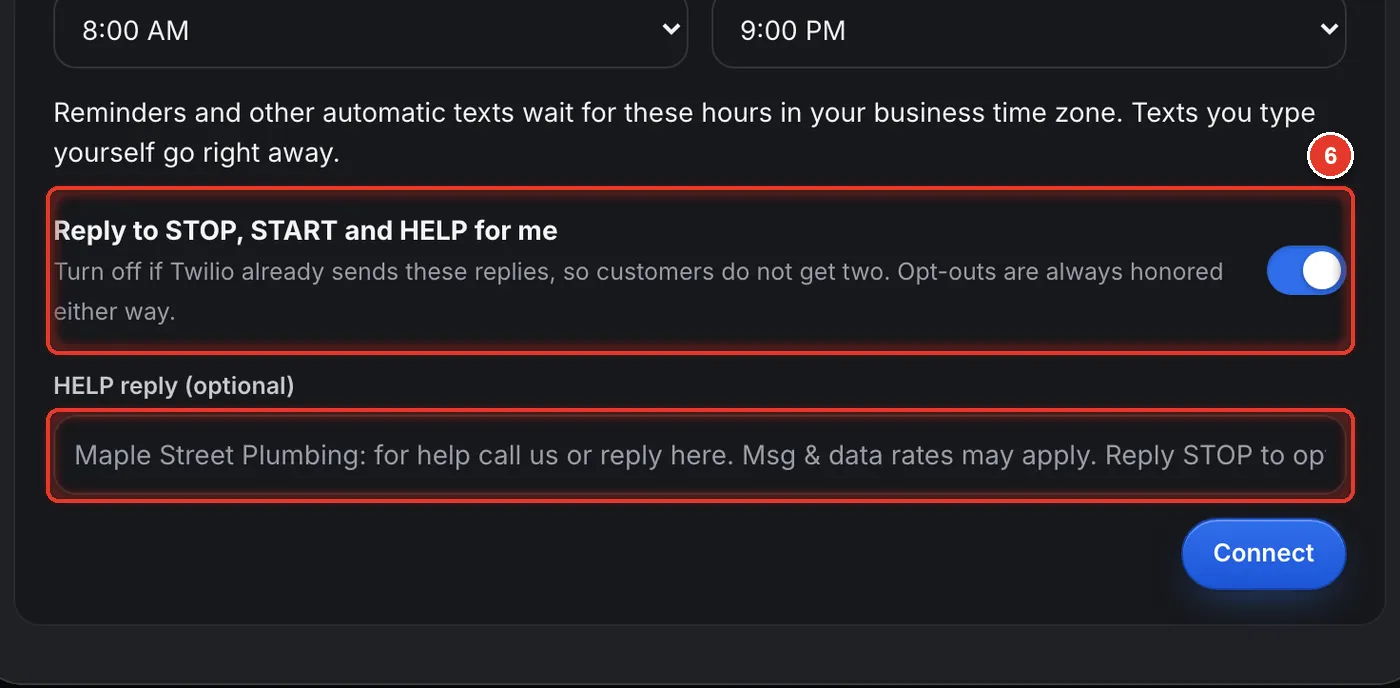
  • STOP, START and HELP replies
  • Texts you type go right away
Quiet hours and opt-outs handled. Sample data in LoonStack CRM.

Alerts on your phone

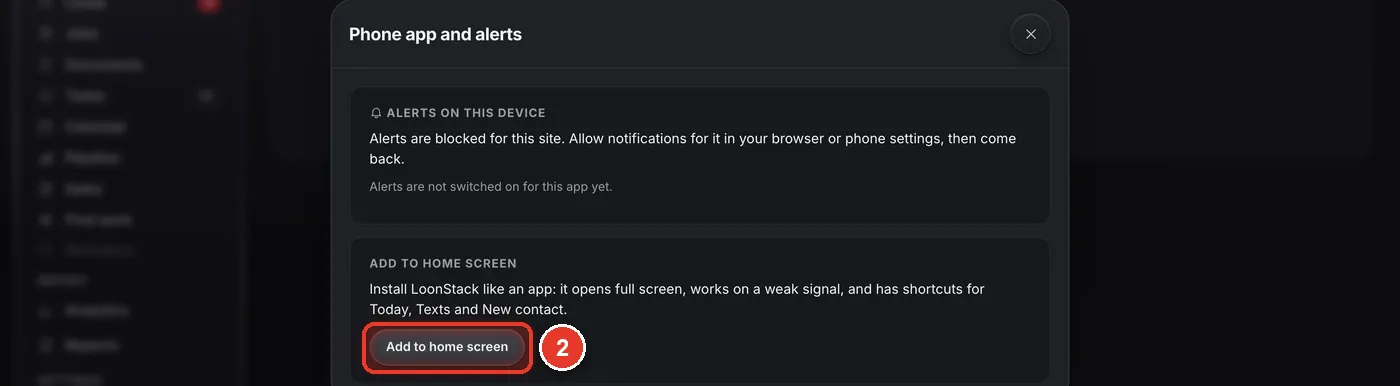
Add LoonStack to your home screen and turn on alerts for new texts and tasks due, on iPhone and Android. Send a test alert to check it.

  • Installs from the browser
  • iPhone needs iOS 16.4 or later from the Home Screen
  • Turn off per device
Alerts on your phone. Sample data in LoonStack CRM.

See it in action

Texts, step by step, in screenshots of the real app with a made-up sample business. Use the buttons to move through it.

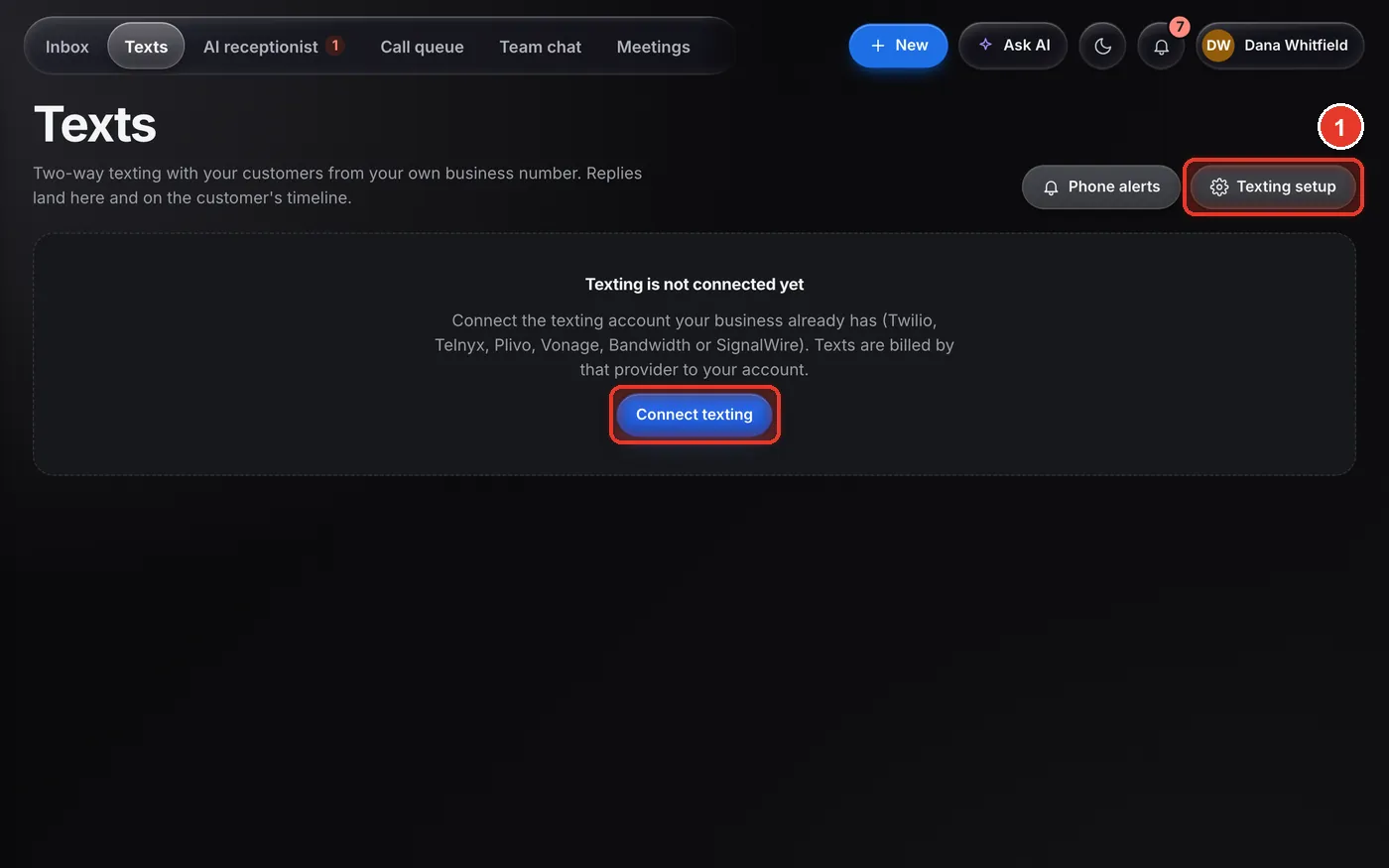
  1. Texts, with Texting setup and Connect texting.
    Step 1 of 6 Texts, with Texting setup and Connect texting.
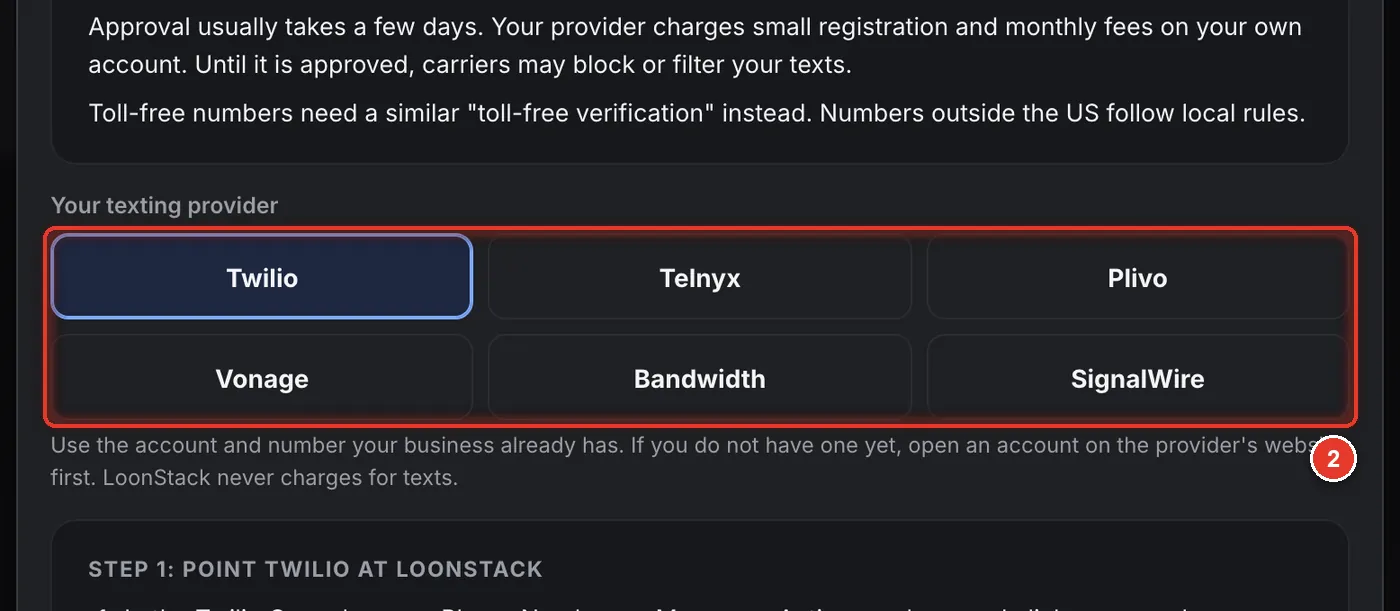
  2. Pick your provider: Twilio, Telnyx, Plivo, Vonage, Bandwidth or SignalWire.
    Step 2 of 6 Pick your provider: Twilio, Telnyx, Plivo, Vonage, Bandwidth or SignalWire.
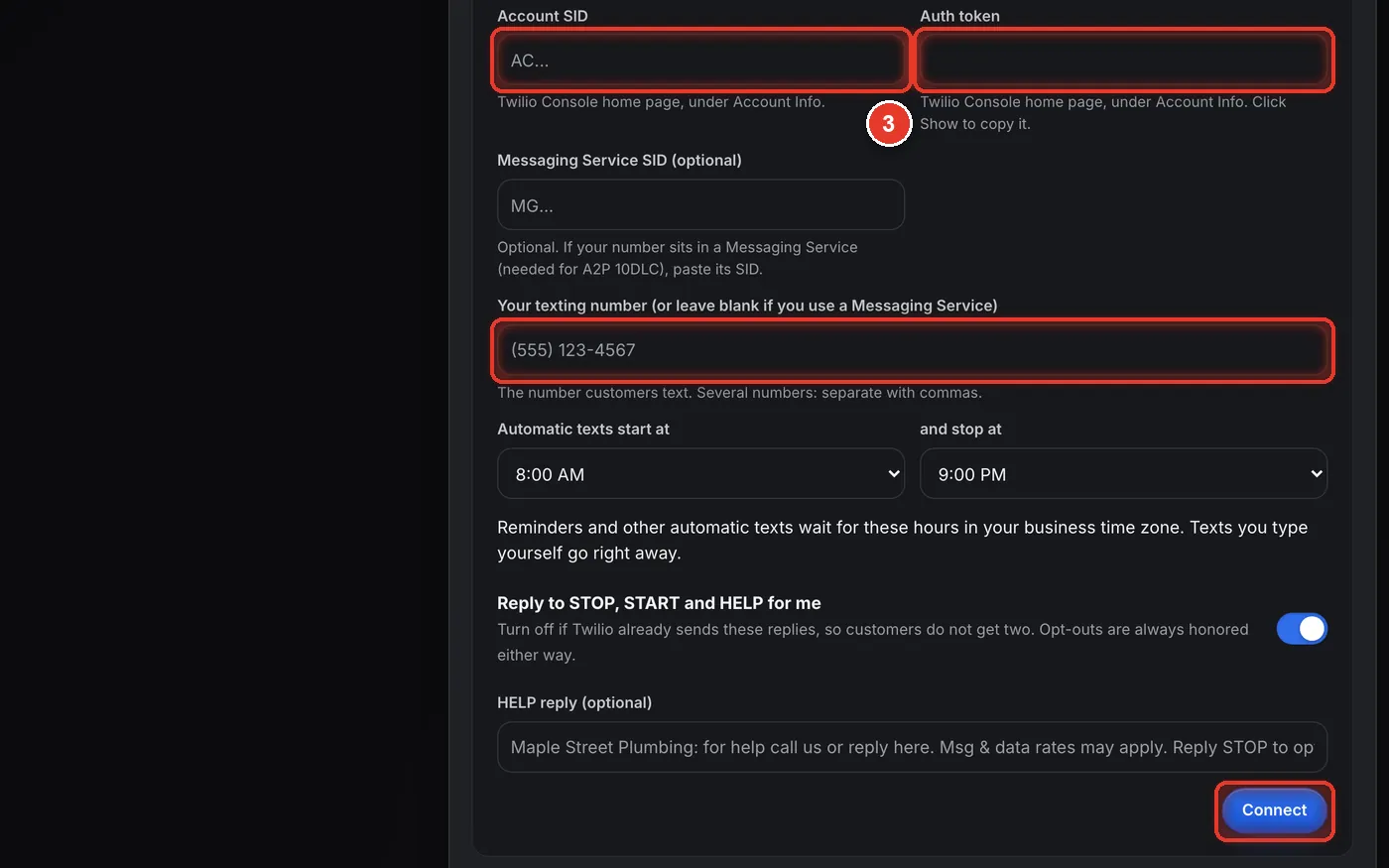
  3. Paste your provider details and your number, then Connect.
    Step 3 of 6 Paste your provider details and your number, then Connect.
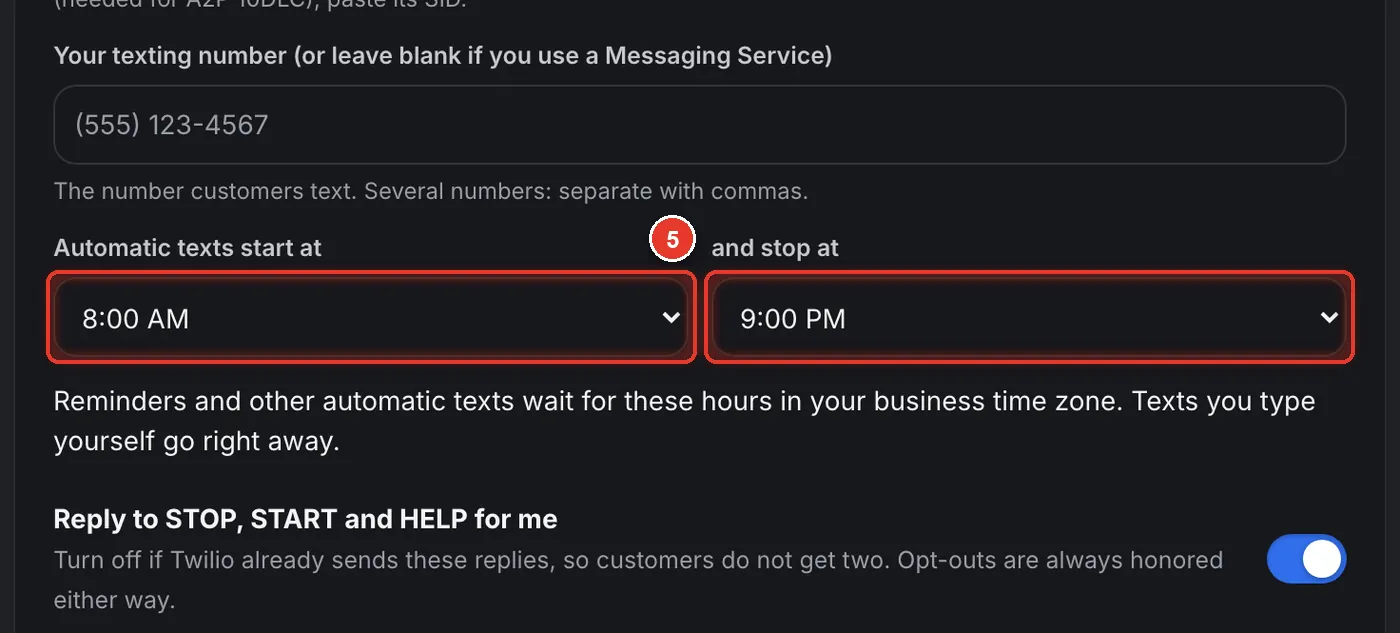
  4. Automatic texts start and stop at the hours you set.
    Step 4 of 6 Automatic texts start and stop at the hours you set.
  5. Reply to STOP, START and HELP for me.
    Step 5 of 6 Reply to STOP, START and HELP for me.
  6. Add to home screen for phone alerts.
    Step 6 of 6 Add to home screen for phone alerts.

Texts in the how-to guide, step by step

Why it helps

  • Customers know the number

    Texts come from your business number, not a new one.

  • No markup on texts

    Your provider bills you at its own rates. LoonStack adds nothing.

  • Opt-outs handled for you

    STOP is honored and automatic texts respect your sending hours.

Everything in Texts

Every plan includes every line below.

  • Double opt-in from public pages

    When someone ticks the texting box on your booking, instant quote or hail report page, they get one text asking them to reply YES. Texts start only after that reply, and never to a number that sent STOP.

  • Text consent for every contact

    Each contact shows Agreed to texts, Opted out of texts or Not asked yet, with how and when. STOP and START replies update it, marketing texts go only to people who opted in, and a CSV import can carry consent columns.

  • Two-way texting

    Send and receive from the CRM.

  • One inbox

    All, Unread and Archived.

  • On the timeline

    Every text on the contact's record.

  • Six providers

    Twilio, Telnyx, Plivo, Vonage, Bandwidth, SignalWire.

  • Test text

    A real text to your own phone before customers.

  • STOP, START and HELP

    Handled for you, with your own HELP reply.

  • Sending hours

    Automatic texts wait for them.

  • Templates

    Saved replies for common messages.

  • Phone alerts

    For new texts and tasks due.

  • Texts in automations

    A Send text step in any automation.

  • Usage this month and a monthly limit

    Texts and emails sent this month with a cost estimate at your own rate, and an optional monthly limit, in text parts, for automatic and marketing texts. Texts you type and STOP or HELP replies always go.

  • Reply C to confirm

    Customers confirm an appointment by replying C or YES to the reminder, or with one tap on a link.

Texts is in every plan

Plans differ only in how many people can sign in. Month to month, no setup fee.

LoonStack CRM Solo

30-day free trial

$69/month

1 user

Every feature included, Texts too.

Start free trial of Solo

$0 today. Card required. 30-day free trial, then $69 a month, renewing automatically until you cancel. Cancel before day 30 in Billing and you pay nothing. To add a second person, switch to Crew in Billing.

LoonStack CRM Crew

Best for teams of 2 to 10

$129/month

Up to 10 users

Every feature included, Texts too.

Start free trial of Crew

$0 today. Card required. 30-day free trial, then $129 a month, renewing automatically until you cancel. Cancel before day 30 in Billing and you pay nothing. We remind you 7, 3 and 1 day before the trial ends.

LoonStack CRM Company

30-day free trial

$199/month

Unlimited users

Every feature included, Texts too.

Start free trial of Company

$0 today. Card required. 30-day free trial, then $199 a month, renewing automatically until you cancel. Cancel before day 30 in Billing and you pay nothing. We remind you 7, 3 and 1 day before the trial ends.

Switch between Solo, Crew and Company anytime from Billing in the CRM. Full pricing, website bundles and terms

See Texts with your business in it

Every plan has every feature. 30-day free trial, $0 today. Cancel before day 30 and you pay nothing.

Questions first? Email [email protected] or request a call. A written reply usually comes within one business day.