Quotes

Quotes they sign and pay on their phone

Send a quote as a link with exactly what the customer asked for. They sign and pay the deposit on the same page, through your own payment account. You see when they open it.

30-day free trial. $0 today, card required. Cancel before day 30 and you pay nothing.

Sign on the phone

Quotes in LoonStack CRM: a quote signed on the phone. Sample data in LoonStack CRM.
1
page to read, sign and pay the deposit
16
payment processors built in

What you can do with Quotes

Exactly what they asked for

Add the lines the customer asked for, with a short description on each. They read the quote, sign and pay the deposit on the same page, without another round of emails.

  • Only the lines the customer asked for
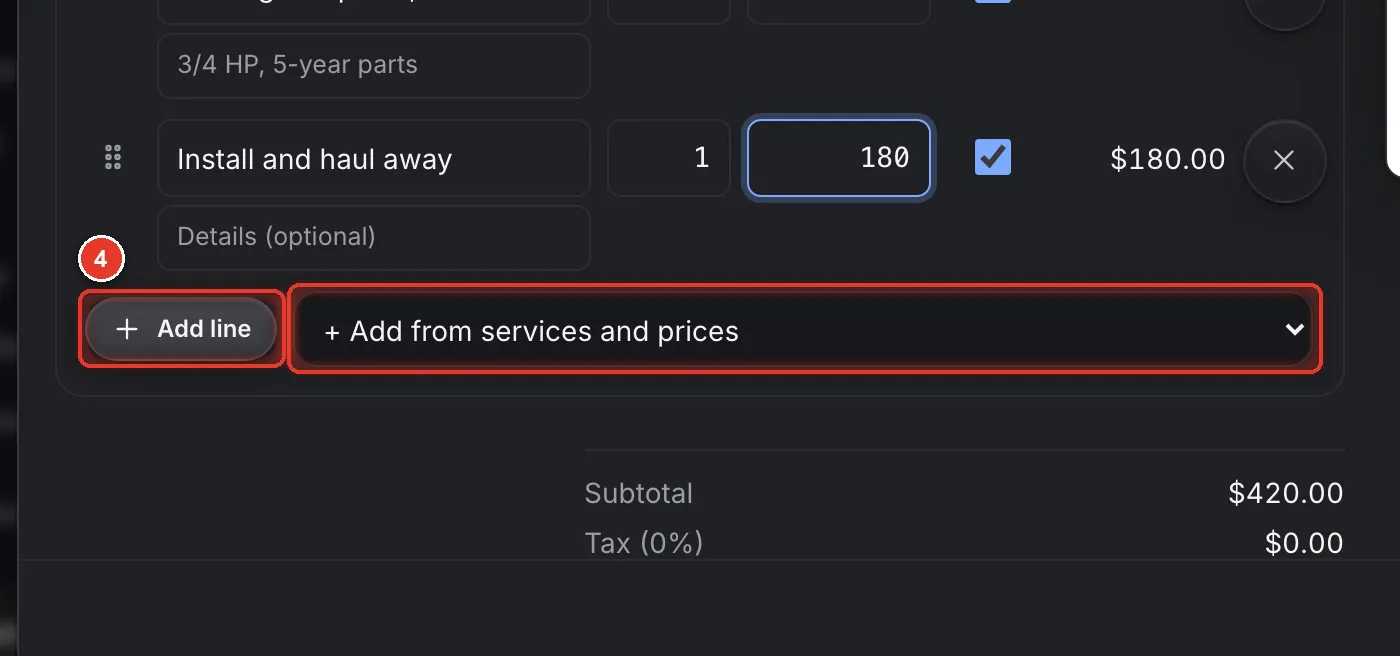
  • Lines from your services and prices
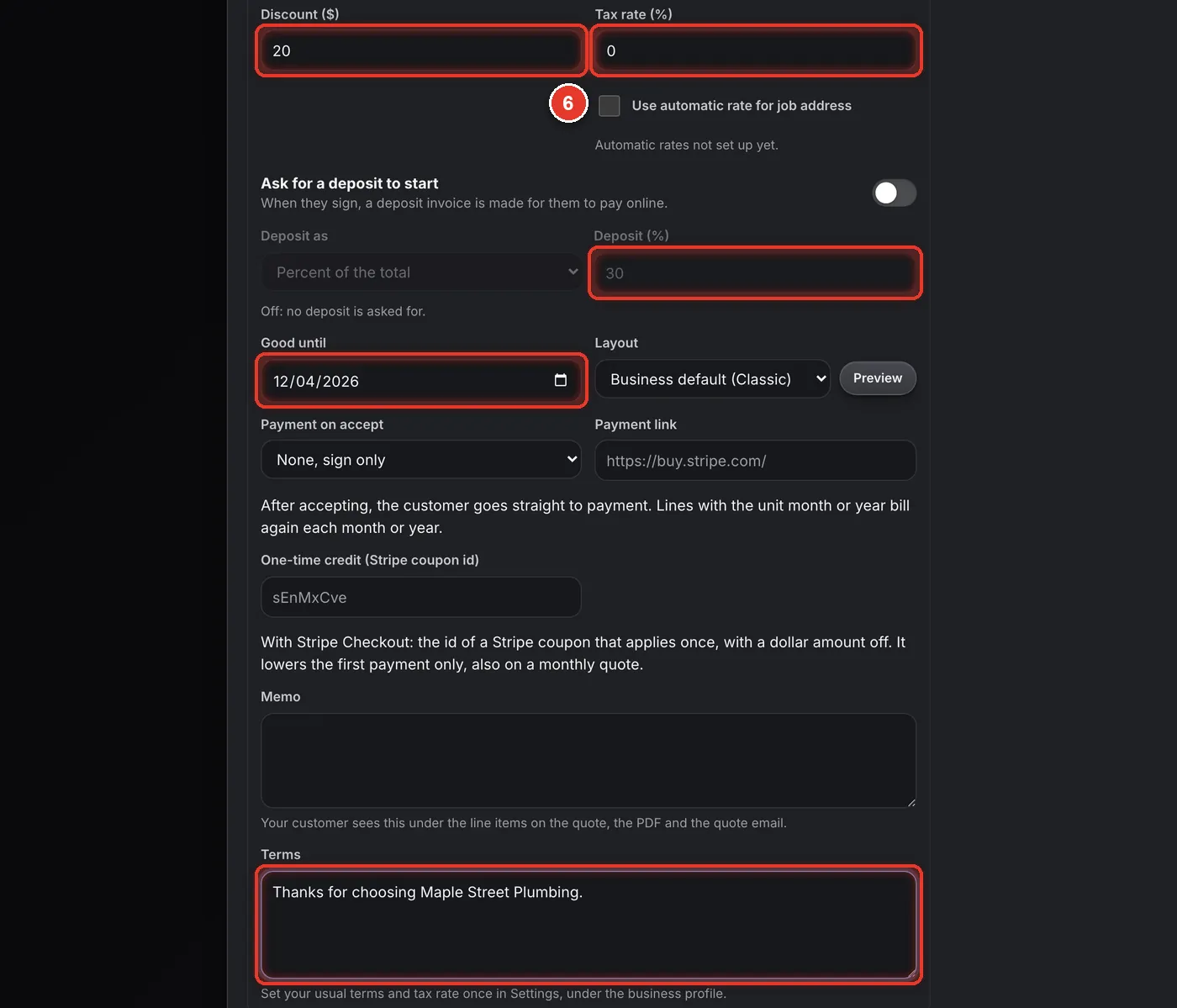
  • Discount, tax, deposit and terms

Signed and paid on one page

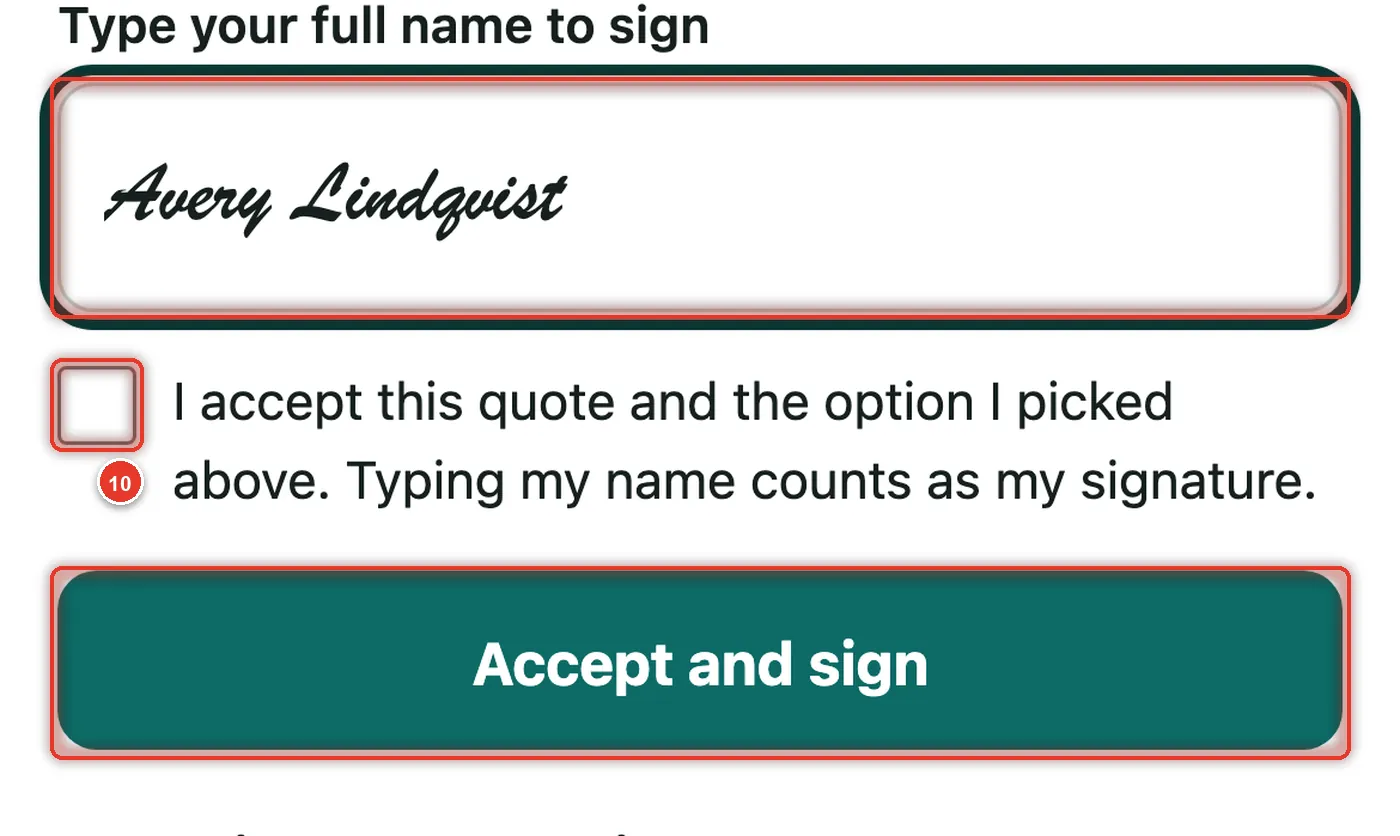
The customer types their name, ticks I accept this quote and chooses Accept and sign. The deal moves forward on its own, and a deposit invoice is made if you asked for one, paid through the account you already use.

  • E-signature with name and acceptance
  • Deposit through your own processor
  • LoonStack adds no fees
Signed and paid on one page. Sample data in LoonStack CRM.

See what they see, before you send

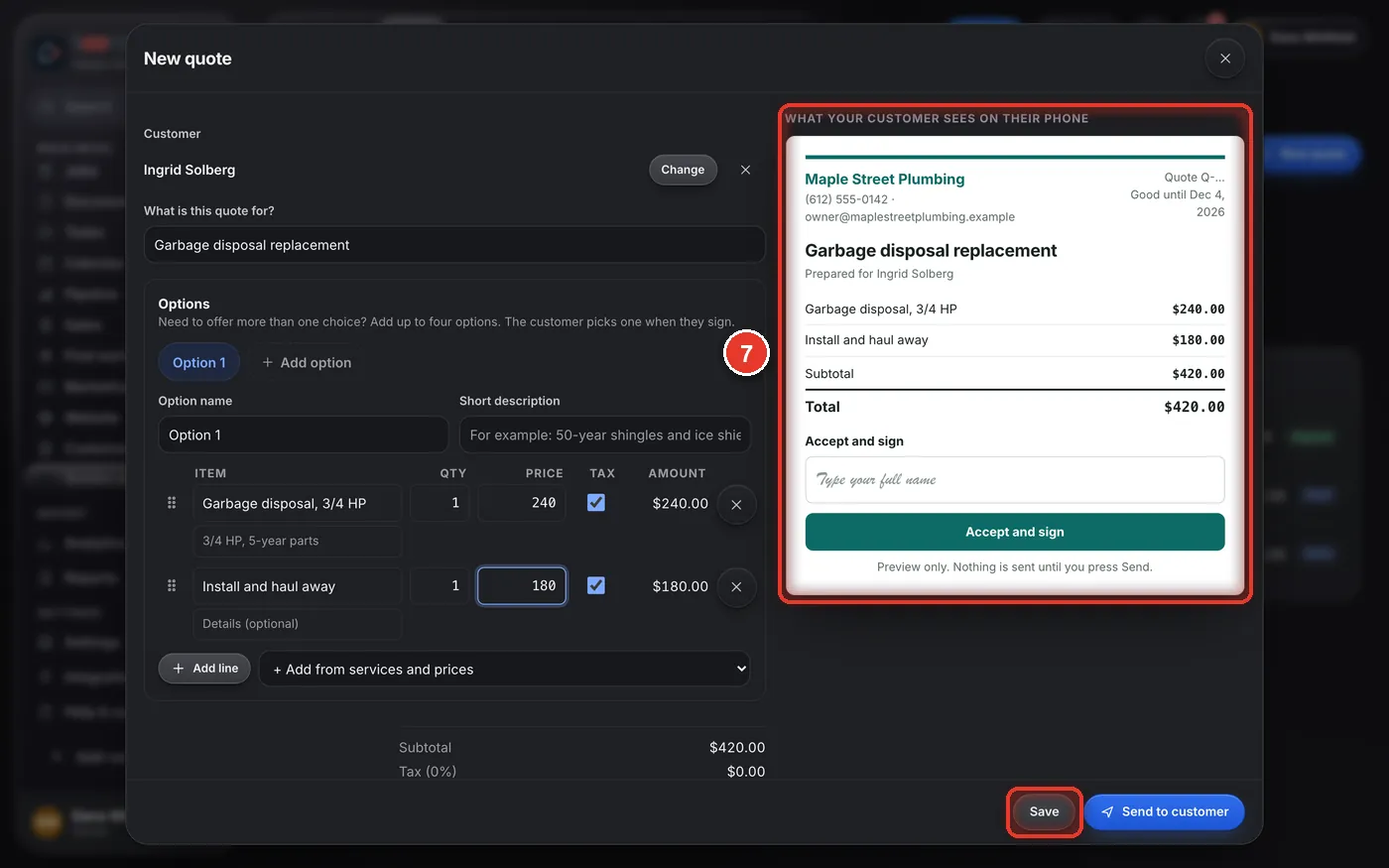
The preview on the right is what your customer sees on their phone. From a deal, Quote by email shows the whole email first, so you can edit To, Subject and Message.

  • Customer preview while you build
  • Email preview before sending
  • Copy link to text a quote instead
See what they see, before you send. Sample data in LoonStack CRM.

Know when they open it

When a customer opens the quote, it shows as viewed, and Today lists quotes that were viewed but not signed. Turn on the quote follow-up automation and reminders go out on the days you pick until they sign or decline.

  • Viewed status on every quote
  • Follow-ups stop the moment they sign
  • Duplicate for a new version
Know when they open it. Sample data in LoonStack CRM.

See it in action

Quotes, step by step, in screenshots of the real app with a made-up sample business. Use the buttons to move through it.

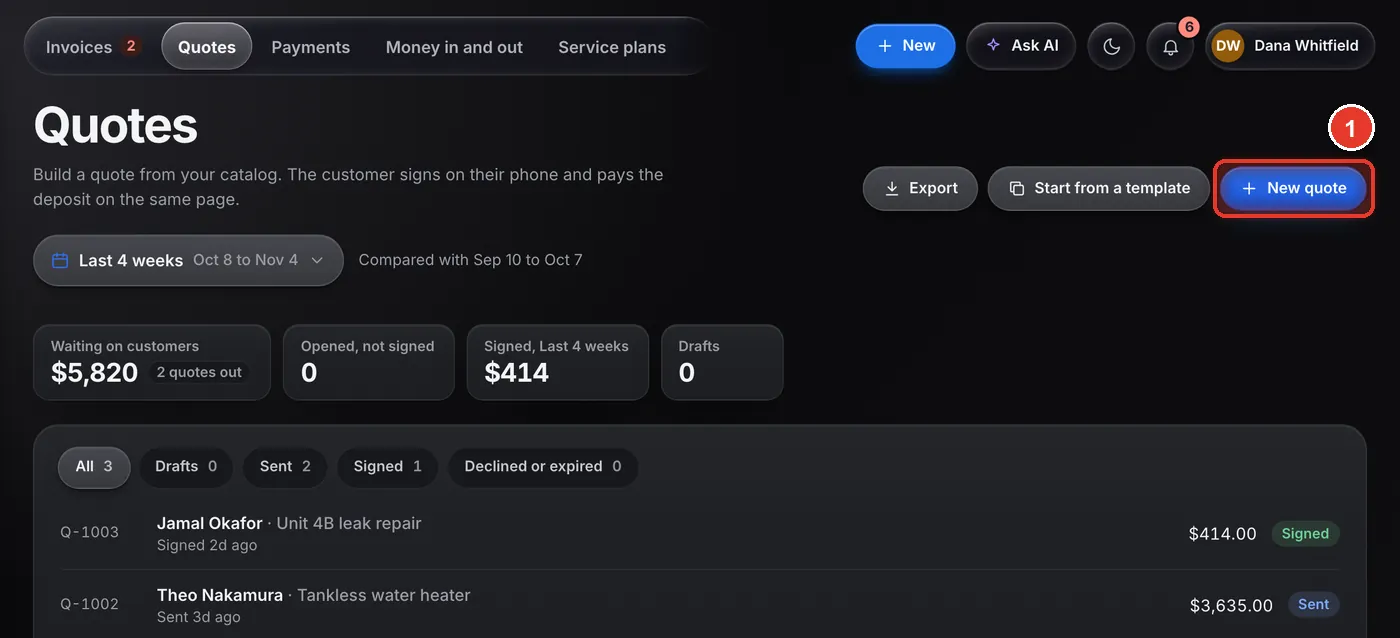
  1. Quotes, with New quote.
    Step 1 of 6 Quotes, with New quote.
  2. Add lines, or pick from services and prices.
    Step 2 of 6 Add lines, or pick from services and prices.
  3. Discount, tax, deposit to start, good until, note and terms.
    Step 3 of 6 Discount, tax, deposit to start, good until, note and terms.
  4. The customer preview on the right.
    Step 4 of 6 The customer preview on the right.
  5. The page your customer sees: name, I accept this quote, Accept and sign.
    Step 5 of 6 The page your customer sees: name, I accept this quote, Accept and sign.
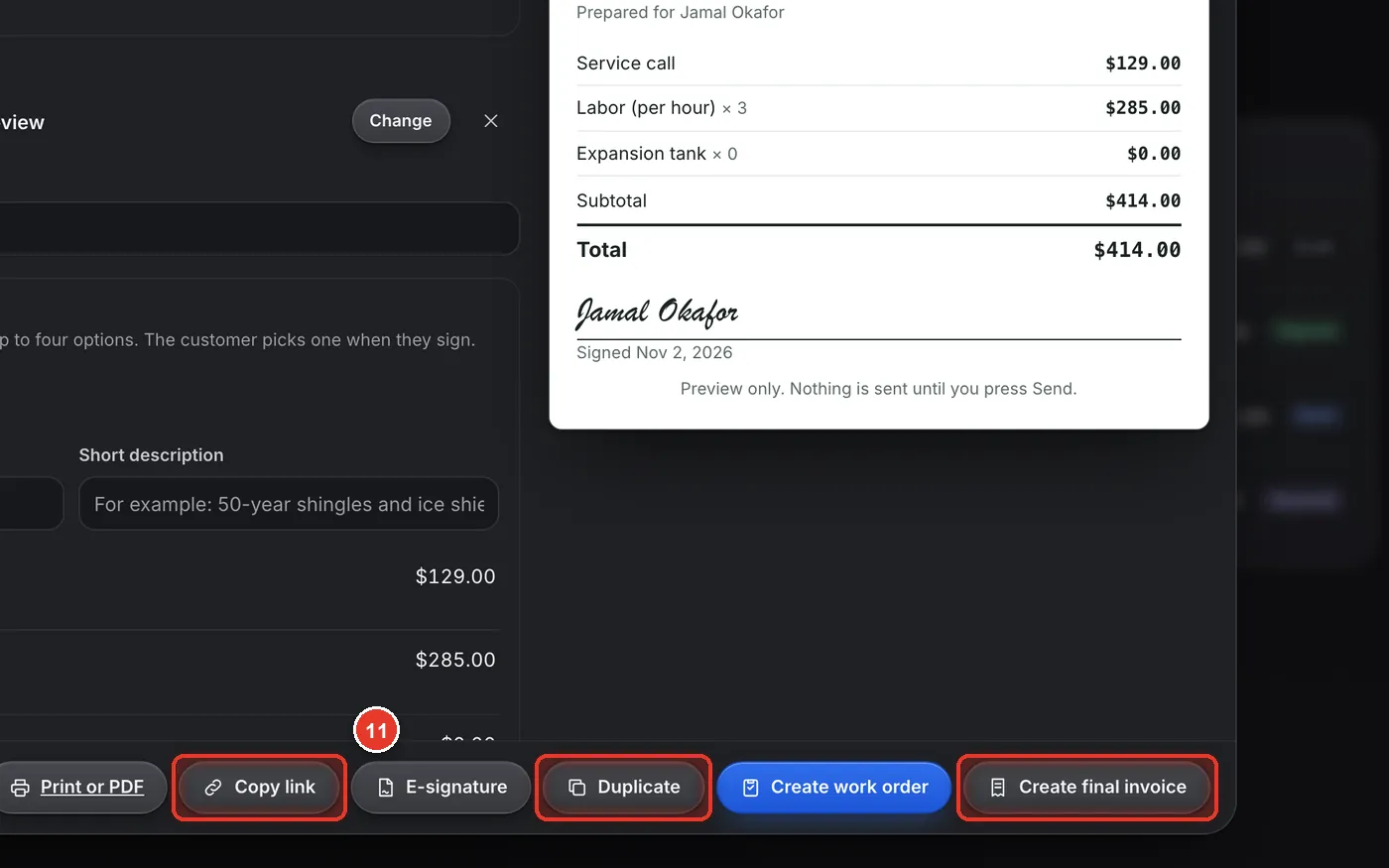
  6. A signed quote, with Create final invoice.
    Step 6 of 6 A signed quote, with Create final invoice.

Quotes in the how-to guide, step by step

Why it helps

  • Faster yes

    The quote and the signature are on one page the customer can finish on their phone.

  • Deposit locks in the job

    The deposit is paid right after signing, through your own account.

  • No per-quote fees

    Send as many quotes as you like on a flat monthly price.

Everything in Quotes

Every plan includes every line below.

  • Proposals with your letterhead and price list

    Start from a ready-made proposal that matches your kind of business, or write your own with bold, headings, lists and alignment. Your logo and business details sit at the top, you add lines from your price list with a discount and tax, and the customer gets a link to accept. It is under Sales, Proposals.

  • Ready-made proposals for your kind of business

    Cleaning, Roofing, Landscaping, HVAC, Painting and General contractor proposals show for those trades. Software, web, SEO and ads businesses see five of their own. Pick several kinds of business and you see the proposals for all of them. A button shows the rest.

  • Customers can ask, or ask for changes

    On the quote page your customer can ask a question and pick a good time for a call back, or request changes, without declining. The quote stays open, you get a notice, and the note is saved on the quote, the contact and the deal. You can have a change request start an automation, for example a text to you right away, and a Pick a time to talk link opens your booking page when online booking is on.

  • How often a quote was opened

    The quote list and the quote show how many times the customer opened it and when they last did. Opens by your own team, while signed in, are not counted.

  • Buttons that show what happened

    Delete, Upload, Download and Send play a short animation that follows the real result: uploads and downloads show true progress, and you only see Deleted, Uploaded, Downloaded or Sent after the server confirms. If something fails, the button says so, for example Not sent. With reduced motion turned on in your device, the animation is replaced by a simple change.

  • Your colors on every document

    Pick the color of your quotes, invoices, receipts, work orders and agreements: your brand colors, a theme color or your own. Your license number, tax ID and the name under the signature line fill in from your business profile, so nothing is typed twice.

  • Date ranges and compare

    Pick a period from presets such as This week, Last 30 days, This quarter or Year to date, or choose days on a calendar. The numbers, charts and trend tags compare it with the period before, or the same dates a year earlier.

  • Five more quote and invoice layouts

    Letterhead, Modern, Contractor, Elegant serif and Two column, with your logo, brand color, address and license number. Pick US Letter or A4 and a font in Templates, and every layout prints cleanly to PDF.

  • Stat tiles with charts

    The numbers at the top, such as open pipeline, money owed and work won, come with a small chart of the last eight weeks and a tag that says up or down compared with before. If there is not enough history to chart, you just see the number.

  • Optional upgrades and more signers

    Upgrades the customer picks with a live total, photo and brochure pages, up to four signers, and your own lender's link. See Jobs.

  • Quote links

    Customers open them on any phone.

  • Exactly what they asked for

    The lines and total the customer agreed to, signed on one page.

  • Lines from your catalog

    Or type your own lines.

  • Discount, tax and deposit

    Deposit to start as a percent.

  • E-signature

    Name and acceptance on the page.

  • Online deposits

    Through your own processor, no LoonStack fees.

  • Viewed status

    You see when they open it.

  • Email preview

    Edit and preview before you send.

  • Follow-ups until signed

    On the days you pick; they stop when signed or declined.

  • Deal moves on its own

    Signed quotes move the deal forward.

  • Duplicate and update prices

    New versions, and current catalog prices on drafts.

  • Create final invoice

    One click from a signed quote.

  • Memo on every layout

    A memo shows on the quote page, the PDF and the quote email, on every layout. Set a default memo for each layout.

  • Competitors

    Note which competitor you met on any quote, and who you lost to when it is declined.

Quotes is in every plan

Plans differ only in how many people can sign in. Month to month, no setup fee.

LoonStack CRM Solo

30-day free trial

$69/month

1 user

Every feature included, Quotes too.

Start free trial of Solo

$0 today. Card required. 30-day free trial, then $69 a month, renewing automatically until you cancel. Cancel before day 30 in Billing and you pay nothing. To add a second person, switch to Crew in Billing.

LoonStack CRM Crew

Best for teams of 2 to 10

$129/month

Up to 10 users

Every feature included, Quotes too.

Start free trial of Crew

$0 today. Card required. 30-day free trial, then $129 a month, renewing automatically until you cancel. Cancel before day 30 in Billing and you pay nothing. We remind you 7, 3 and 1 day before the trial ends.

LoonStack CRM Company

30-day free trial

$199/month

Unlimited users

Every feature included, Quotes too.

Start free trial of Company

$0 today. Card required. 30-day free trial, then $199 a month, renewing automatically until you cancel. Cancel before day 30 in Billing and you pay nothing. We remind you 7, 3 and 1 day before the trial ends.

Switch between Solo, Crew and Company anytime from Billing in the CRM. Full pricing, website bundles and terms

See Quotes with your business in it

Every plan has every feature. 30-day free trial, $0 today. Cancel before day 30 and you pay nothing.

Questions first? Email [email protected] or request a call. A written reply usually comes within one business day.