Agreements

Service agreements that remind you before they renew

Start from the template library or write your own, send it for e-signature, and set the renewal date. Thirty days before it, the person responsible for that customer gets a reminder.

30-day free trial. $0 today, card required. Cancel before day 30 and you pay nothing.

A template library to start from

Agreements in LoonStack CRM: A template library to start from. Sample data in LoonStack CRM.
10
agreement templates built in
30 days
before renewal, the owner gets a reminder

What you can do with Agreements

A template library to start from

Open the Template library tab, pick a template and choose Use this template, or write your own. Base an agreement on a quote to fill in the scope and price.

  • 10 built-in templates
  • Based on a quote, optional
  • Fill in [square brackets] with Edit text

Sent for signature from the CRM

Create a draft, edit the text, then choose Send for signature. It cannot be sent while merge fields are still in the text, so nothing goes out half finished.

  • Value, start, end and renewal dates
  • Renews on its own for another term
  • Save dates later
Sent for signature from the CRM. Sample data in LoonStack CRM.

Renewals you will not miss

30 days before the renewal date, the person responsible for that customer gets a reminder in the bell, by email and as a phone alert if alerts are on. The Agreements menu shows how many renew in the next 30 days.

  • Bell, email and phone alert
  • Renewing count on the menu
  • Renewal automations for customers
Renewals you will not miss. Sample data in LoonStack CRM.

See it in action

Agreements, step by step, in screenshots of the real app with a made-up sample business. Use the buttons to move through it.

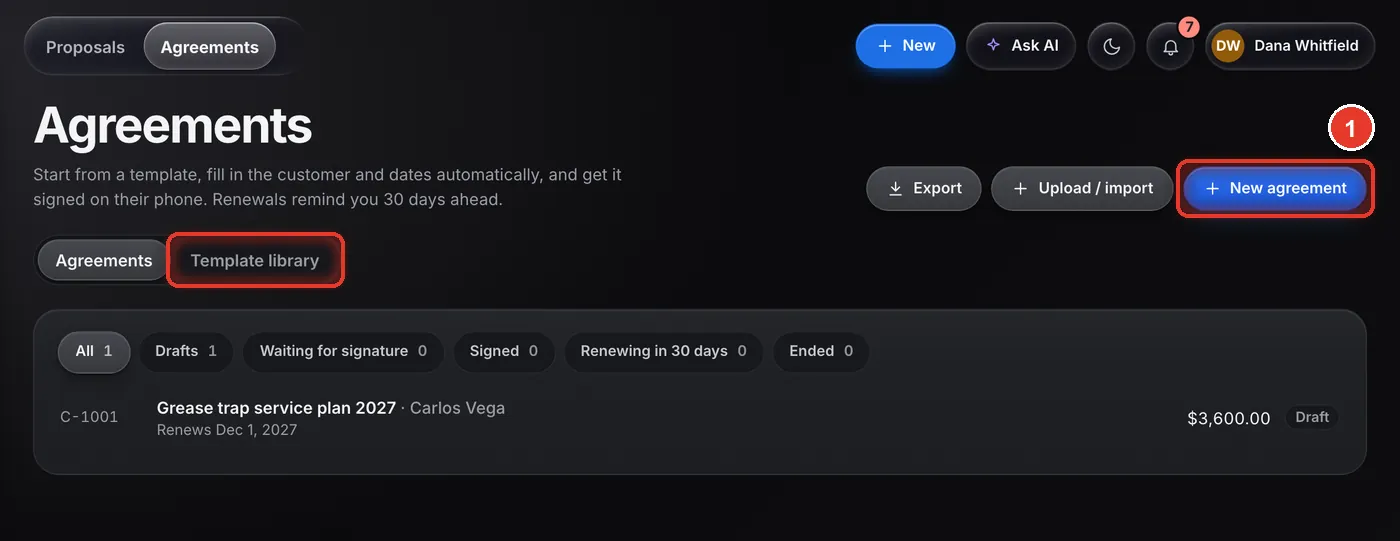
  1. Agreements, with New agreement and the Template library tab.
    Step 1 of 5 Agreements, with New agreement and the Template library tab.
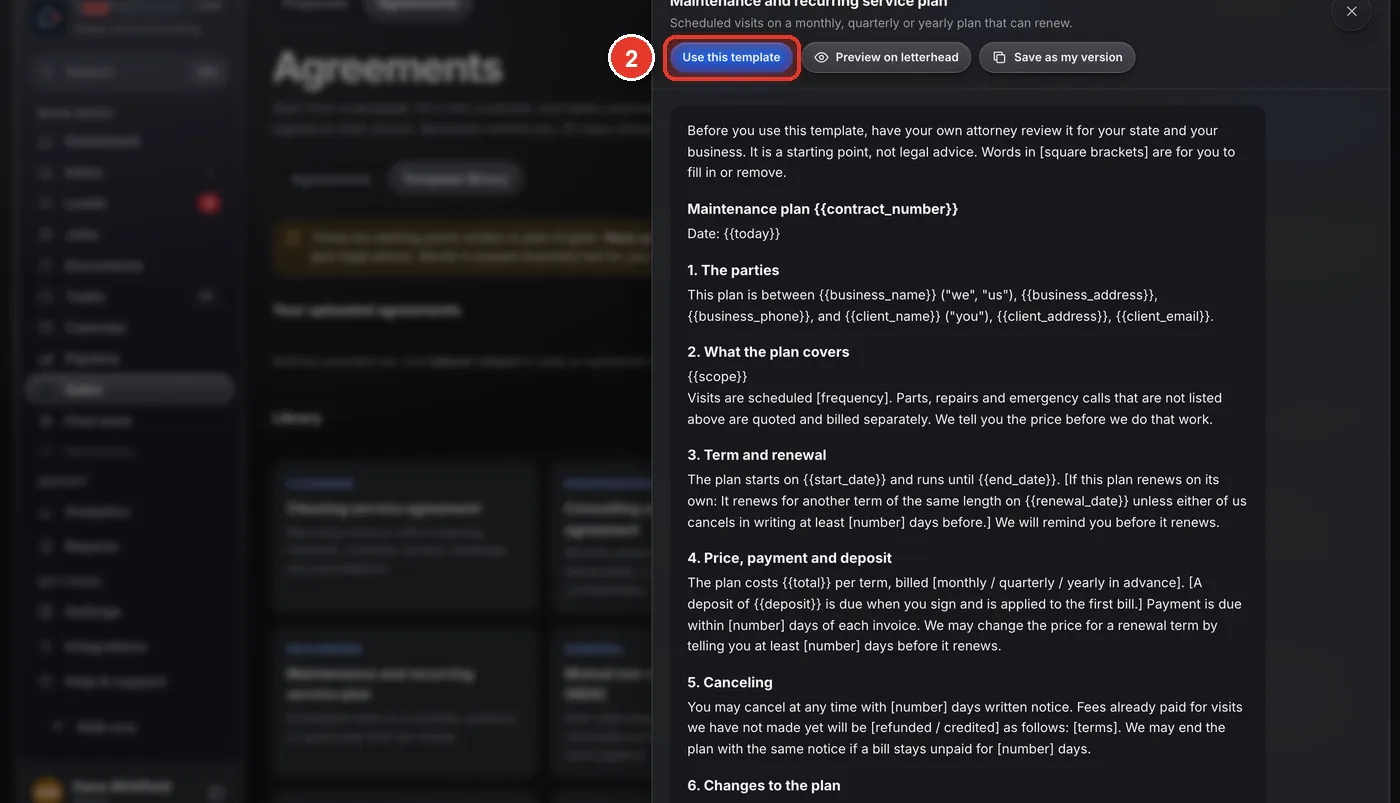
  2. A template from the library, with Use this template.
    Step 2 of 5 A template from the library, with Use this template.
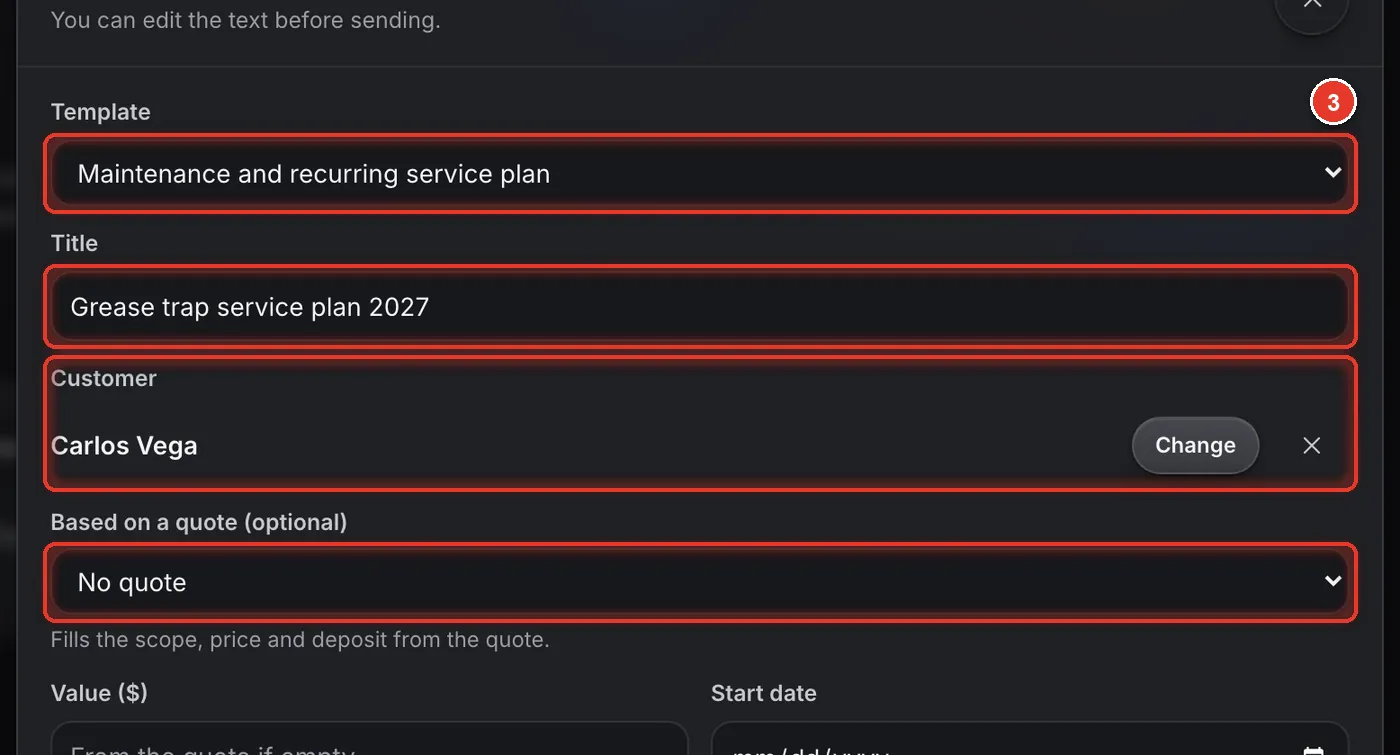
  3. Template, title, customer and Based on a quote.
    Step 3 of 5 Template, title, customer and Based on a quote.
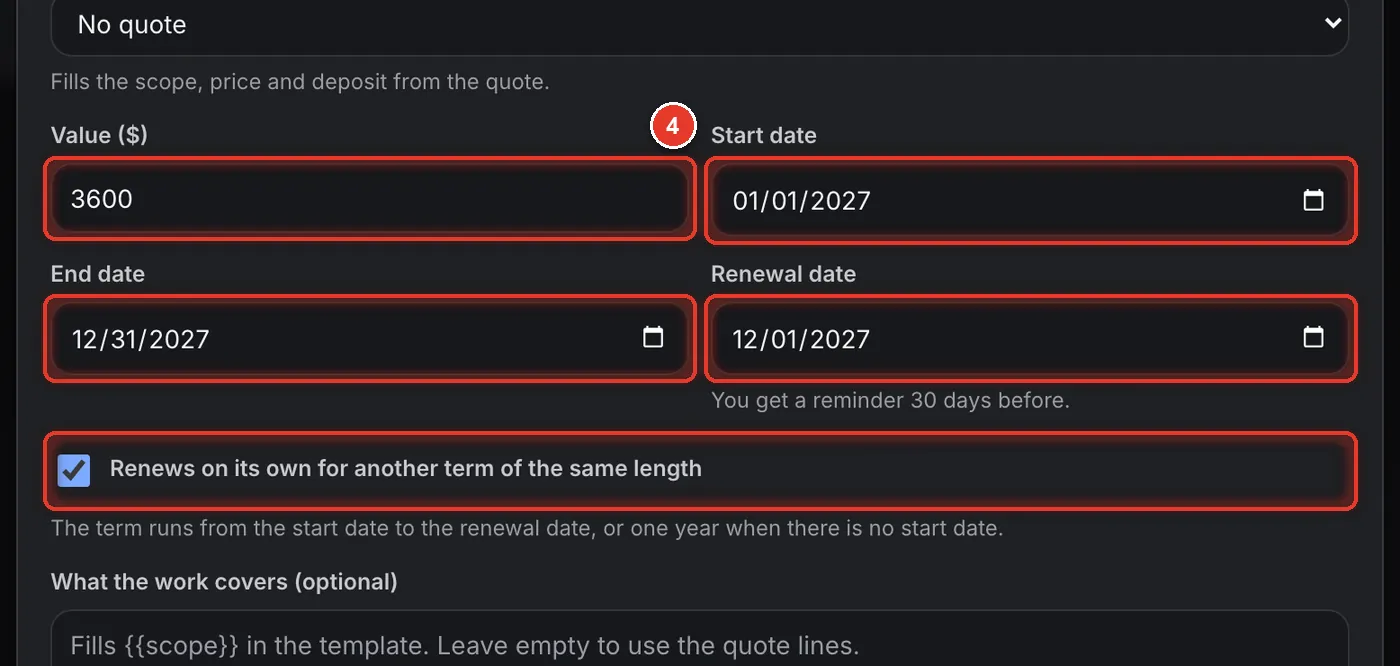
  4. Value, start, end and renewal dates, and Renews on its own.
    Step 4 of 5 Value, start, end and renewal dates, and Renews on its own.
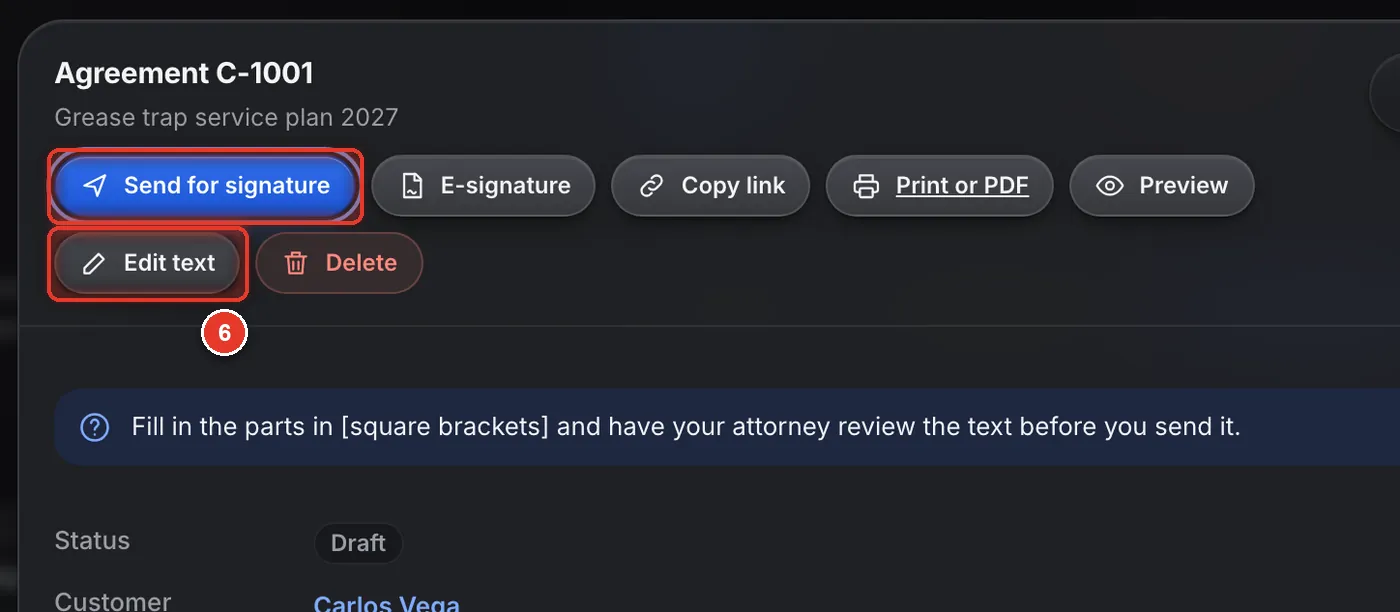
  5. Edit text and Send for signature.
    Step 5 of 5 Edit text and Send for signature.

Agreements in the how-to guide, step by step

Why it helps

  • Recurring work on paper

    Maintenance plans and service agreements are signed and stored with the customer.

  • Renewals on time

    A reminder 30 days before every renewal date.

  • Starting points included

    Ten templates to adapt. Have your attorney review any template before you use it.

Everything in Agreements

Every plan includes every line below.

  • Documents and contracts

    A library for your files, in folders with tags and search inside the words, with every new upload kept as a version. Contracts are locked once signed, send for e-signature, and remind you before they renew. Choose what AI may read: off, your team only, or customer-facing.

  • Your colors on every document

    Pick the color of your quotes, invoices, receipts, work orders and agreements: your brand colors, a theme color or your own. Your license number, tax ID and the name under the signature line fill in from your business profile, so nothing is typed twice.

  • Agreements

    Service agreements, maintenance plans and more.

  • Template library

    10 built-in templates, or write your own.

  • Based on a quote

    Fills in the scope and price.

  • E-signature

    Send for signature from the CRM.

  • Merge field check

    Cannot be sent with merge fields left in.

  • Dates

    Value, start, end and renewal dates.

  • Auto-renew flag

    Renews on its own for another term.

  • Renewal reminder

    30 days before, by bell, email and phone alert.

  • E-signatures for any PDF

    Send any PDF, or a quote, agreement, change order or work order, to one or more signers by email or text, in order if you like. Reminders every few days, then a signed PDF and a certificate. No monthly limit and no extra cost.

Agreements is in every plan

Plans differ only in how many people can sign in. Month to month, no setup fee.

LoonStack CRM Solo

30-day free trial

$69/month

1 user

Every feature included, Agreements too.

Start free trial of Solo

$0 today. Card required. 30-day free trial, then $69 a month, renewing automatically until you cancel. Cancel before day 30 in Billing and you pay nothing. To add a second person, switch to Crew in Billing.

LoonStack CRM Crew

Best for teams of 2 to 10

$129/month

Up to 10 users

Every feature included, Agreements too.

Start free trial of Crew

$0 today. Card required. 30-day free trial, then $129 a month, renewing automatically until you cancel. Cancel before day 30 in Billing and you pay nothing. We remind you 7, 3 and 1 day before the trial ends.

LoonStack CRM Company

30-day free trial

$199/month

Unlimited users

Every feature included, Agreements too.

Start free trial of Company

$0 today. Card required. 30-day free trial, then $199 a month, renewing automatically until you cancel. Cancel before day 30 in Billing and you pay nothing. We remind you 7, 3 and 1 day before the trial ends.

Switch between Solo, Crew and Company anytime from Billing in the CRM. Full pricing, website bundles and terms

See Agreements with your business in it

Every plan has every feature. 30-day free trial, $0 today. Cancel before day 30 and you pay nothing.

Questions first? Email [email protected] or request a call. A written reply usually comes within one business day.