Meetings

Turn a site visit into notes, decisions and tasks

Create a meeting, bring in a transcript or record an in-person visit with everyone's consent, then get a summary, decisions and action items on the contact.

30-day free trial. $0 today, card required. Cancel before day 30 and you pay nothing.

Record only with consent

Meetings in LoonStack CRM: Record only with consent. Sample data in LoonStack CRM.

What you can do with Meetings

Record only with consent

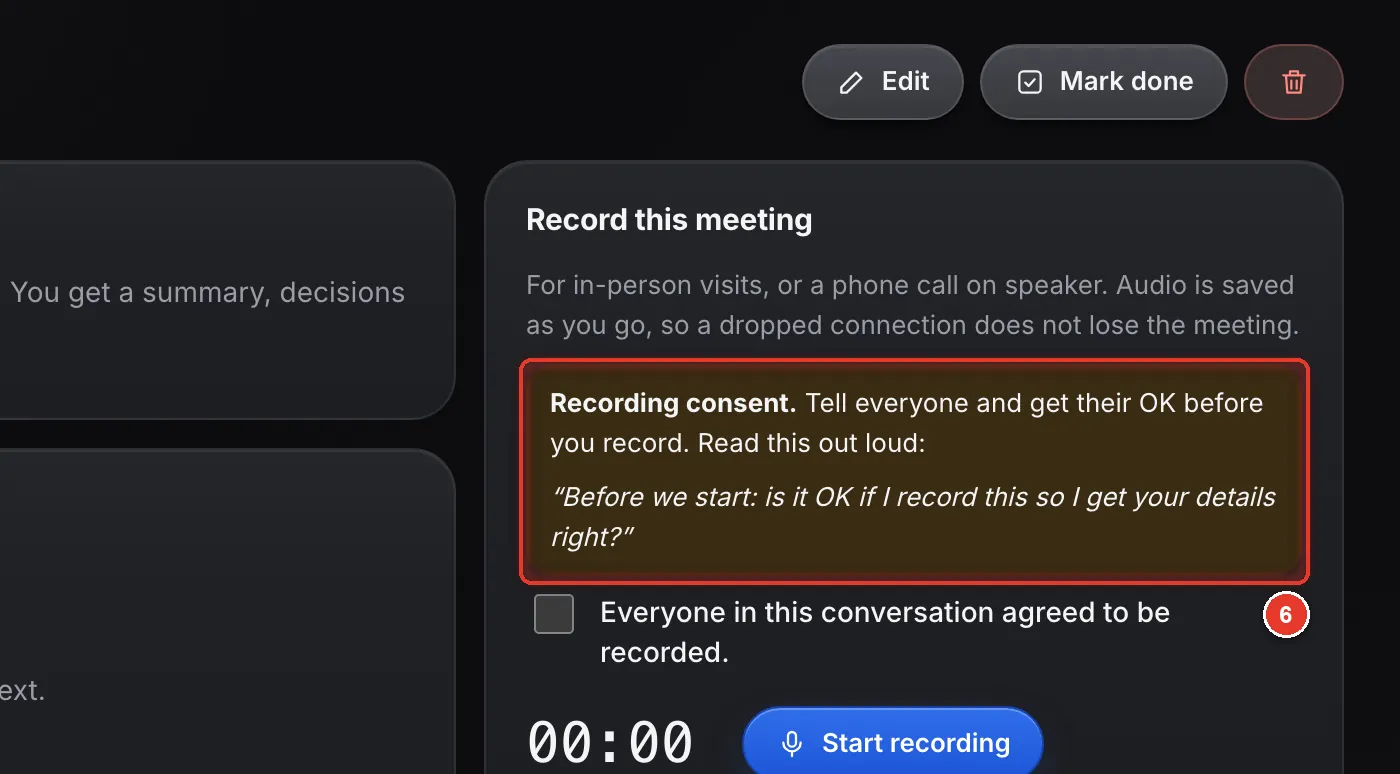
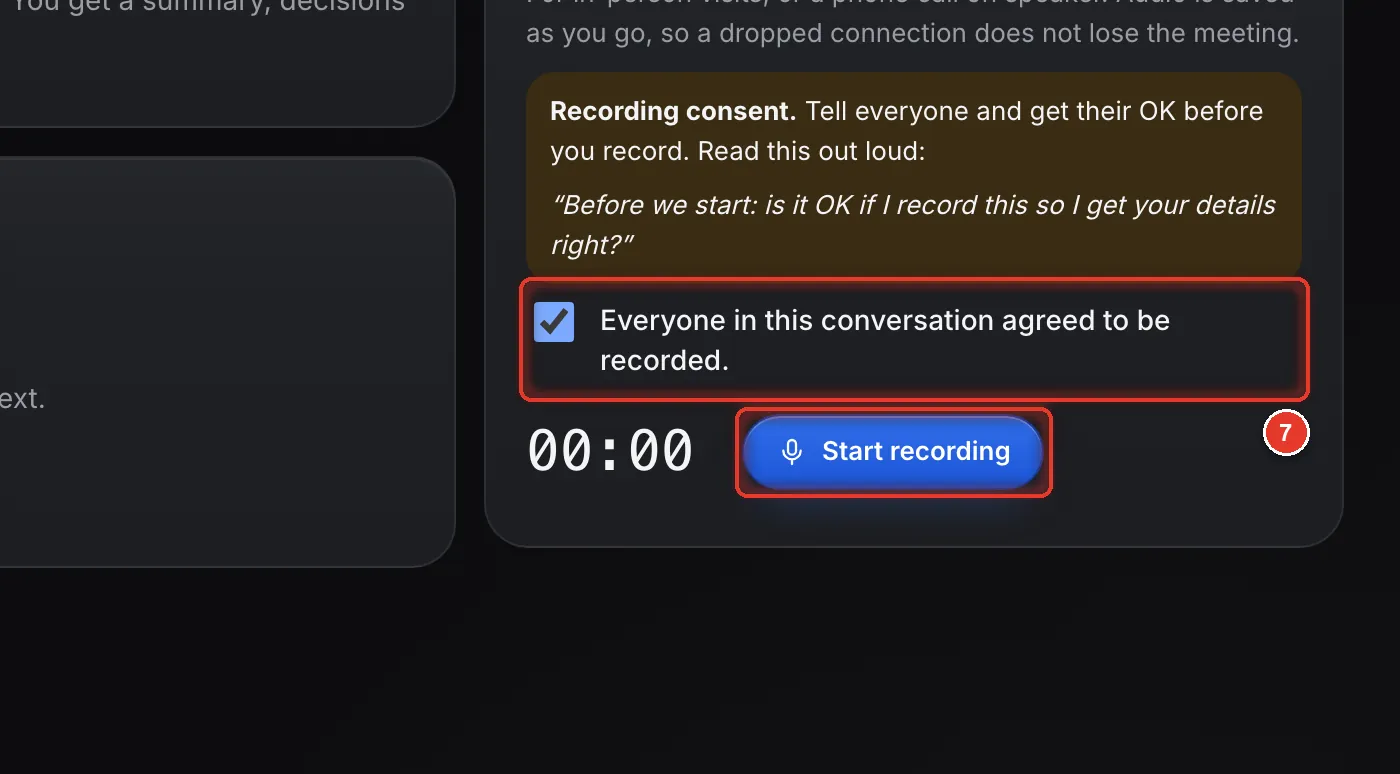
The CRM will not start recording until you tick that everyone in the conversation agreed. That confirmation is saved with the meeting. Pause and stop as you go, and audio is saved while you record.

  • Consent checkbox before recording
  • Consent saved with the meeting
  • Pause and Stop

Summary, decisions and action items

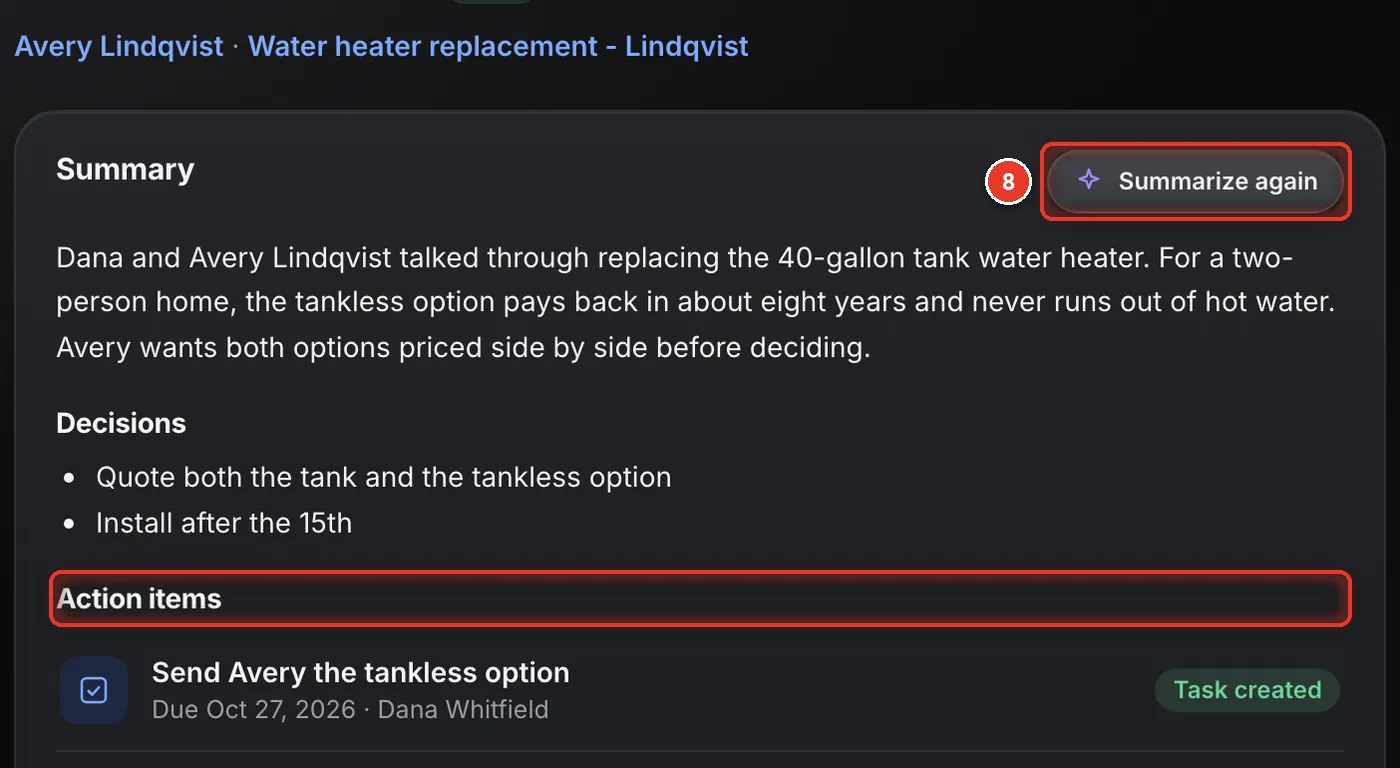
Turn the recording into text, then Summarize with AI. You get a summary, decisions and action items, and Create task on any action item puts it on the right person's list.

  • AI included, no extra charge
  • Create task from an action item
  • Saved on the contact and deal
Summary, decisions and action items. Sample data in LoonStack CRM.

Bring in the transcript you already have

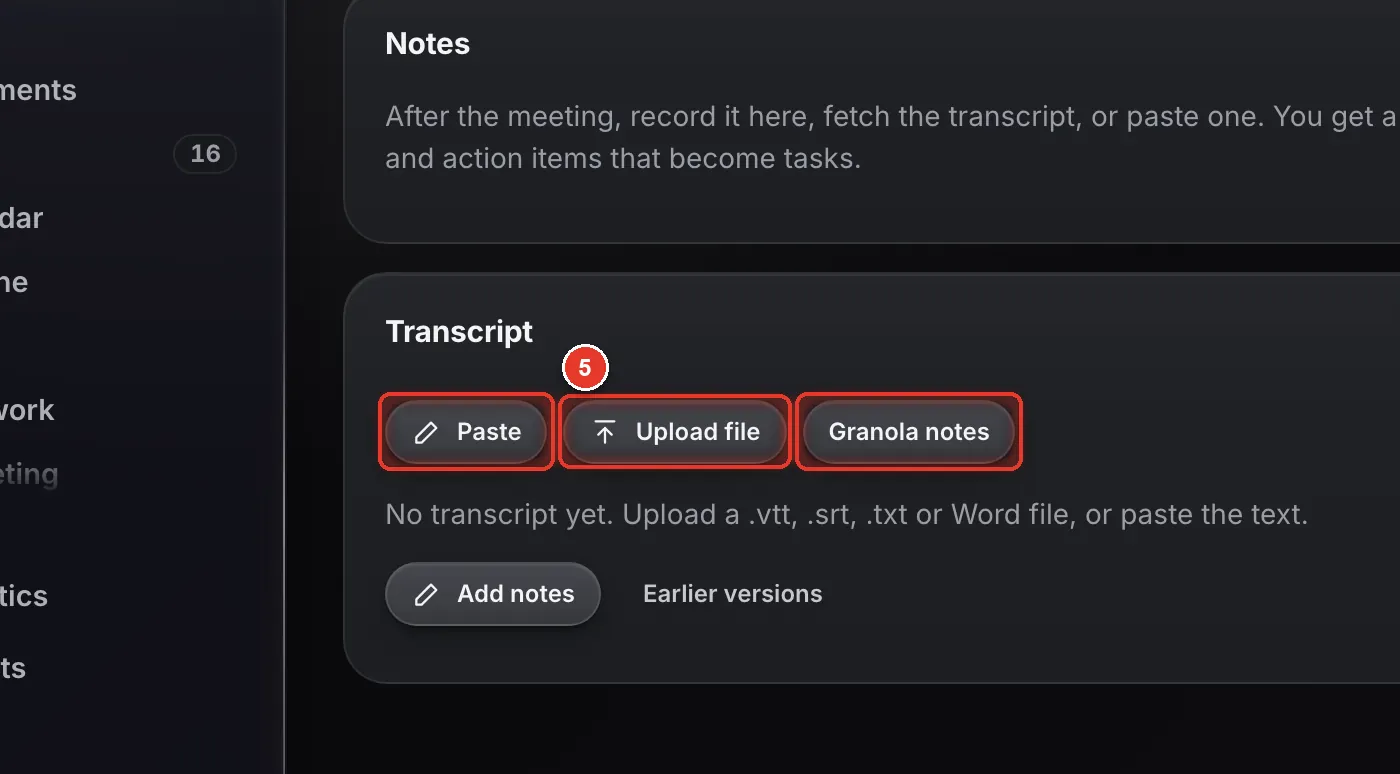
Paste a transcript, upload the file Zoom or Teams gives you (.vtt), a .srt, .txt or Word file, or paste Granola notes. Add your Zoom, Teams or Google Meet link to the meeting.

  • Paste, upload or Granola notes
  • Meeting link on the record
  • Contact and deal on every meeting
Bring in the transcript you already have. Sample data in LoonStack CRM.

See it in action

Meetings, step by step, in screenshots of the real app with a made-up sample business. Use the buttons to move through it.

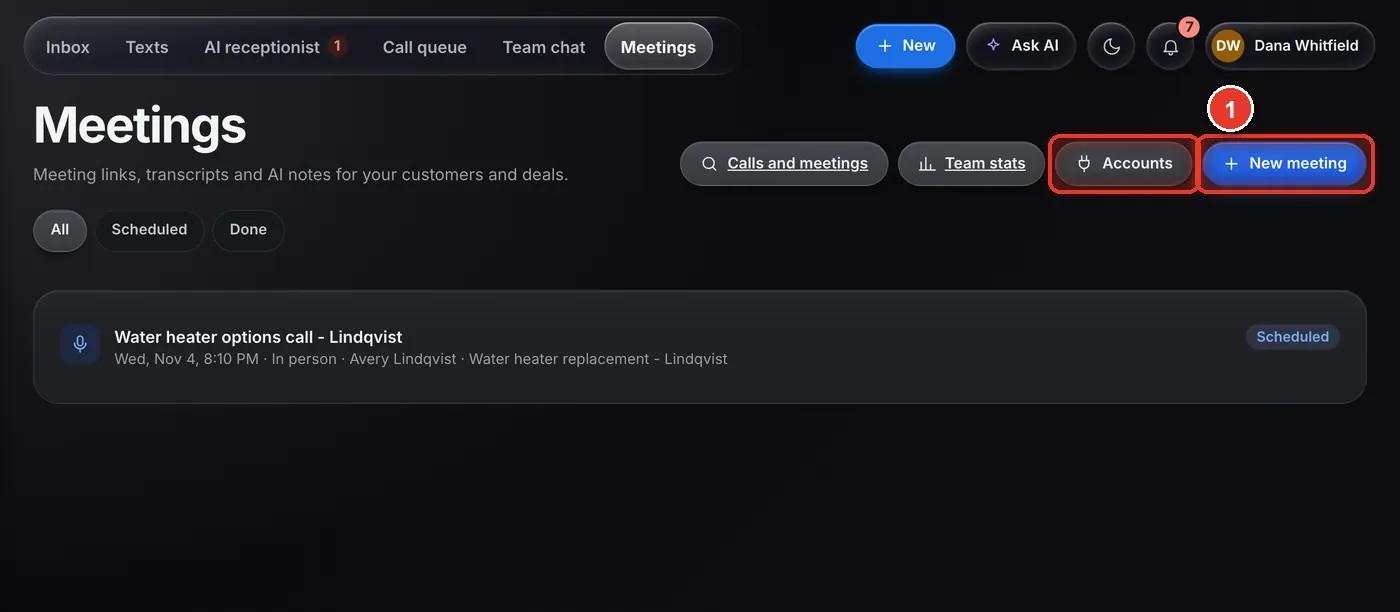
  1. Meetings, with Accounts and New meeting.
    Step 1 of 6 Meetings, with Accounts and New meeting.
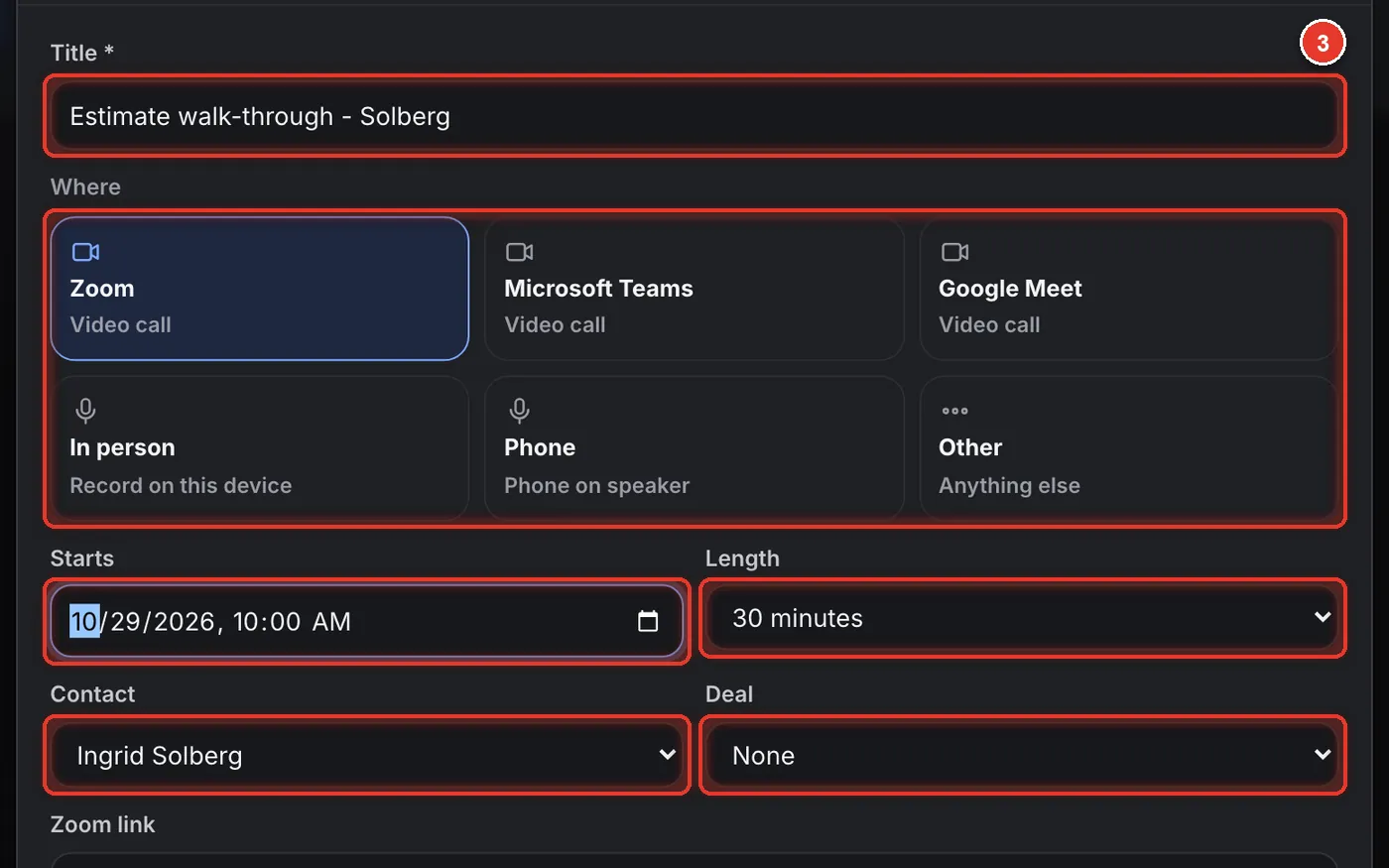
  2. New meeting: title, place, start, length, contact and deal.
    Step 2 of 6 New meeting: title, place, start, length, contact and deal.
  3. Bring in the transcript: Paste, Upload file or Granola notes.
    Step 3 of 6 Bring in the transcript: Paste, Upload file or Granola notes.
  4. The recording consent note.
    Step 4 of 6 The recording consent note.
  5. Tick that everyone agreed, then Start recording.
    Step 5 of 6 Tick that everyone agreed, then Start recording.
  6. Summarize with AI.
    Step 6 of 6 Summarize with AI.

Meetings in the how-to guide, step by step

Why it helps

  • Nothing lost after a visit

    Decisions and action items land on the contact while they are fresh.

  • Consent first

    Recording waits until you confirm everyone agreed, and the confirmation is kept.

  • AI included

    Summaries use LoonStack AI at no extra charge. LoonStack AI also turns recordings into text, with no key to set up.

Everything in Meetings

Every plan includes every line below. Items marked Coming are not available yet and say what they wait on.

  • Conversation stats and keyword counts

    Each meeting and call shows how much your team talked, the questions asked and the longest stretch each side talked, plus how often price, financing, insurance, competitors, warranty and decision makers came up. Team stats adds it up per person. Plain counting, no AI.

  • Voice memo after a visit

    Record your own notes after you leave the house. LoonStack turns them into a summary, tasks and a next step on the deal. For meetings with customers, the recorder shows your consent script and a reminder in states where everyone must agree to be recorded.

  • Notes that keep earlier versions

    Edit the notes on a meeting or call and every earlier version stays one tap away. A deleted call goes to Recently deleted, with Undo.

  • Recommended next steps

    Three to five steps from what is saved about that customer, each with a button: create the task, draft the message, call or schedule. Nothing happens until you press it.

  • Follow-up drafts

    A thank-you written from the summary, notes and transcript, as an email or a text. It is only a draft: you read it, change it and send it.

  • Calls and meetings history

    Every meeting, phone call, voicemail and logged call in one list, with notes and transcripts you can search by a word that was said or written.

  • Meetings

    Title, place, start, length, contact and deal.

  • In-person recording

    In your browser, with Pause and Stop.

  • Consent gate

    Recording blocked until consent is ticked; saved with the meeting.

  • Transcript import

    .vtt, .srt, .txt or Word, or pasted Granola notes.

  • AI summary

    Summary, decisions and action items.

  • Create task

    From any action item.

  • Recordings turned into text

    LoonStack AI does it, with nothing to set up. You can use your own provider instead if you prefer.

  • Meeting link

    Paste your Zoom, Teams or Google Meet link.

  • Links and transcripts from a connected account Coming

    Coming, after Zoom, Microsoft and Google approve LoonStack.

Meetings is in every plan

Plans differ only in how many people can sign in. Month to month, no setup fee.

LoonStack CRM Solo

30-day free trial

$69/month

1 user

Every feature included, Meetings too.

Start free trial of Solo

$0 today. Card required. 30-day free trial, then $69 a month, renewing automatically until you cancel. Cancel before day 30 in Billing and you pay nothing. To add a second person, switch to Crew in Billing.

LoonStack CRM Crew

Best for teams of 2 to 10

$129/month

Up to 10 users

Every feature included, Meetings too.

Start free trial of Crew

$0 today. Card required. 30-day free trial, then $129 a month, renewing automatically until you cancel. Cancel before day 30 in Billing and you pay nothing. We remind you 7, 3 and 1 day before the trial ends.

LoonStack CRM Company

30-day free trial

$199/month

Unlimited users

Every feature included, Meetings too.

Start free trial of Company

$0 today. Card required. 30-day free trial, then $199 a month, renewing automatically until you cancel. Cancel before day 30 in Billing and you pay nothing. We remind you 7, 3 and 1 day before the trial ends.

Switch between Solo, Crew and Company anytime from Billing in the CRM. Full pricing, website bundles and terms

See Meetings with your business in it

Every plan has every feature. 30-day free trial, $0 today. Cancel before day 30 and you pay nothing.

Questions first? Email [email protected] or request a call. A written reply usually comes within one business day.