Settings

Your team, your keys, your data

Invite people with built-in or custom roles, connect your own email and other apps, and download everything whenever you like. AI is included.

30-day free trial. $0 today, card required. Cancel before day 30 and you pay nothing.

Roles that fit your team

Settings in LoonStack CRM: Roles that fit your team. Sample data in LoonStack CRM.

What you can do with Settings

Roles that fit your team

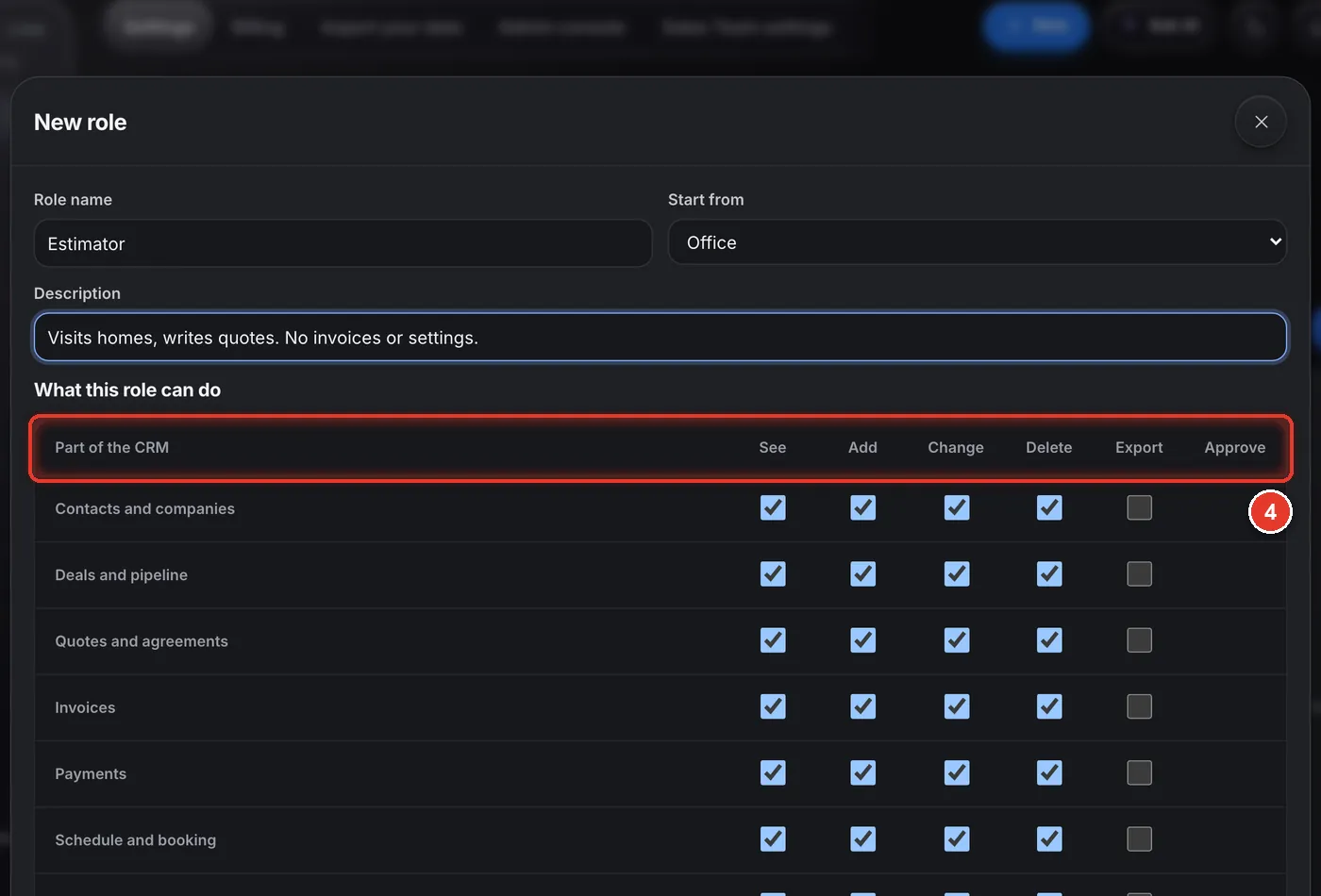
Use the built-in roles (Owner, Office, Field crew and Read only) or make your own, and give admin access to the people you choose with a separate switch. For each part of the CRM, pick who can see, add, change, delete or export, whose records they see, and whether they see money amounts.

  • Five built-in roles
  • Own, team or all records
  • Hide money per role

Email from your business

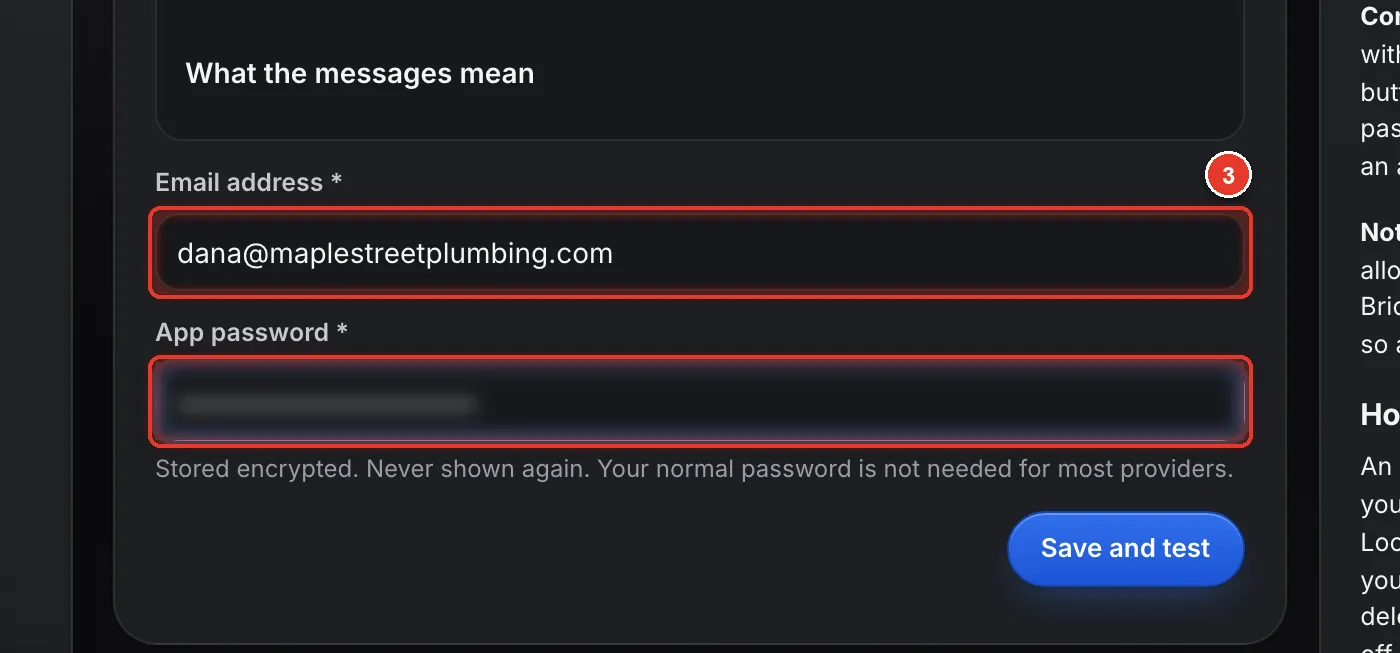
Add your sending domain so quotes, invoices and reminders come from your business address, or connect your own mailbox with an app password. Gmail, Yahoo, AOL, iCloud, Zoho, Fastmail and any IMAP and SMTP provider work today.

  • Your own sending domain
  • Your mailbox with an app password
  • Microsoft accounts: Coming
Email from your business. Sample data in LoonStack CRM.

AI included, your own key if you prefer

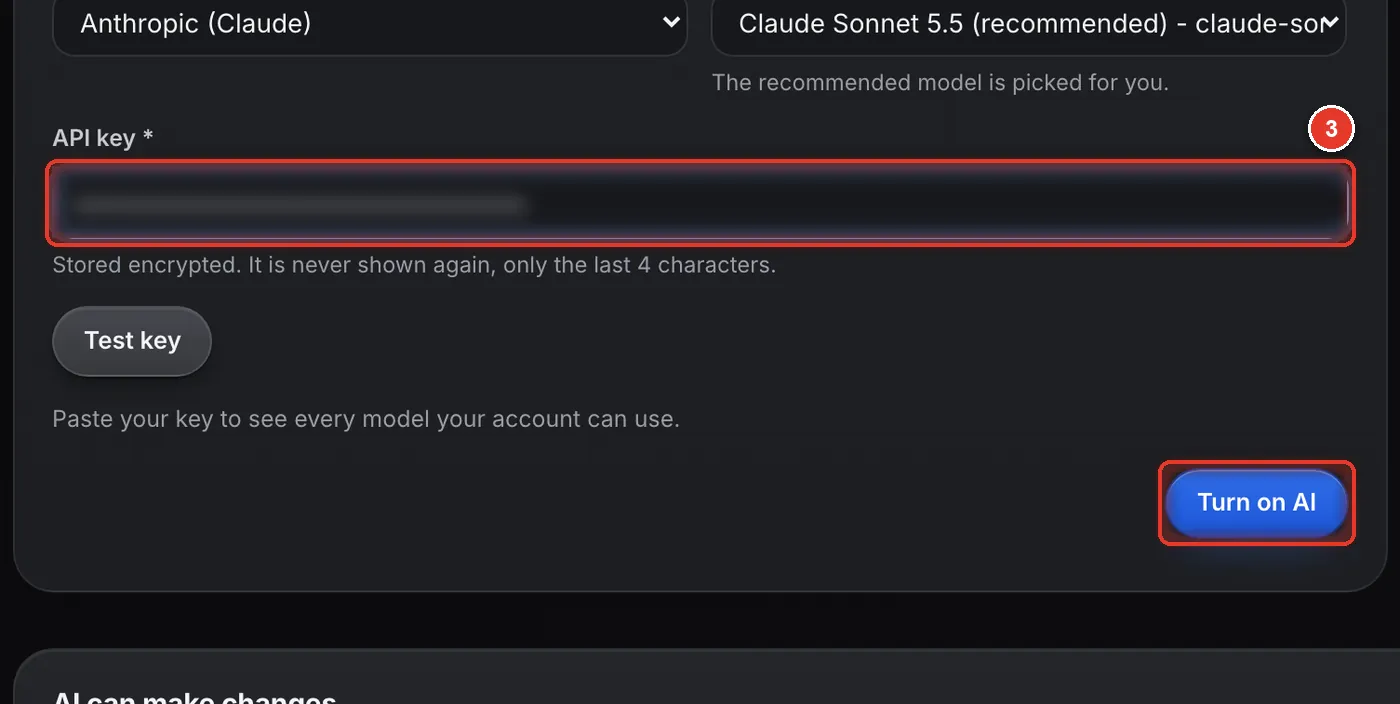
AI is included at no extra charge and works from day one. Nothing to paste. If you would rather use your own account, paste a key from Anthropic, OpenAI or Google. The key is stored encrypted and only its last 4 characters are ever shown. Turn off AI and the key is deleted.

  • Your own key is optional
  • Test connection
  • Drafts never go out without your click
AI included, your own key if you prefer. Sample data in LoonStack CRM.

Your data is yours

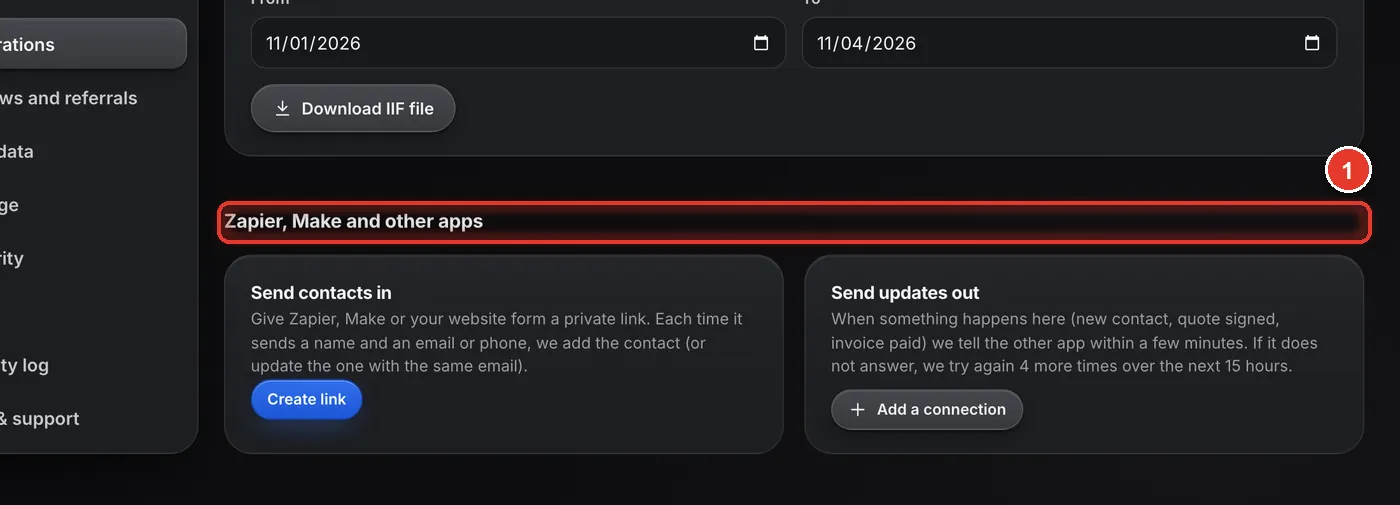
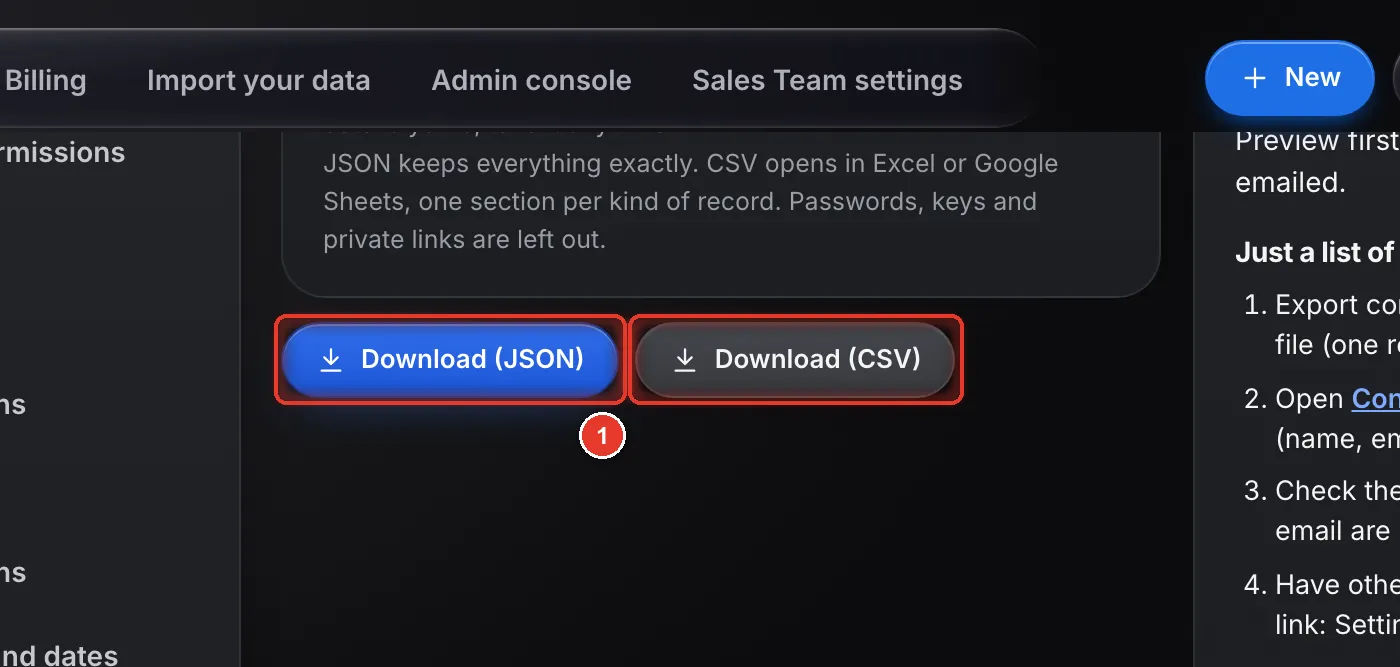
Download every record any time as a spreadsheet (CSV) or an exact copy (JSON). Connect Zapier or Make to send contacts in and updates out, and subscribe your calendar app to your schedule.

  • CSV or JSON download
  • Zapier and Make, in and out
  • Owners can delete the account themselves
Your data is yours. Sample data in LoonStack CRM.

See it in action

Settings, step by step, in screenshots of the real app with a made-up sample business. Use the buttons to move through it.

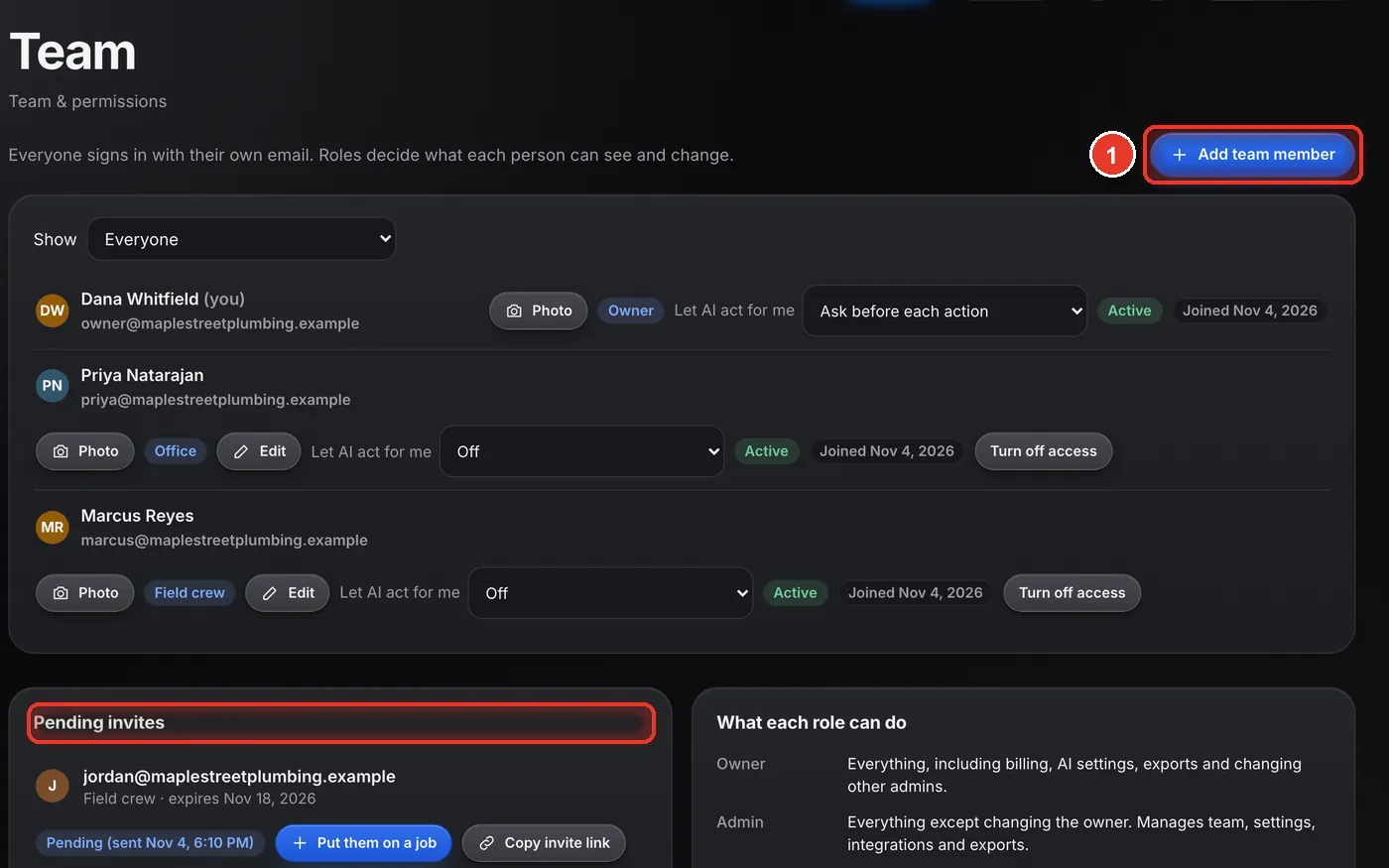
  1. Settings, Team, with Invite teammate.
    Step 1 of 7 Settings, Team, with Invite teammate.
  2. What this role can do: See, Add, Change, Delete and Export.
    Step 2 of 7 What this role can do: See, Add, Change, Delete and Export.
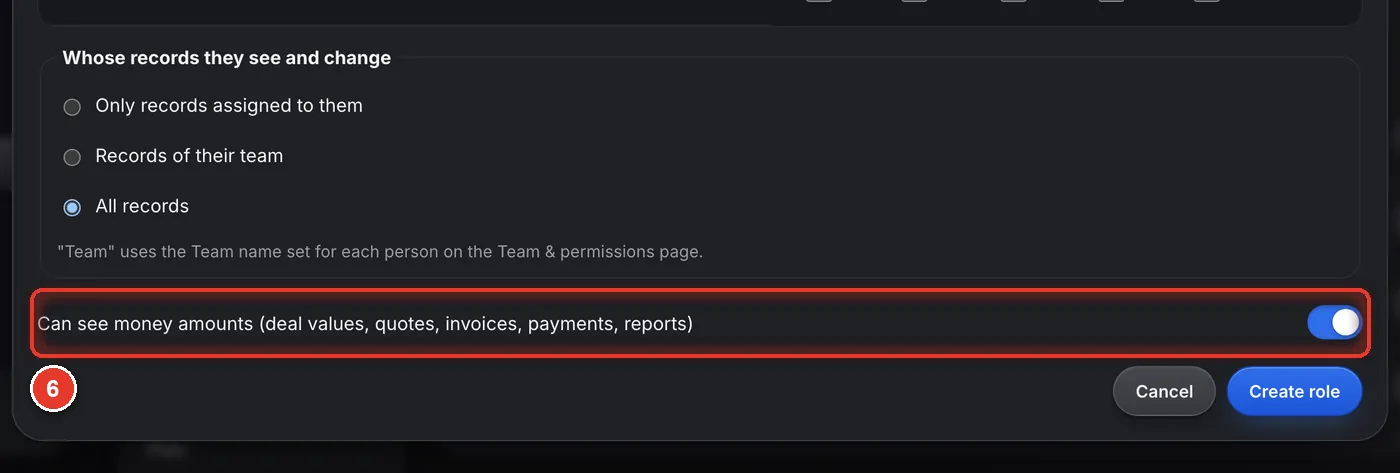
  3. Can see money amounts, per role.
    Step 3 of 7 Can see money amounts, per role.
  4. Paste your AI key and Turn on AI.
    Step 4 of 7 Paste your AI key and Turn on AI.
  5. Connect your mailbox with an app password.
    Step 5 of 7 Connect your mailbox with an app password.
  6. Zapier, Make and other apps.
    Step 6 of 7 Zapier, Make and other apps.
  7. Your data: Download (JSON) and Download (CSV).
    Step 7 of 7 Your data: Download (JSON) and Download (CSV).

Settings in the how-to guide, step by step

Why it helps

  • Everyone sees what they should

    Custom roles with record scope and money hidden where it should be.

  • You hold the keys

    Your payment and texting keys, and your AI key if you add one, are stored encrypted and never shown again.

  • Easy to leave

    Export everything any time. Month to month, cancel in Billing.

Everything in Settings

Every plan includes every line below. Items marked Coming are not available yet and say what they wait on.

  • Your own Inbox in LoonStack

    Connect your mailbox with an app password, then press Show my inbox here. New email shows up in Inbox, you can open it, reply or write a new one from your own address, and only you can see it. Turn it off and the copies LoonStack kept are deleted. Reading Gmail through the Sign in with Google button is not on for customers yet; Gmail works with an app password.

  • Connections: calendar, email, texting and payments in one place

    Settings, Connections shows each service your business links to, whether it is working, and one button to set it up. iCloud, Fastmail and Yahoo calendars connect two-way with an app password today; Google two-way sync and one-click Outlook sign-in turn on once LoonStack's sign-in is approved.

  • Business memory for AI

    Write down the standing facts your AI should always know, such as "We never book jobs on Sundays" or which customer pays in 30 days. Ask AI, the morning brief and AI drafts read it every time, at no extra charge. Owners and admins edit it, add one line with Remember this, or choose Draft from the last 7 days and review the suggestion before saving. The whole team can read it, so leave out anything private.

  • Your own pins in the menu

    Each person can pin the screens they use most to the top of their menu, drag them into order, or go back to the defaults for their type of business. Only your own menu changes. Everyone has the same short menu; the other pages of each option are tabs along the top of the page.

  • AI levels per person

    Beside each person in Team and permissions, the Let AI act for me menu offers Off, Ask before each action, or Act without asking. Even then, anything that moves money, messages customers, deletes several records or changes settings asks once, unless the owner turns that off. AI only does what that person is allowed to do.

  • Documents and contracts

    A library for your files, in folders with tags and search inside the words, with every new upload kept as a version. Contracts are locked once signed, send for e-signature, and remind you before they renew. Choose what AI may read: off, your team only, or customer-facing. Find it under Documents, Library.

  • Keyboard shortcuts

    Press ? for the cheat sheet: g then c, p, t or s to jump to Contacts, Pipeline, Tasks or Schedule, j and k to move down a list, n for a new record. You can turn them off.

  • Storage and plan limits

    See how much of your plan's storage your files and recordings use (10 GB on Solo, 25 GB on Crew, 50 GB on Company).

  • Choose which AI features use your own key

    AI starts on LoonStack AI. If you add your own key, choose for each feature whether it runs on your key or on LoonStack AI, see this month's use of each, and switch everything with one button. If your key fails, LoonStack AI answers instead and the owner is told.

  • A role plus an Admin access switch

    Pick a role for each person (Office, Field crew, Read only, or your own such as Manager), then decide separately whether they also get admin access. One manager can have it and another not. Only owners and admins can give it, only the owner can take it away from an admin, and nobody can give more than they have.

  • 23 color themes and your own color

    Each person picks a color theme, in light or dark, from Appearance. Choose one of 23 themes or build your own color with sliders or a hex code; LoonStack keeps the text readable. Owners and admins can set the business colors in Settings, then Customize, and anyone can choose to use them.

  • Invite teammates

    Each person signs in with their own email.

  • Built-in roles

    Owner, Admin, Office, Field crew, Read only.

  • Custom roles

    See, add, change, delete, export, per part of the CRM.

  • Record scope

    Own, team or all records.

  • Hide money

    Per role.

  • Sending domain

    Quotes and invoices from your address.

  • Connect your mailbox

    With an app password; Microsoft accounts Coming.

  • AI included

    Your own Anthropic, OpenAI or Google key is optional; key deleted on turn-off.

  • Zapier and Make

    Contacts in, updates out with retries.

  • Full data export

    CSV or JSON, any time.

  • Activity log

    Who changed what.

  • Two-step verification for admins Coming

    Coming, once LoonStack turns it on with its sign-in provider.

Settings is in every plan

Plans differ only in how many people can sign in. Month to month, no setup fee.

LoonStack CRM Solo

30-day free trial

$69/month

1 user

Every feature included, Settings too.

Start free trial of Solo

$0 today. Card required. 30-day free trial, then $69 a month, renewing automatically until you cancel. Cancel before day 30 in Billing and you pay nothing. To add a second person, switch to Crew in Billing.

LoonStack CRM Crew

Best for teams of 2 to 10

$129/month

Up to 10 users

Every feature included, Settings too.

Start free trial of Crew

$0 today. Card required. 30-day free trial, then $129 a month, renewing automatically until you cancel. Cancel before day 30 in Billing and you pay nothing. We remind you 7, 3 and 1 day before the trial ends.

LoonStack CRM Company

30-day free trial

$199/month

Unlimited users

Every feature included, Settings too.

Start free trial of Company

$0 today. Card required. 30-day free trial, then $199 a month, renewing automatically until you cancel. Cancel before day 30 in Billing and you pay nothing. We remind you 7, 3 and 1 day before the trial ends.

Switch between Solo, Crew and Company anytime from Billing in the CRM. Full pricing, website bundles and terms

See Settings with your business in it

Every plan has every feature. 30-day free trial, $0 today. Cancel before day 30 and you pay nothing.

Questions first? Email [email protected] or request a call. A written reply usually comes within one business day.