Admin console

Room for more offices and more people

For businesses with more than one office or team: locations with their own pipelines, booking types and texting numbers, teams and an org chart, field access by role, the activity log and the API.

30-day free trial. $0 today, card required. Cancel before day 30 and you pay nothing.

Locations that keep records apart

Admin console in LoonStack CRM: Locations that keep records apart. Sample data in LoonStack CRM.

What you can do with Admin console

Locations that keep records apart

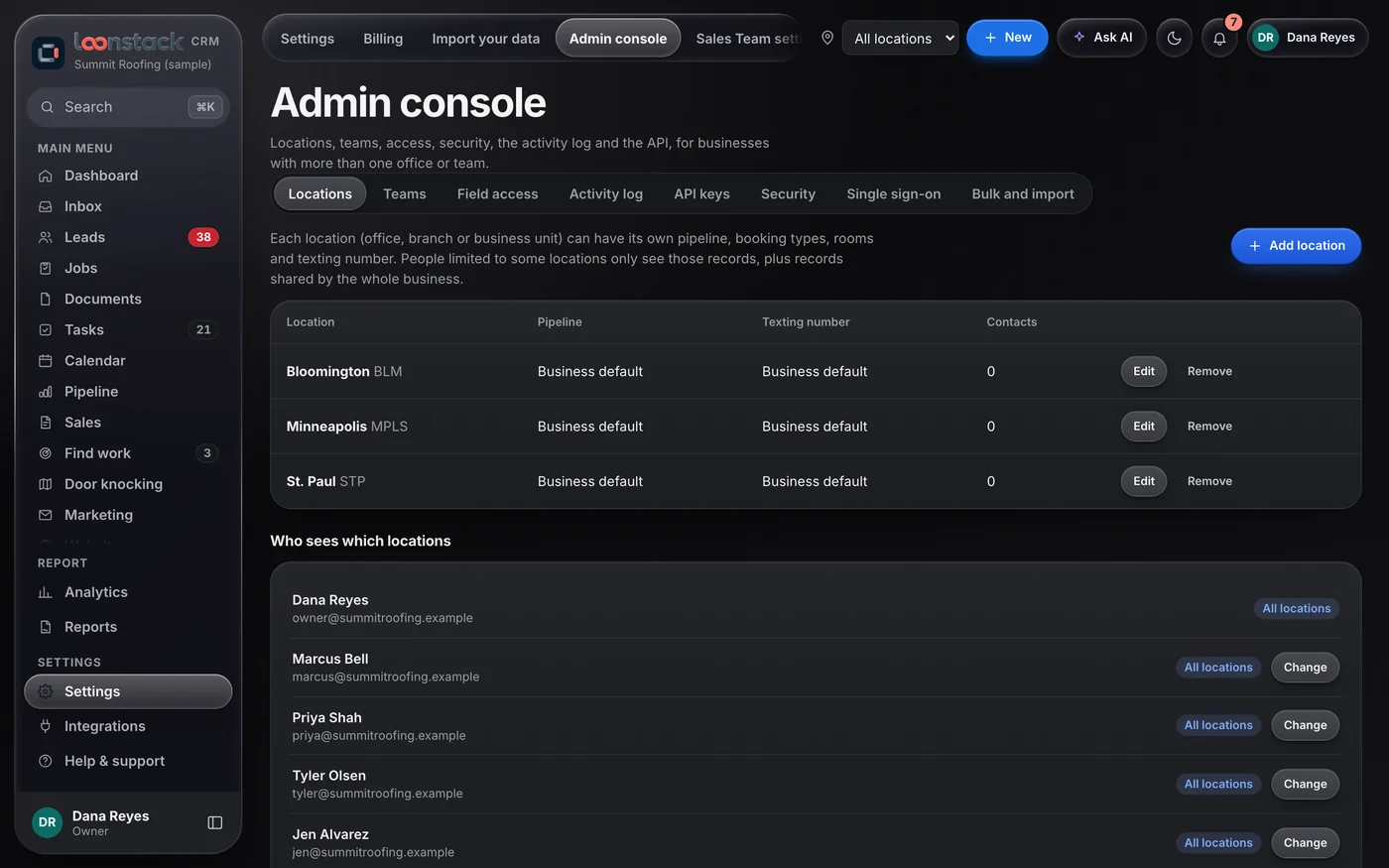
Each location can have its own pipeline, booking types and rooms, and texting number. People limited to some locations see only those records, plus records shared by the whole business. The pin menu in the top bar narrows every list to one location.

  • Up to 500 locations
  • Who sees which locations
  • Location switcher in the top bar

Teams, leads and an org chart

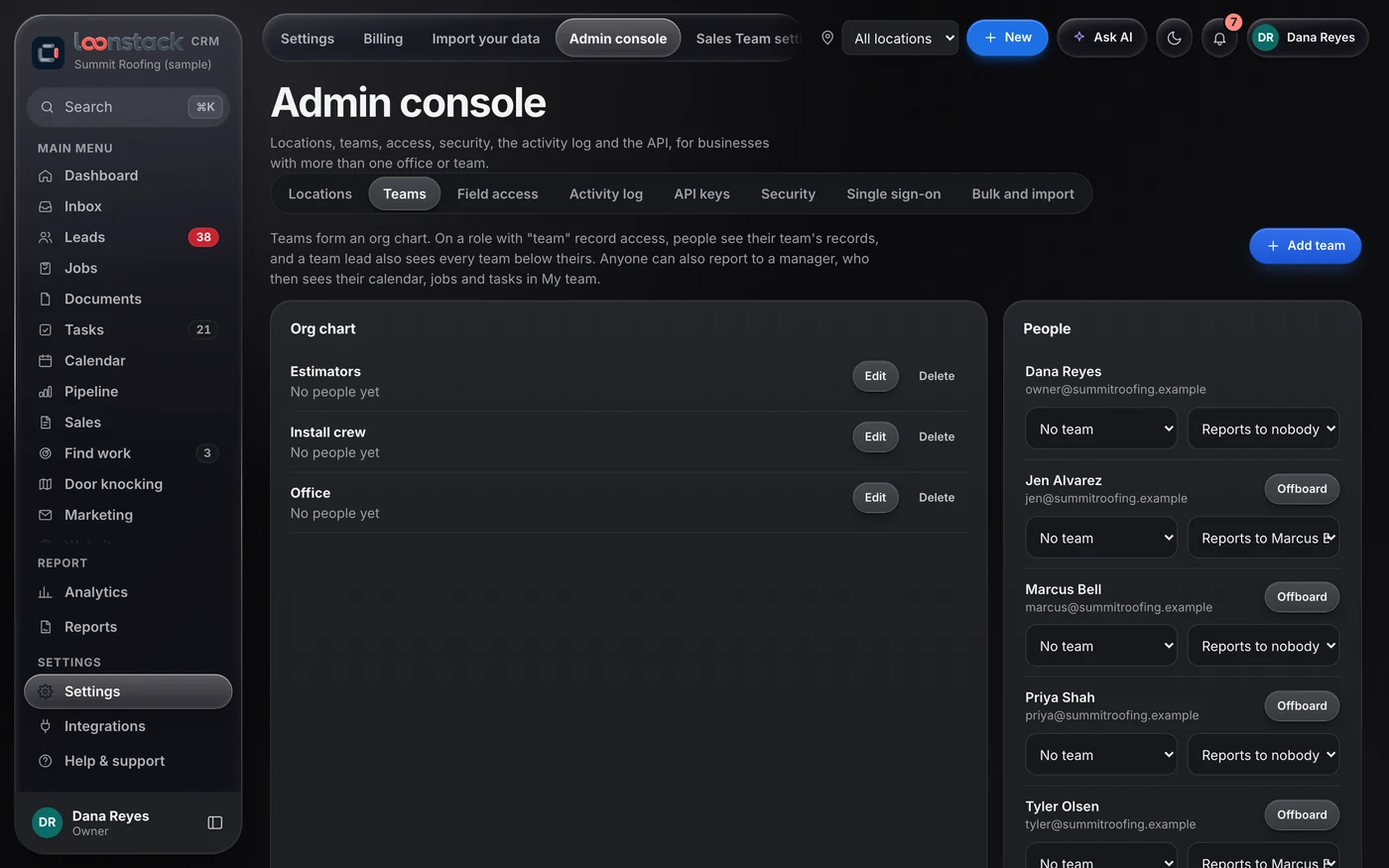
Add teams, set which team each reports to and pick a team lead. On a role with team access, people see their team's records, and a team lead also sees every team below theirs.

  • Nested teams
  • Team leads see teams below
  • People on one team each
Teams, leads and an org chart. Sample data in LoonStack CRM.

Field access, logs and security

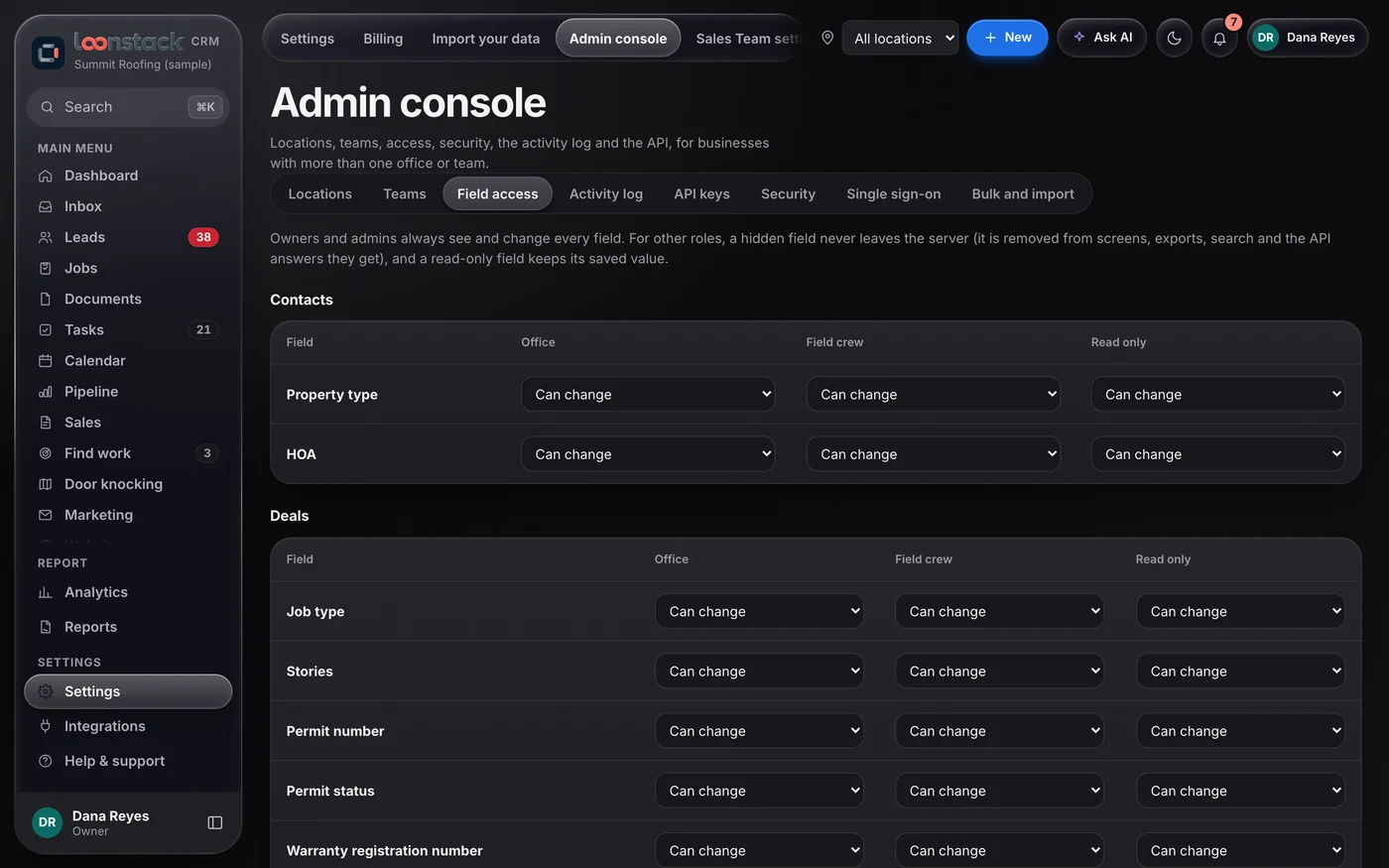
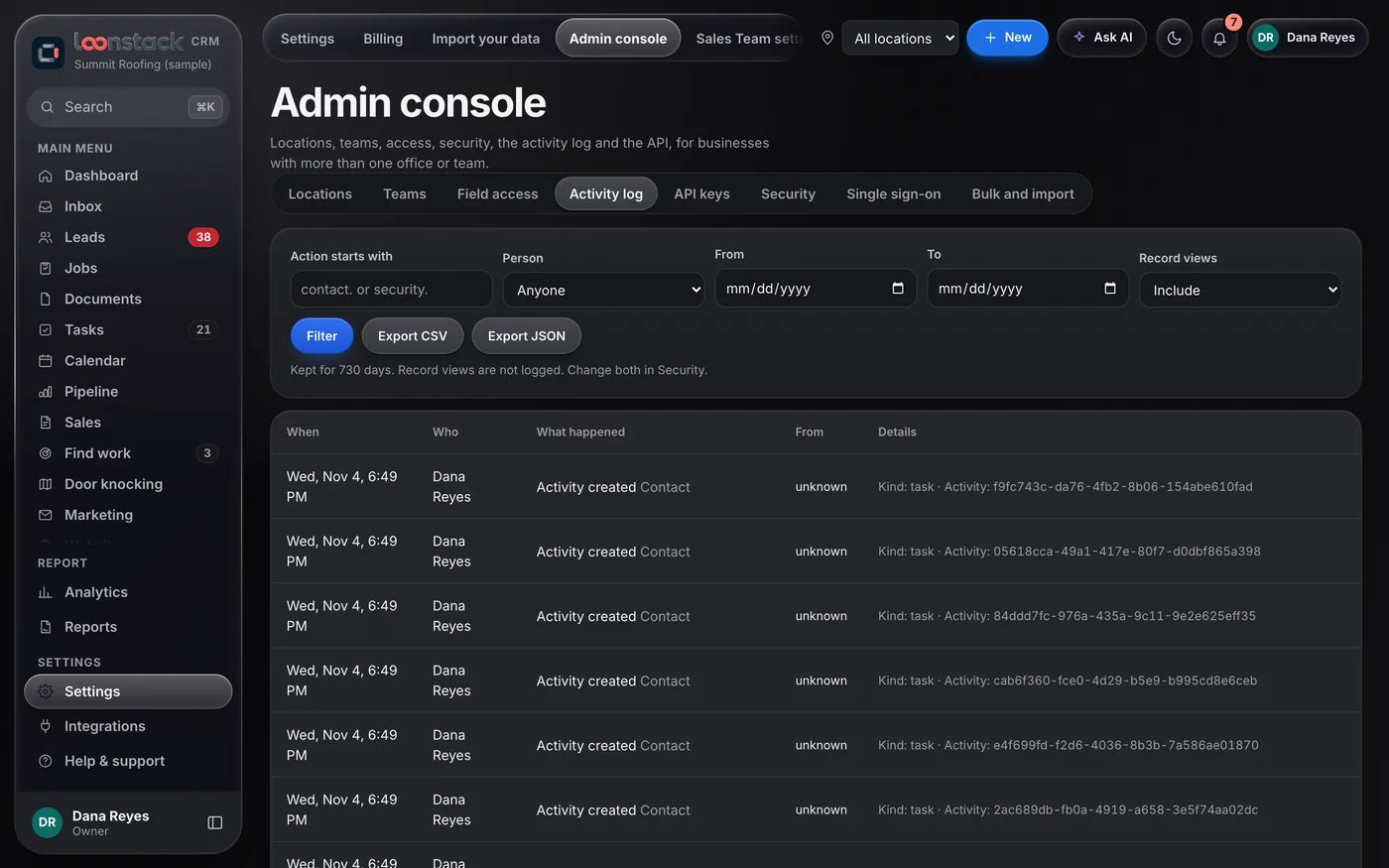
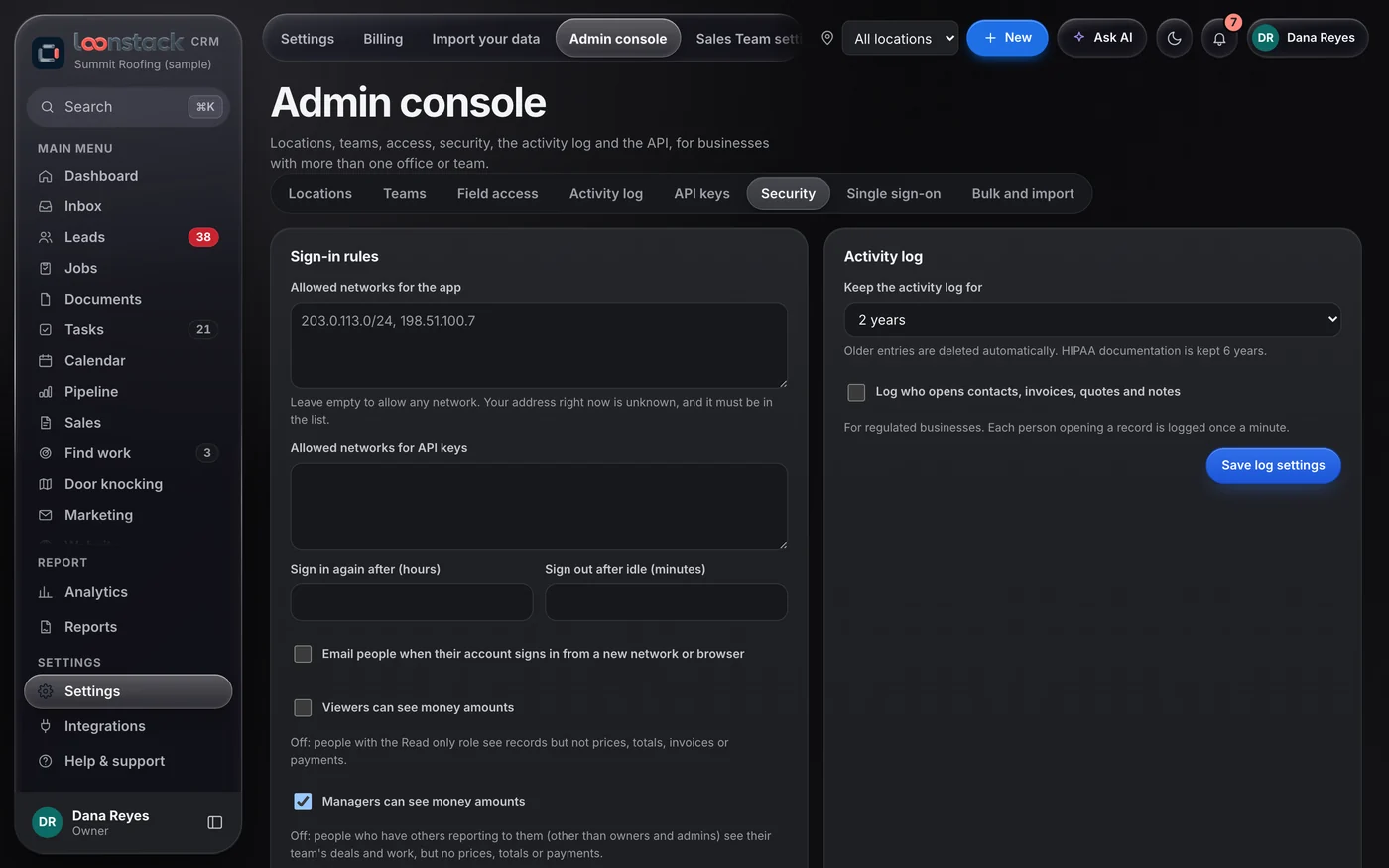
Hide a custom field from a role or make it read only. Filter and export the activity log, keep it from 90 days to 10 years, and optionally log who opens records. Owners can limit sign-in to allowed networks, ask people to sign in again after some hours and sign out after idle minutes.

  • Hidden or read-only fields per role
  • Activity log export, CSV or JSON
  • New sign-in alerts by email
Field access, logs and security. Sample data in LoonStack CRM.

An API and bulk changes

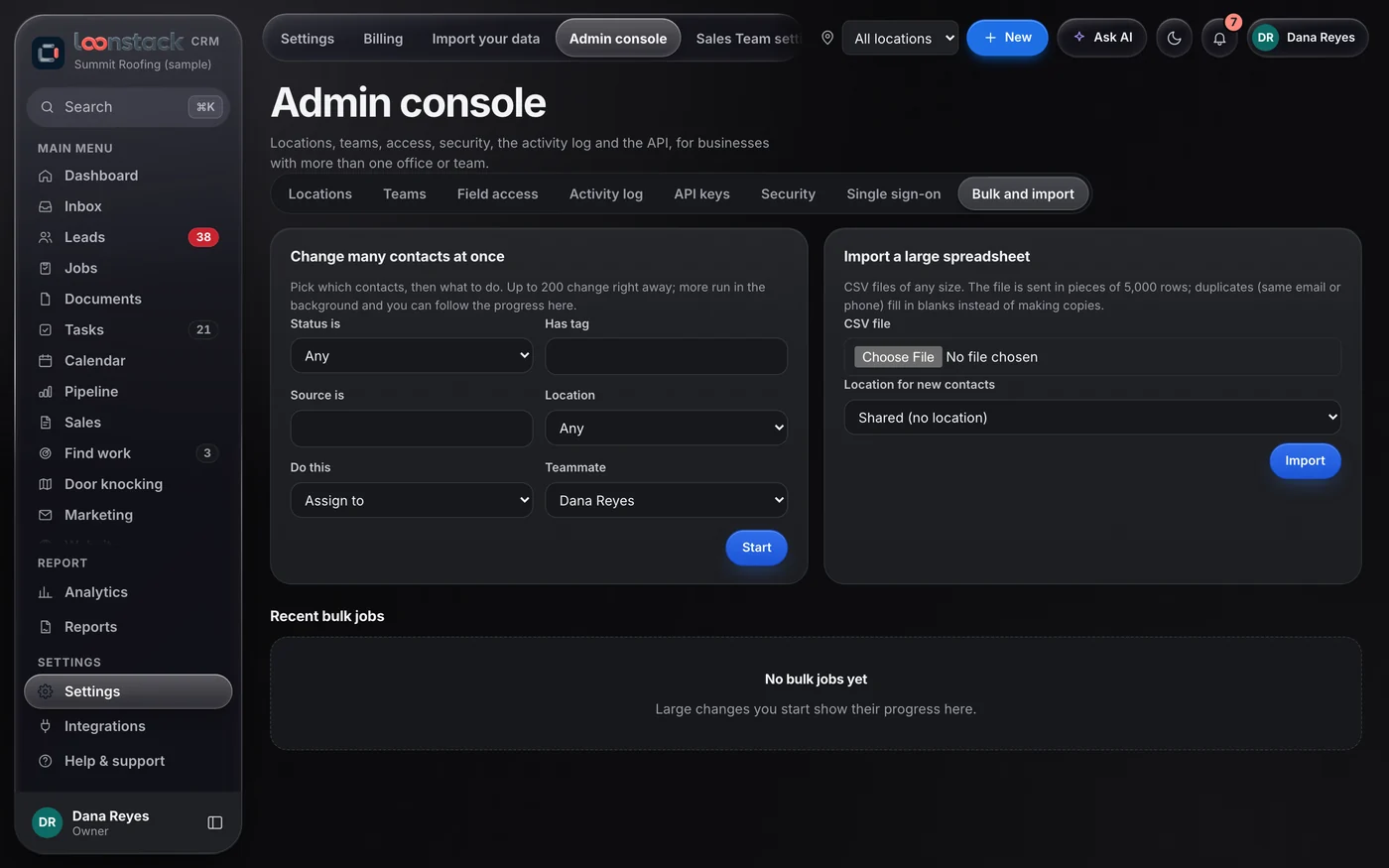
Create API keys with their own permissions and request limits for the REST API, with OpenAPI docs. Change many contacts at once, or import a large spreadsheet in pieces with duplicates filled in instead of copied.

  • Scoped keys, shown once
  • Rotate or revoke keys
  • Bulk assign, tag, move or delete
An API and bulk changes. Sample data in LoonStack CRM.

See it in action

Admin console, step by step, in screenshots of the real app with a made-up sample business. Use the buttons to move through it.

  1. Locations, each with its own pipeline and texting number.
    Step 1 of 6 Locations, each with its own pipeline and texting number.
  2. Teams and the org chart.
    Step 2 of 6 Teams and the org chart.
  3. Field access: Can change, Read only or Hidden per role.
    Step 3 of 6 Field access: Can change, Read only or Hidden per role.
  4. The activity log, with filters and CSV or JSON export.
    Step 4 of 6 The activity log, with filters and CSV or JSON export.
  5. Security: allowed networks, idle sign-out and log retention.
    Step 5 of 6 Security: allowed networks, idle sign-out and log retention.
  6. Change many contacts at once, or import a large spreadsheet.
    Step 6 of 6 Change many contacts at once, or import a large spreadsheet.

Admin console in the how-to guide, step by step

Why it helps

  • Grows with you

    Add offices and teams without a different product. Every plan includes it.

  • Right access for each person

    Locations, record scope and field access decide what each person sees.

  • A record of who did what

    Filter, export and keep the activity log as long as you need.

Everything in Admin console

Every plan includes every line below. Items marked Coming are not available yet and say what they wait on.

  • Locations

    Own pipeline, booking types, rooms and texting number.

  • Who sees which locations

    Every location or only some, with a default.

  • Location switcher

    Narrows every list to one location.

  • Teams and org chart

    Reports to, team leads.

  • Field access

    Hidden or read-only custom fields per role.

  • Activity log

    Filters, CSV and JSON export, 90 days to 10 years.

  • Record view logging

    Optional, for regulated businesses.

  • Sign-in rules

    Allowed networks, sign in again, idle sign-out.

  • New sign-in alerts

    Email on a new network or browser.

  • API keys

    Scoped, rate limited, rotate and revoke.

  • REST API v1

    OpenAPI description and readable docs.

  • Bulk changes

    Assign, tag, set lifecycle, move or delete many contacts.

  • Large imports

    CSV in pieces, duplicates filled in.

  • Single sign-on Coming

    Not available yet: prove your domain and save your provider details now.

Admin console is in every plan

Plans differ only in how many people can sign in. Month to month, no setup fee.

LoonStack CRM Solo

30-day free trial

$69/month

1 user

Every feature included, Admin console too.

Start free trial of Solo

$0 today. Card required. 30-day free trial, then $69 a month, renewing automatically until you cancel. Cancel before day 30 in Billing and you pay nothing. To add a second person, switch to Crew in Billing.

LoonStack CRM Crew

Best for teams of 2 to 10

$129/month

Up to 10 users

Every feature included, Admin console too.

Start free trial of Crew

$0 today. Card required. 30-day free trial, then $129 a month, renewing automatically until you cancel. Cancel before day 30 in Billing and you pay nothing. We remind you 7, 3 and 1 day before the trial ends.

LoonStack CRM Company

30-day free trial

$199/month

Unlimited users

Every feature included, Admin console too.

Start free trial of Company

$0 today. Card required. 30-day free trial, then $199 a month, renewing automatically until you cancel. Cancel before day 30 in Billing and you pay nothing. We remind you 7, 3 and 1 day before the trial ends.

Switch between Solo, Crew and Company anytime from Billing in the CRM. Full pricing, website bundles and terms

See Admin console with your business in it

Every plan has every feature. 30-day free trial, $0 today. Cancel before day 30 and you pay nothing.

Questions first? Email [email protected] or request a call. A written reply usually comes within one business day.