Reports

Know what is working, at a glance

Built-in reports show money in, your pipeline, win rate, best lead sources and no-shows. Build your own, and export any of them in six formats.

30-day free trial. $0 today, card required. Cancel before day 30 and you pay nothing.

Nine built-in reports

Reports in LoonStack CRM: Nine built-in reports. Sample data in LoonStack CRM.
9
built-in reports
6
export formats

What you can do with Reports

Nine built-in reports

Money collected by month, pipeline by stage, won and lost with win rate, lead sources with close rate, sales by service, appointments with the no-show rate, quotes sent and signed, marketing emails sent, and team activity. Pick the dates at the top.

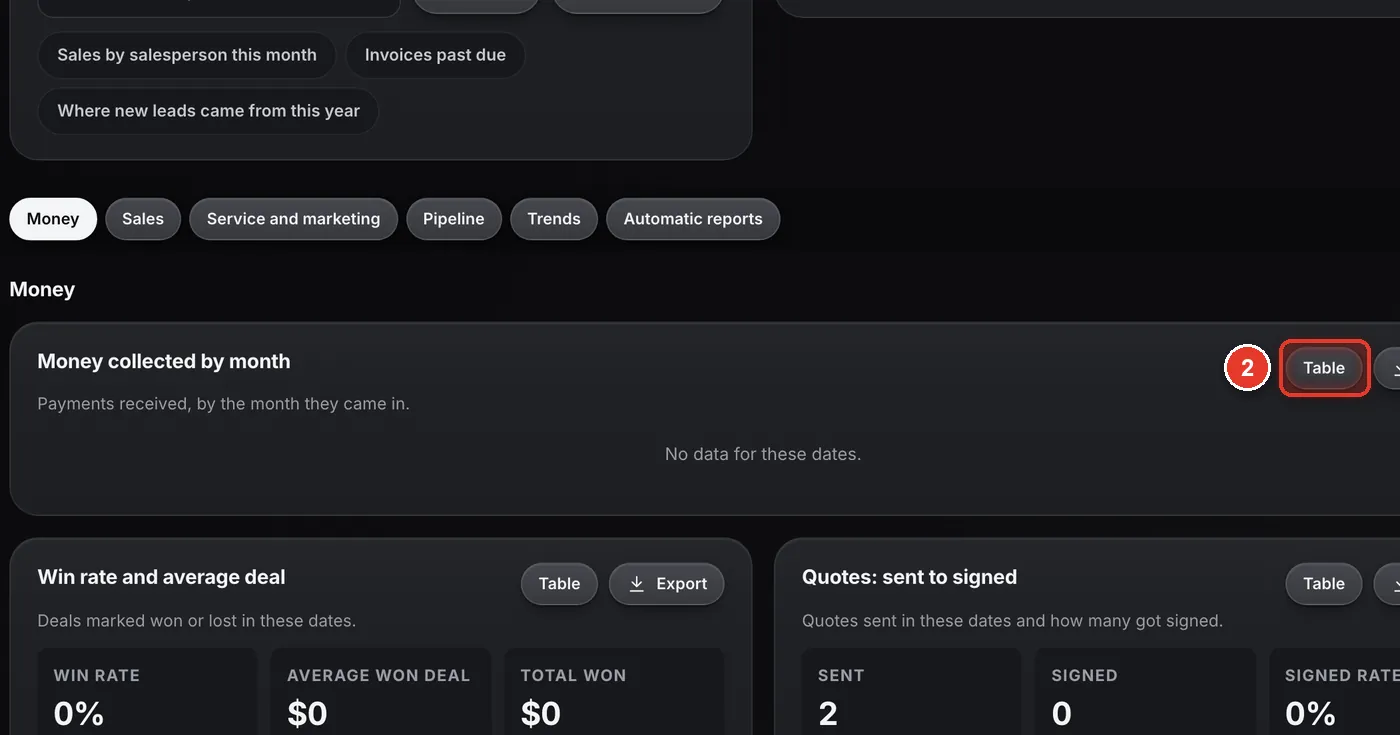
  • Table view for exact numbers
  • Dates picker
  • Respects each person's access

Build your own report

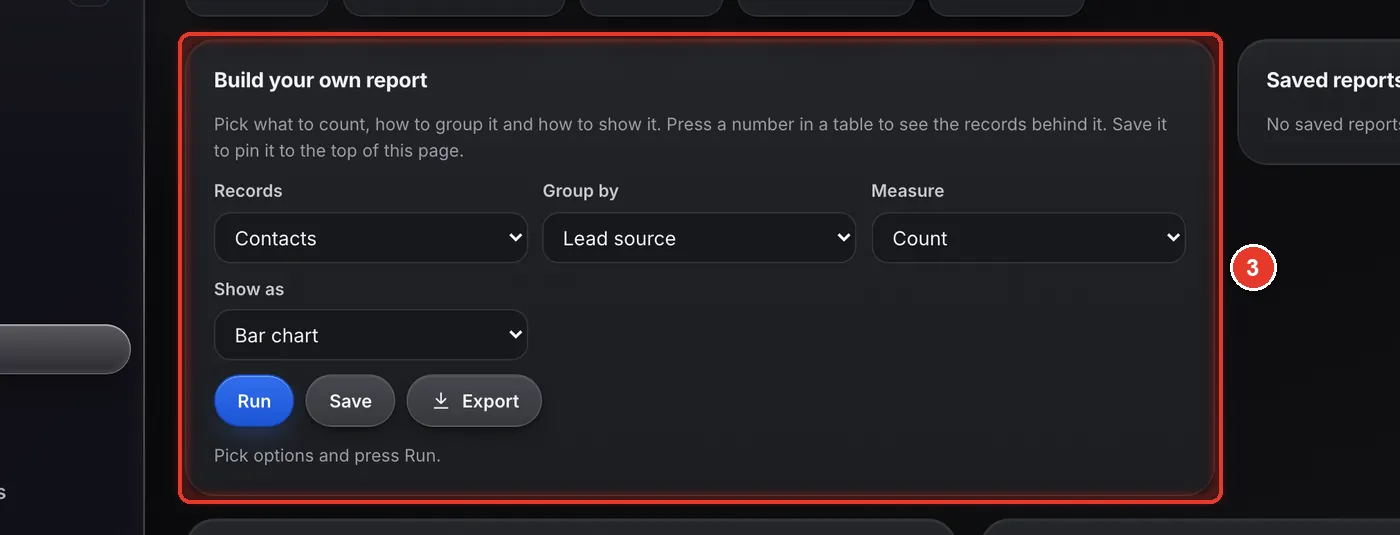
Pick the records, what to group by, the measure and how to show it, then Run and Save. Saved reports sit under Saved reports.

  • Contacts, deals, quotes, invoices, payments, appointments
  • Count, sum or average
  • Saved reports list
Build your own report. Sample data in LoonStack CRM.

Exports your accountant can use

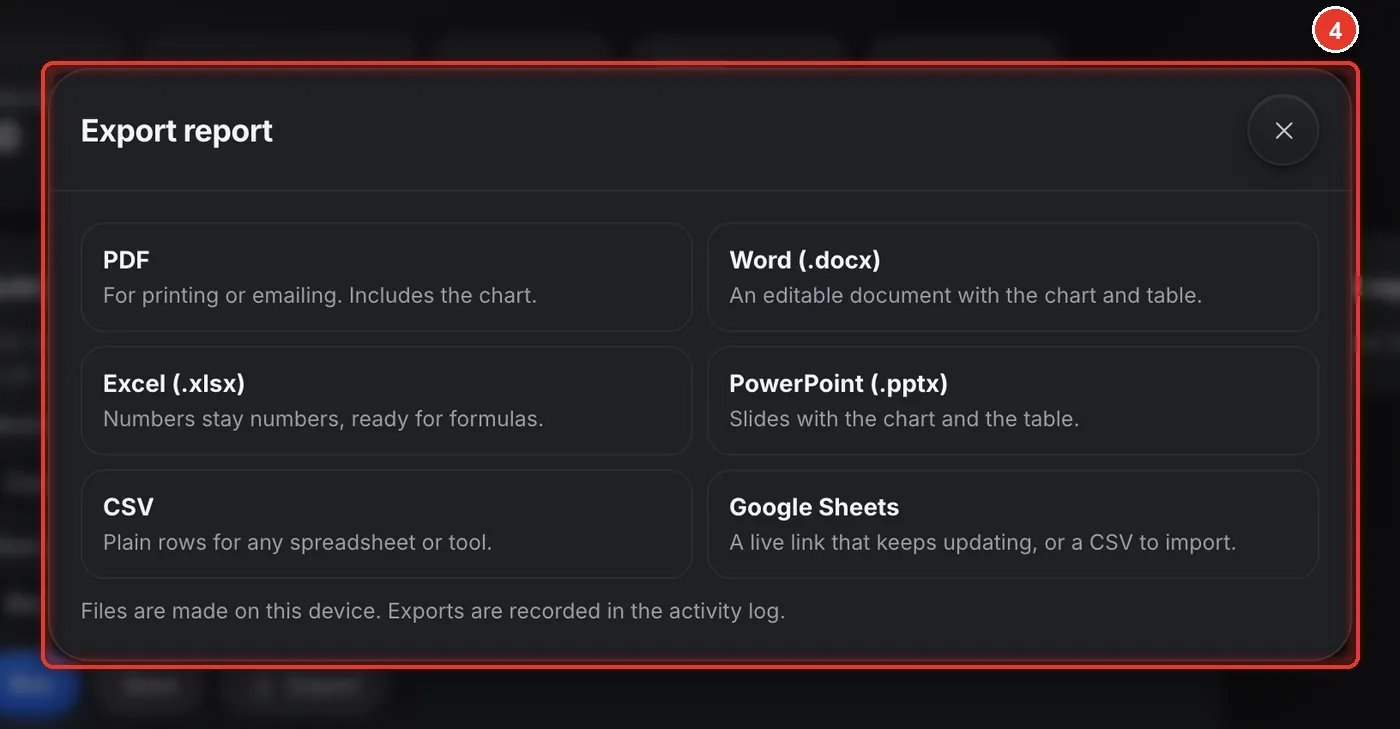
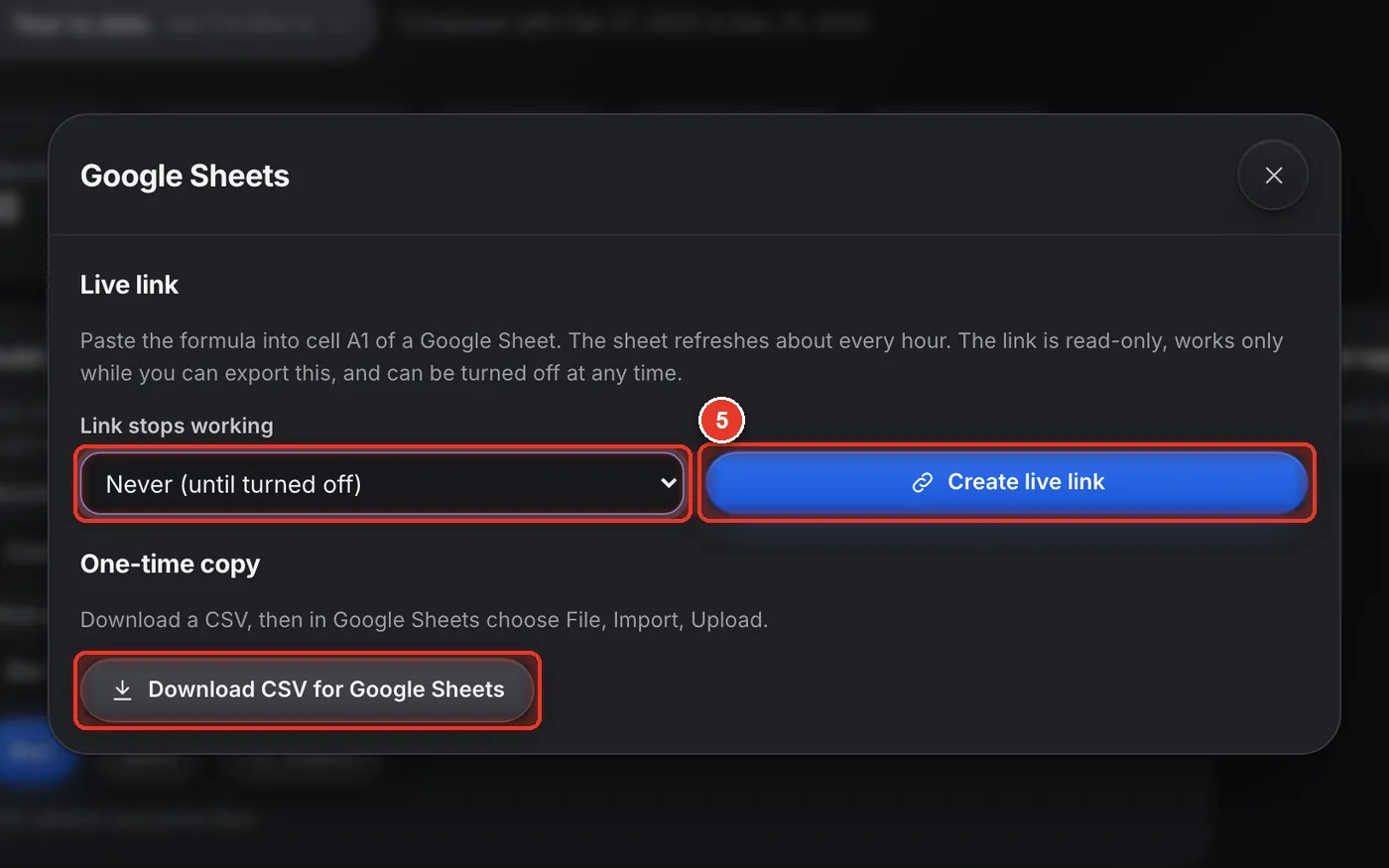
Export any report or list to PDF, Word, Excel, PowerPoint or CSV, or create a live Google Sheets link that keeps updating. Every export is recorded in the activity log.

  • Files made on your device
  • Live link with an end date
  • Who can export depends on the role
Exports your accountant can use. Sample data in LoonStack CRM.

See it in action

Reports, step by step, in screenshots of the real app with a made-up sample business. Use the buttons to move through it.

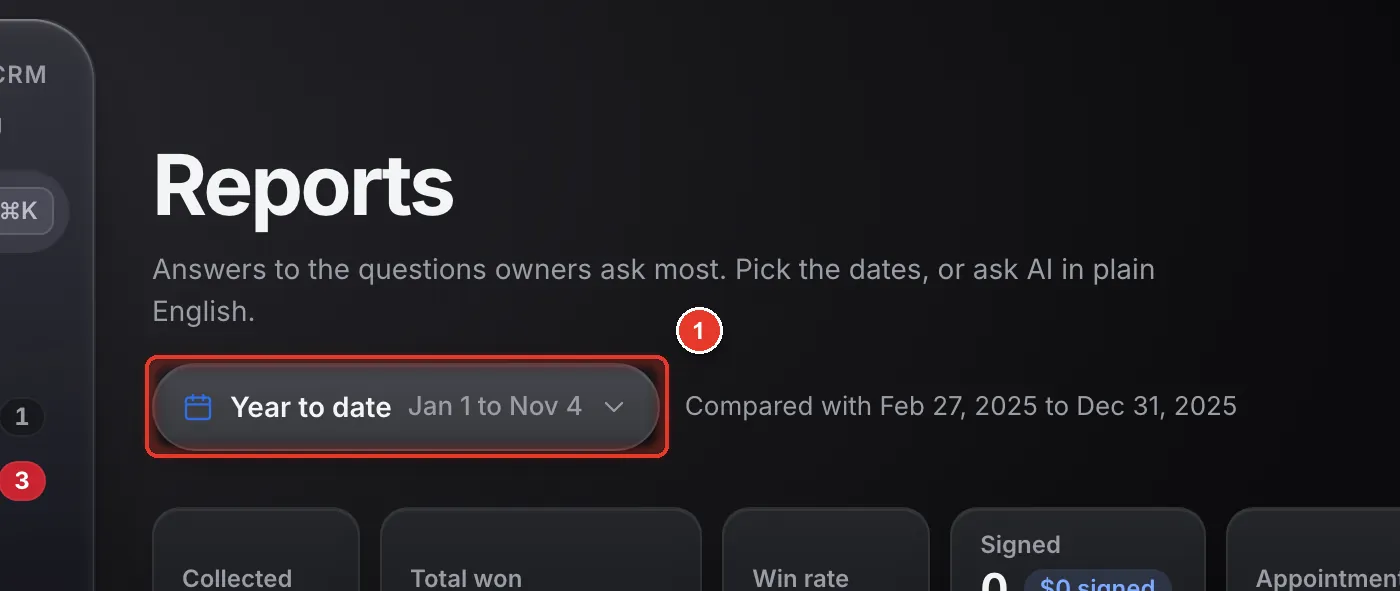
  1. Reports, with the Dates picker.
    Step 1 of 5 Reports, with the Dates picker.
  2. Table on any chart for exact numbers.
    Step 2 of 5 Table on any chart for exact numbers.
  3. Build your own report.
    Step 3 of 5 Build your own report.
  4. Export: PDF, Word, Excel, PowerPoint, CSV or Google Sheets.
    Step 4 of 5 Export: PDF, Word, Excel, PowerPoint, CSV or Google Sheets.
  5. A live Google Sheets link.
    Step 5 of 5 A live Google Sheets link.

Reports in the how-to guide, step by step

Why it helps

  • Answers without spreadsheets

    The numbers owners ask about most are built in.

  • Your format

    Six export formats, including a live Google Sheet.

  • Right people, right numbers

    Reports follow each role's access, and money can be hidden per role.

Everything in Reports

Every plan includes every line below.

  • Industry Intel

    One screen under Grow with news, prices and federal rule changes for your type of business, weather warnings at your ZIP code, the nearest businesses in your line of work within 15 miles, and free best-practice guides picked for your industry. Every headline opens the publisher's site, and AI summaries are labeled.

  • Easier to find your way around

    Build your own report and Saved reports sit at the very top, then Ask AI for a report and Report templates. A bar of buttons (Money, Sales, Service and marketing, Pipeline, Trends, Automatic reports) jumps to a section, and long lists show their first 8 rows with a Show all button.

  • Date ranges and compare

    Pick a period from presets such as This week, Last 30 days, This quarter or Year to date, or choose days on a calendar. The numbers, charts and trend tags compare it with the period before, or the same dates a year earlier.

  • Stat tiles with charts

    The numbers at the top, such as open pipeline, money owed and work won, come with a small chart of the last eight weeks and a tag that says up or down compared with before. If there is not enough history to chart, you just see the number.

  • Money collected

    By month.

  • Pipeline by stage

    Deals and value per stage.

  • Win rate

    Won, lost, average deal.

  • Lead sources

    Contacts, won and close rate per source.

  • Sales by service

    From invoice lines.

  • Appointments and no-shows

    By status, with the no-show rate.

  • Quotes

    Sent, signed and signing rate.

  • Marketing sent

    Marketing emails by month.

  • Team activity

    Activity by person.

  • Custom report builder

    Records, group by, measure, show as.

  • Six export formats

    PDF, Word, Excel, PowerPoint, CSV, Google Sheets.

  • Live Google Sheets link

    Keeps updating until you turn it off.

  • Competitors report

    Times met, won and lost, win rate, who you lost to, the top lost reason and the price difference, for each competitor. Tap any number to see the deals behind it.

  • Revenue forecast and stage moves

    Open and weighted deal value by month of expected close, and how many deals move on from each stage.

Reports is in every plan

Plans differ only in how many people can sign in. Month to month, no setup fee.

LoonStack CRM Solo

30-day free trial

$69/month

1 user

Every feature included, Reports too.

Start free trial of Solo

$0 today. Card required. 30-day free trial, then $69 a month, renewing automatically until you cancel. Cancel before day 30 in Billing and you pay nothing. To add a second person, switch to Crew in Billing.

LoonStack CRM Crew

Best for teams of 2 to 10

$129/month

Up to 10 users

Every feature included, Reports too.

Start free trial of Crew

$0 today. Card required. 30-day free trial, then $129 a month, renewing automatically until you cancel. Cancel before day 30 in Billing and you pay nothing. We remind you 7, 3 and 1 day before the trial ends.

LoonStack CRM Company

30-day free trial

$199/month

Unlimited users

Every feature included, Reports too.

Start free trial of Company

$0 today. Card required. 30-day free trial, then $199 a month, renewing automatically until you cancel. Cancel before day 30 in Billing and you pay nothing. We remind you 7, 3 and 1 day before the trial ends.

Switch between Solo, Crew and Company anytime from Billing in the CRM. Full pricing, website bundles and terms

See Reports with your business in it

Every plan has every feature. 30-day free trial, $0 today. Cancel before day 30 and you pay nothing.

Questions first? Email [email protected] or request a call. A written reply usually comes within one business day.