Today

Start every day knowing what needs you

Today is the first screen after you sign in. It lists what is overdue, what is owed to you, who is on the schedule and which deals have no next step, with a drafted follow-up ready for each.

30-day free trial. $0 today, card required. Cancel before day 30 and you pay nothing.

What needs you, in one list

Today in LoonStack CRM: What needs you, in one list. Sample data in LoonStack CRM.

What you can do with Today

What needs you, in one list

Needs you today pulls together overdue tasks, overdue invoices, quotes that were opened but not signed, and deals with no next step. Open any line to act on it.

  • Overdue tasks and invoices first
  • Quotes viewed but not signed
  • Deals missing a next step

Follow-ups already drafted

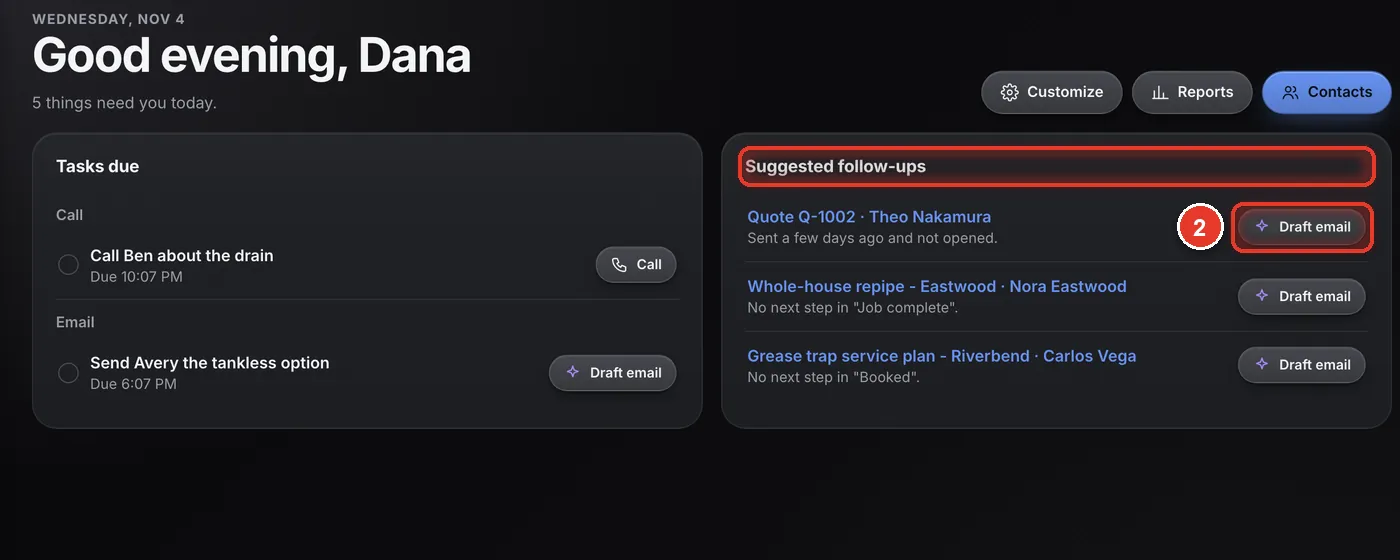
Suggested follow-ups pick quiet deals and unsigned quotes and say why each was picked. Draft email opens a ready-to-edit message. With AI turned on, the draft is written from your notes and emails with that customer.

  • A standard draft works without AI
  • You read and change it before it goes
  • Mark the task done when you send
Follow-ups already drafted. Sample data in LoonStack CRM.

Your day at a glance

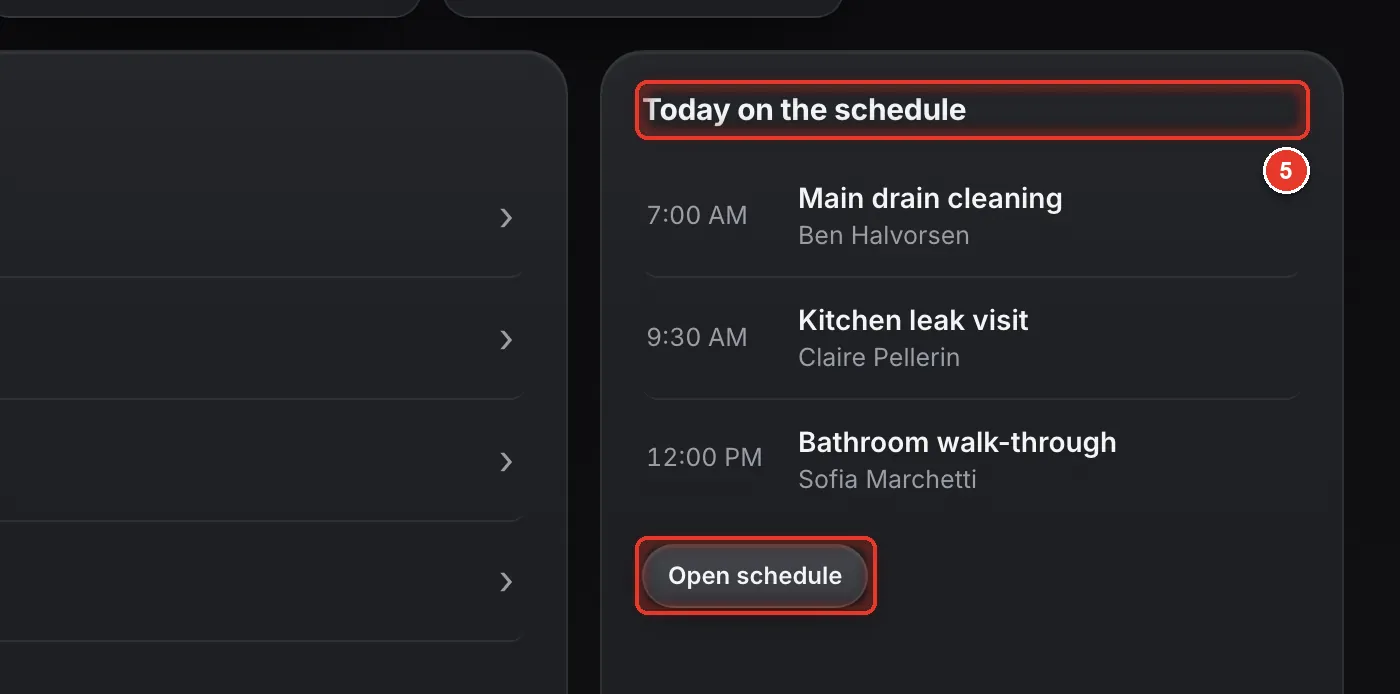
Key numbers sit at the top: your open pipeline, money owed to you, work won this month and appointments today, each with a small chart and an up or down tag so you see which way it is moving. Today on the schedule lists the day's visits, and Latest activity shows what changed.

  • Open pipeline and money owed
  • Today's appointments with Open schedule
  • Latest activity across the business
Your day at a glance. Sample data in LoonStack CRM.

An AI morning brief

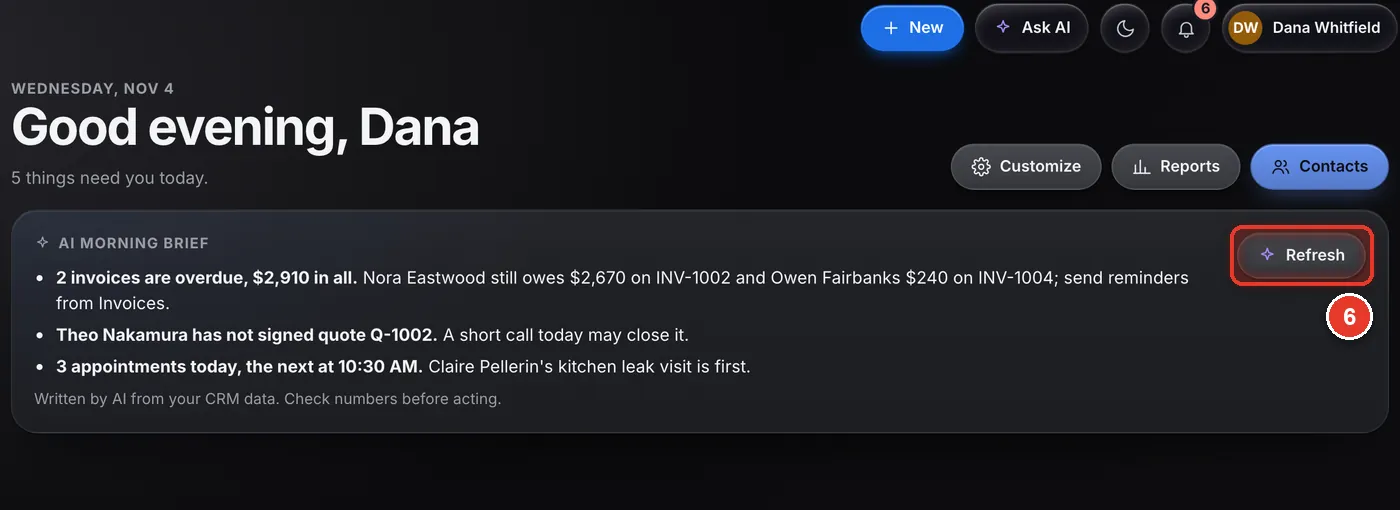
AI is included and works from day one. Today adds a short morning brief with a Refresh button, plus Ask a question. Turn AI off and everything else on Today works the same.

  • Included at no extra charge
  • Your own Anthropic, OpenAI or Google key is optional
  • Nothing is sent without your click
An AI morning brief, included. Sample data in LoonStack CRM.

See it in action

Today, step by step, in screenshots of the real app with a made-up sample business. Use the buttons to move through it.

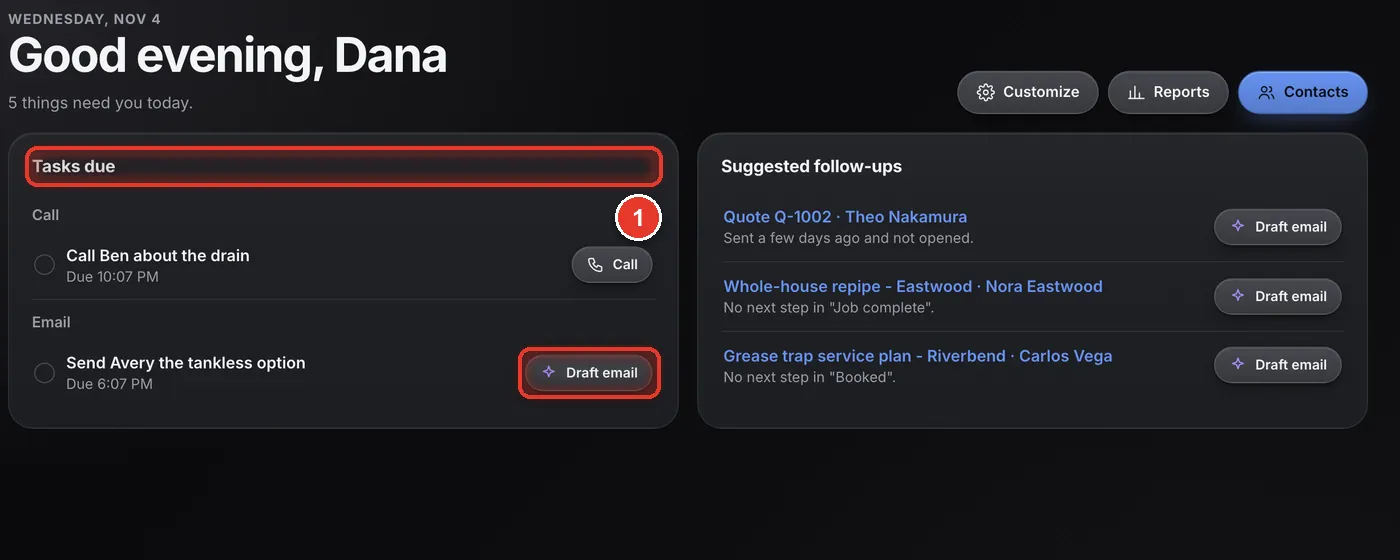
  1. Tasks due, each with the next move: Draft email, Draft text, Call or Quote.
    Step 1 of 6 Tasks due, each with the next move: Draft email, Draft text, Call or Quote.
  2. Suggested follow-ups: quiet deals and unsigned quotes, with the reason each was picked.
    Step 2 of 6 Suggested follow-ups: quiet deals and unsigned quotes, with the reason each was picked.
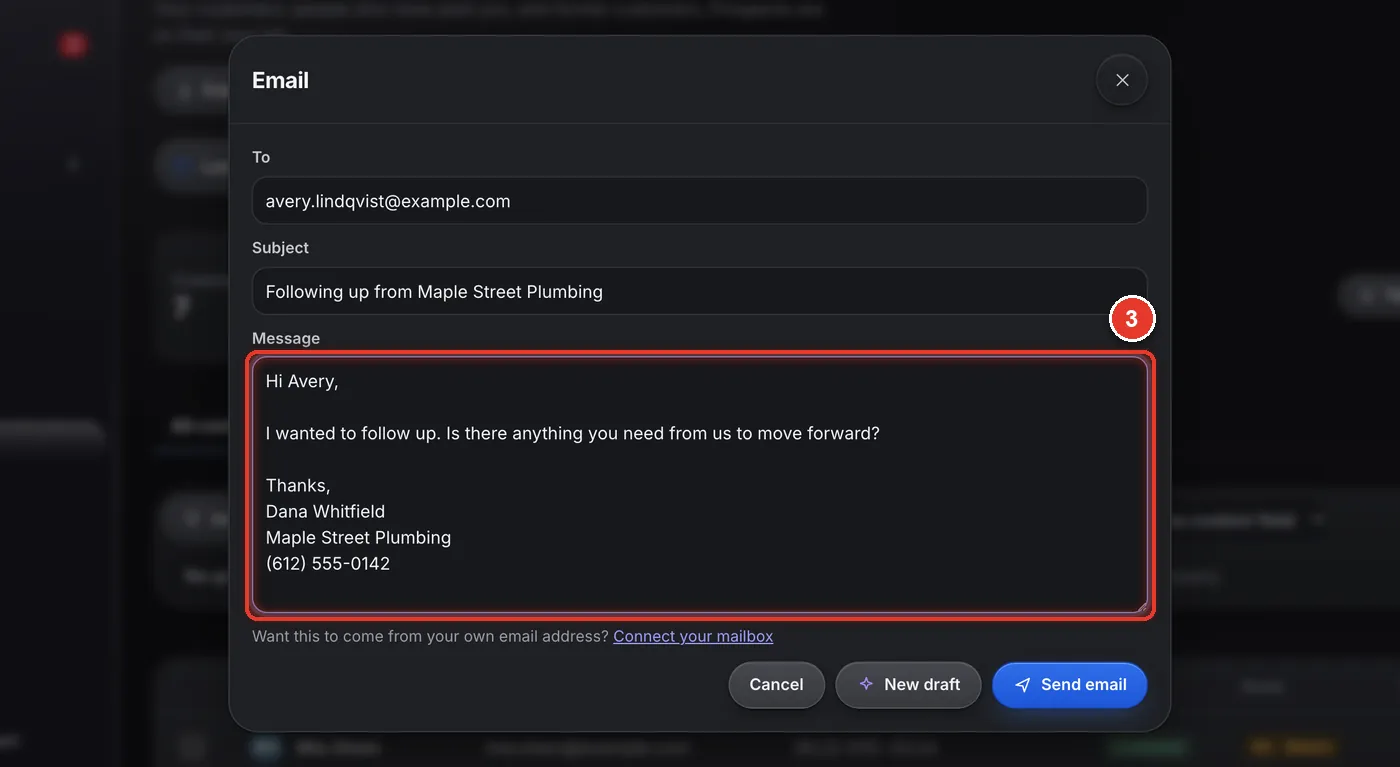
  3. Draft email opens a ready-to-edit message.
    Step 3 of 6 Draft email opens a ready-to-edit message.
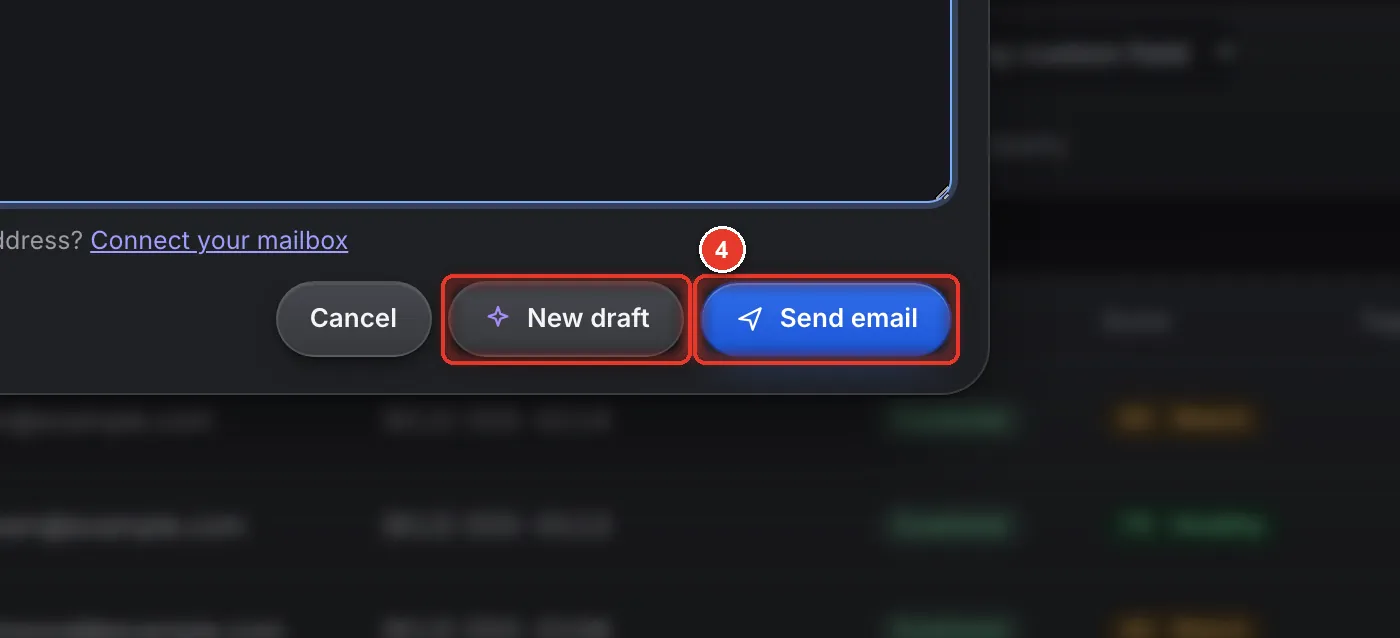
  4. New draft for another version, then Send email. The task can close at the same time.
    Step 4 of 6 New draft for another version, then Send email. The task can close at the same time.
  5. Today on the schedule, with Open schedule.
    Step 5 of 6 Today on the schedule, with Open schedule.
  6. The AI morning brief, ready from day one.
    Step 6 of 6 The AI morning brief, ready from day one.

Today in the how-to guide, step by step

Why it helps

  • Nothing slips

    Overdue work, unsigned quotes and deals without a next step come to you instead of waiting to be found.

  • Less writing

    A drafted follow-up is one click away for every suggestion. You stay the one who sends it.

  • Works with or without AI

    AI is included and you can turn it off. Every list and number on Today works either way.

Everything in Today

Every plan includes every line below.

  • A short side menu, and tabs along the top

    The side menu shows only the main options: Today, Inbox, Schedule, Customers, Pipeline, Quotes, Jobs and Invoices, then Find work, Marketing, Automations and Reports, and Integrations, Settings and Help at the bottom. Open one and its other pages sit as tabs along the top of the page, so any screen is two clicks away. Everyone sees the same menu, and you can still pin your own screens from My menu.

  • Hail near your customers (roofing and storm businesses)

    Roofing, siding, gutter and storm restoration businesses get a card on Today: how many hail hits in the last 7 days have customers in the path, which opens Storm & hail. The Storm & hail menu item shows a badge for new hits since you last looked.

  • Buttons that show what happened

    Delete, Upload, Download and Send play a short animation that follows the real result: uploads and downloads show true progress, and you only see Deleted, Uploaded, Downloaded or Sent after the server confirms. If something fails, the button says so, for example Not sent. With reduced motion turned on in your device, the animation is replaced by a simple change.

  • Date ranges and compare

    Pick a period from presets such as This week, Last 30 days, This quarter or Year to date, or choose days on a calendar. The numbers, charts and trend tags compare it with the period before, or the same dates a year earlier.

  • Stat tiles with charts

    The numbers at the top, such as open pipeline, money owed and work won, come with a small chart of the last eight weeks and a tag that says up or down compared with before. If there is not enough history to chart, you just see the number.

  • Needs you today

    Overdue tasks, overdue invoices, viewed but unsigned quotes, and deals with no next step.

  • Key numbers

    Open pipeline, money owed to you, won this month and appointments today.

  • Suggested follow-ups

    Quiet deals and unsigned quotes, each with the reason it was picked.

  • Draft email and Draft text

    A ready-to-edit message for each task or suggestion.

  • Today on the schedule

    The day's appointments with a link to the full schedule.

  • Latest activity

    Notes, calls, stage moves and payments as they happen.

  • AI morning brief

    Included at no extra charge, with Refresh and Ask a question.

  • Getting started checklist

    Shows setup progress until every step is done.

Today is in every plan

Plans differ only in how many people can sign in. Month to month, no setup fee.

LoonStack CRM Solo

30-day free trial

$69/month

1 user

Every feature included, Today too.

Start free trial of Solo

$0 today. Card required. 30-day free trial, then $69 a month, renewing automatically until you cancel. Cancel before day 30 in Billing and you pay nothing. To add a second person, switch to Crew in Billing.

LoonStack CRM Crew

Best for teams of 2 to 10

$129/month

Up to 10 users

Every feature included, Today too.

Start free trial of Crew

$0 today. Card required. 30-day free trial, then $129 a month, renewing automatically until you cancel. Cancel before day 30 in Billing and you pay nothing. We remind you 7, 3 and 1 day before the trial ends.

LoonStack CRM Company

30-day free trial

$199/month

Unlimited users

Every feature included, Today too.

Start free trial of Company

$0 today. Card required. 30-day free trial, then $199 a month, renewing automatically until you cancel. Cancel before day 30 in Billing and you pay nothing. We remind you 7, 3 and 1 day before the trial ends.

Switch between Solo, Crew and Company anytime from Billing in the CRM. Full pricing, website bundles and terms

See Today with your business in it

Every plan has every feature. 30-day free trial, $0 today. Cancel before day 30 and you pay nothing.

Questions first? Email [email protected] or request a call. A written reply usually comes within one business day.