Schedule

Fill your calendar without the back-and-forth

See everyone's appointments by day, week, month or person, and let customers book open times on a booking page with your business name. Confirmations and reminders include links to reschedule or cancel.

30-day free trial. $0 today, card required. Cancel before day 30 and you pay nothing.

A booking page that knows your hours

Schedule in LoonStack CRM: A booking page that knows your hours. Sample data in LoonStack CRM.

What you can do with Schedule

A booking page that knows your hours

Customers see times from your hours, minus bookings, buffers and time off. Choose one-on-one, group, round robin or everyone-together events, ask questions, and take a deposit at booking.

  • Four kinds of event
  • Buffers, notice and booking window
  • No LoonStack branding on your page

Everyone's day in one calendar

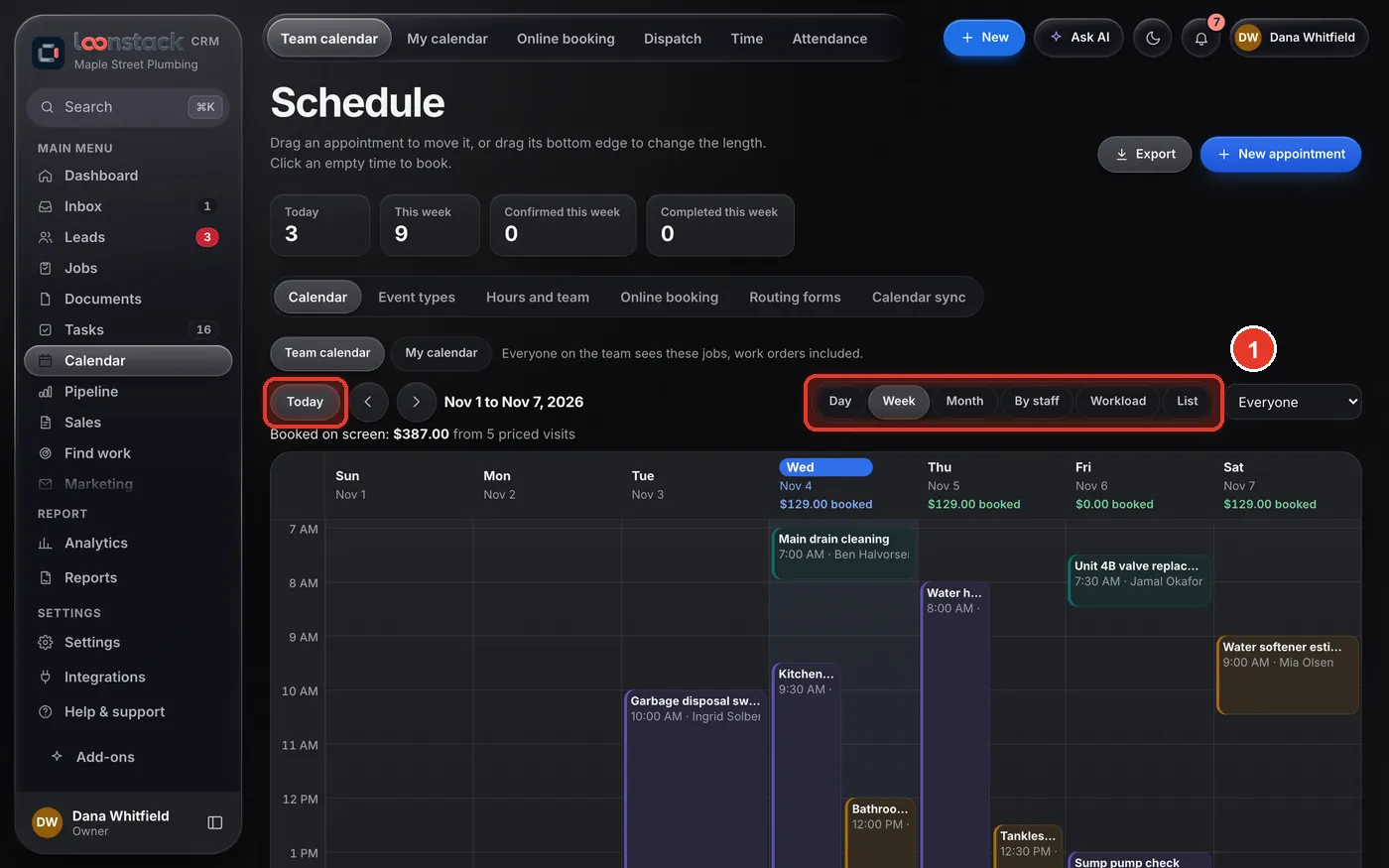
Switch between Day, Week, Month, By staff and List. Drag an appointment to move it, or click an empty time to book. Field crew see their own appointments under My day.

  • Drag to reschedule
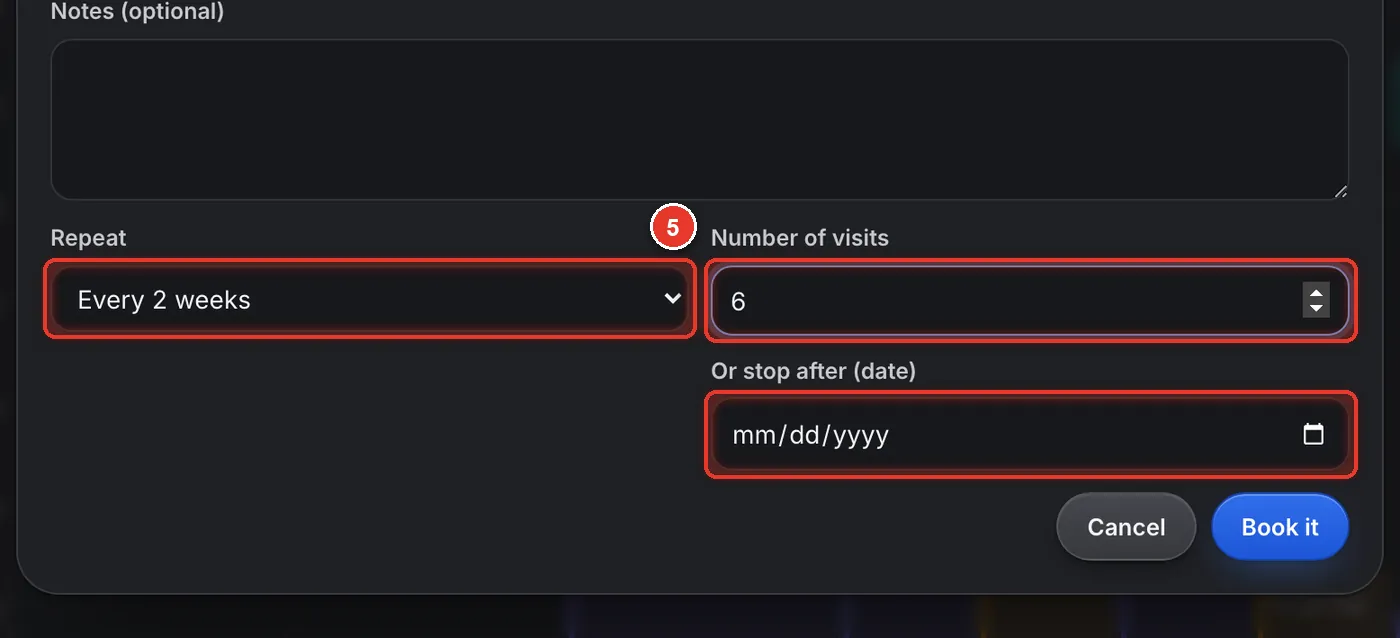
  • Repeat visits every 1 to 4 weeks
  • Booking a visit moves the deal forward
Everyone's day in one calendar. Sample data in LoonStack CRM.

Fewer no-shows

Confirmations and reminders go out by email 24 hours and 2 hours before, each with links to reschedule or cancel. Customers fix their own time instead of simply not showing up.

  • Reminder timing you choose
  • Reschedule and cancel links
  • No-show rate in reports
Fewer no-shows. Sample data in LoonStack CRM.

Send people to the right event

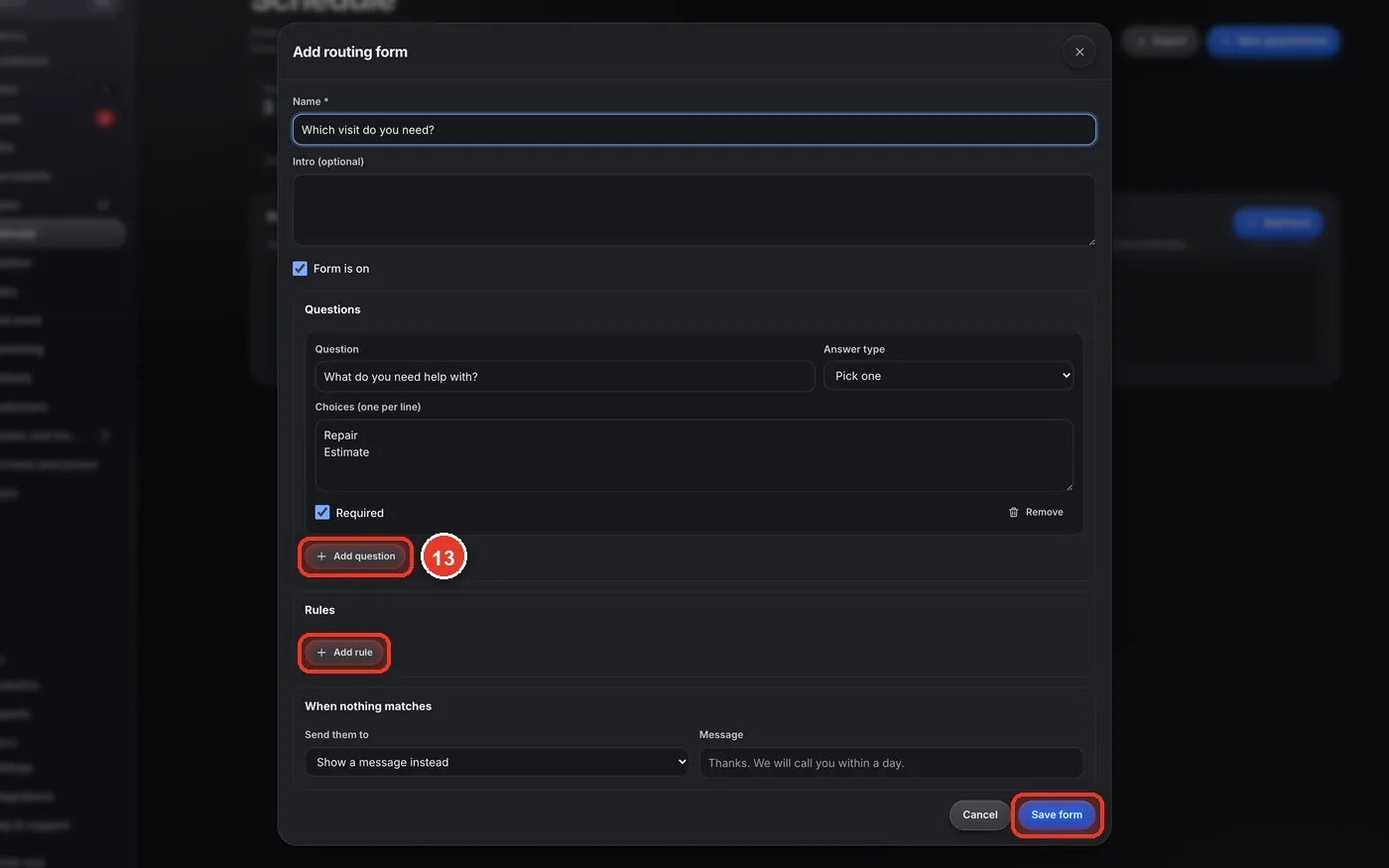
Routing forms ask a question or two first, then send each person to the right event type. Put the calendar on your website, or a Book now button that opens it.

  • Routing rules on answers
  • Website embed or Book now button
  • Private links that expire
Send people to the right event. Sample data in LoonStack CRM.

See it in action

Schedule, step by step, in screenshots of the real app with a made-up sample business. Use the buttons to move through it.

  1. Week view, with Day, Week, Month, By staff and List.
    Step 1 of 7 Week view, with Day, Week, Month, By staff and List.
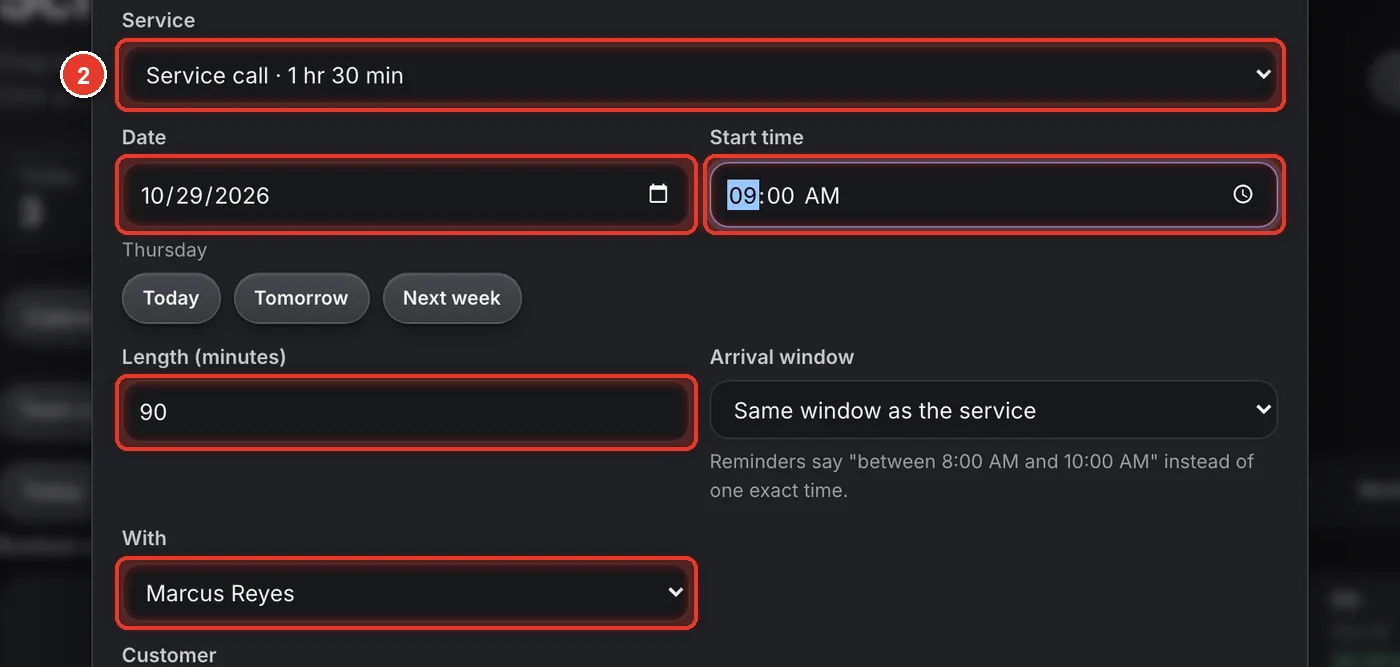
  2. New appointment: service, date, time, length and who it is with.
    Step 2 of 7 New appointment: service, date, time, length and who it is with.
  3. Repeat visits every few weeks.
    Step 3 of 7 Repeat visits every few weeks.
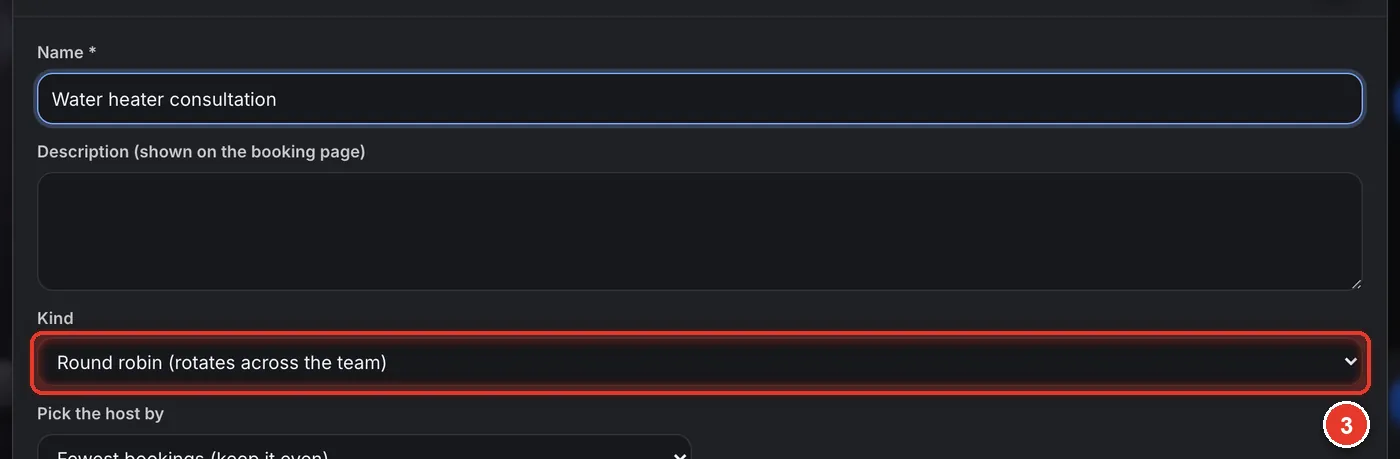
  4. Event kinds: one-on-one, group, round robin or everyone together.
    Step 4 of 7 Event kinds: one-on-one, group, round robin or everyone together.
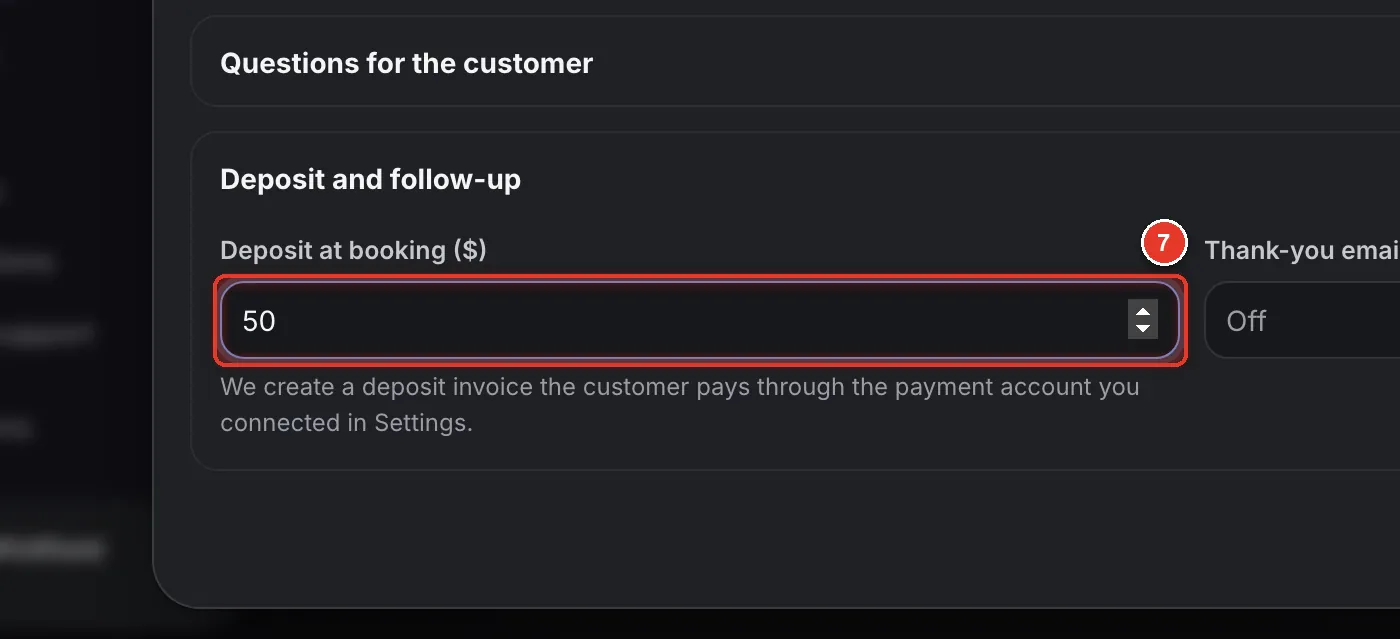
  5. Deposit at booking, through your payment account.
    Step 5 of 7 Deposit at booking, through your payment account.
  6. Routing forms send people to the right event.
    Step 6 of 7 Routing forms send people to the right event.
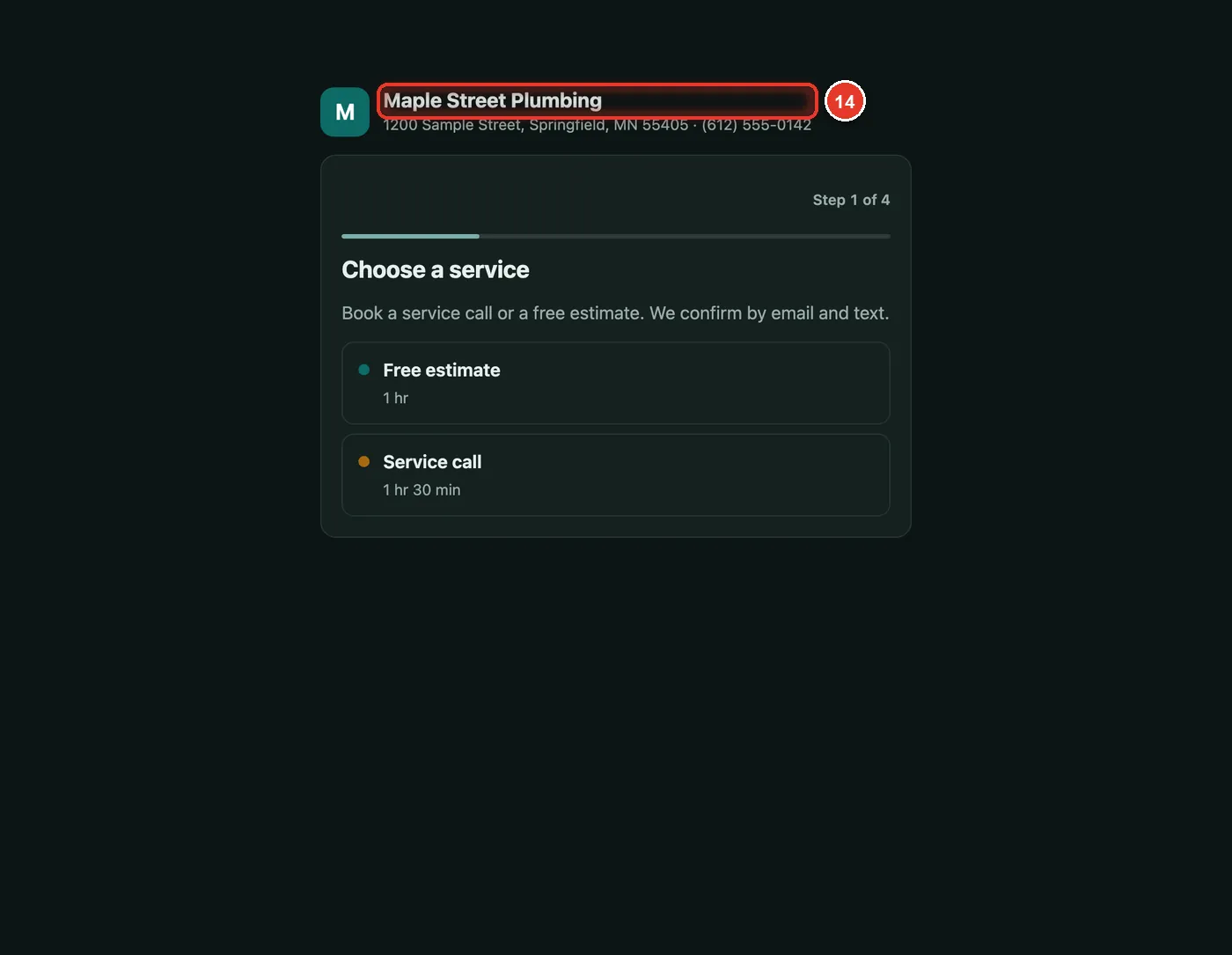
  7. Your public booking page, with your business name.
    Step 7 of 7 Your public booking page, with your business name.

Schedule in the how-to guide, step by step

Why it helps

  • Booked while you work

    Customers pick real open times on their own, day or night.

  • Fewer empty slots

    Reminders with reschedule links give customers an easy way to move instead of missing the visit.

  • On the phone you carry

    Subscribe to your calendar feed in Apple, Google or Outlook.

Everything in Schedule

Every plan includes every line below. Items marked Coming are not available yet and say what they wait on.

  • Workload: who is booked too much

    Schedule, Calendar, Workload shows each person's hours booked out of hours available for every day of the week, with over-booked days in amber and visits nobody is on in their own row. Tap a day to fix it in By staff.

  • Hail Impact Reports at the door

    Make a branded hail report for any address, text or email it to the homeowner, walk them through it full screen, and print door hangers with a QR code per home. Reps get a meeting prep packet before each appointment, with the sections you choose.

  • Live weather on the map

    On the Dispatch map, the Storm & hail map and the Sales Team field map, a Weather button shows a radar loop with play, pause and a time scrubber, plus switches for weather warnings and lightning, and hail size where Storm & hail is on. It uses free public data (NOAA and NWS), is off until you turn it on, and is not for life safety decisions.

  • Day, Week, Month, By staff, List

    Every view of the team's schedule.

  • Drag to move

    Or click an empty time to book.

  • Repeat visits

    Every 1 to 4 weeks, by count or end date.

  • Online booking page

    Your business name, no LoonStack branding.

  • Four event kinds

    One-on-one, group, round robin, everyone together.

  • Hours, team hours and time off

    Open times come from these.

  • Buffers and limits

    Buffer before and after, minimum notice, book up to.

  • Deposits at booking

    Paid through the account you connected.

  • Routing forms

    Answers send people to the right event.

  • Website embed

    The calendar on your page or a Book now button.

  • Confirmations and reminders

    Email with reschedule and cancel links.

  • Calendar feed

    Apple, Google and Outlook subscribe to your schedule.

  • Two-way Google and Outlook sync Coming

    Coming, after Google and Microsoft approve LoonStack. The feed works today.

  • Confirm by reply or link

    A customer replies C or YES to the reminder, or taps a link, and the appointment is marked confirmed.

  • Running late

    Tell the customer you are 10, 20, 30 or any number of minutes late with one tap.

  • Tech photo and bio

    The On my way text can link a small page with the tech's photo, first name and short bio.

Schedule is in every plan

Plans differ only in how many people can sign in. Month to month, no setup fee.

LoonStack CRM Solo

30-day free trial

$69/month

1 user

Every feature included, Schedule too.

Start free trial of Solo

$0 today. Card required. 30-day free trial, then $69 a month, renewing automatically until you cancel. Cancel before day 30 in Billing and you pay nothing. To add a second person, switch to Crew in Billing.

LoonStack CRM Crew

Best for teams of 2 to 10

$129/month

Up to 10 users

Every feature included, Schedule too.

Start free trial of Crew

$0 today. Card required. 30-day free trial, then $129 a month, renewing automatically until you cancel. Cancel before day 30 in Billing and you pay nothing. We remind you 7, 3 and 1 day before the trial ends.

LoonStack CRM Company

30-day free trial

$199/month

Unlimited users

Every feature included, Schedule too.

Start free trial of Company

$0 today. Card required. 30-day free trial, then $199 a month, renewing automatically until you cancel. Cancel before day 30 in Billing and you pay nothing. We remind you 7, 3 and 1 day before the trial ends.

Switch between Solo, Crew and Company anytime from Billing in the CRM. Full pricing, website bundles and terms

See Schedule with your business in it

Every plan has every feature. 30-day free trial, $0 today. Cancel before day 30 and you pay nothing.

Questions first? Email [email protected] or request a call. A written reply usually comes within one business day.