Email marketing

Bring customers back with email that looks like you

Start from 220+ templates written for local businesses, branded with your logo and colors. Send to people who opted in, now or on a date you pick, with unsubscribe links added for you.

30-day free trial. $0 today, card required. Cancel before day 30 and you pay nothing.

Templates for local businesses

Email marketing in LoonStack CRM: Templates for local businesses. Sample data in LoonStack CRM.
220+
email templates
25
template categories

What you can do with Email marketing

Templates for local businesses

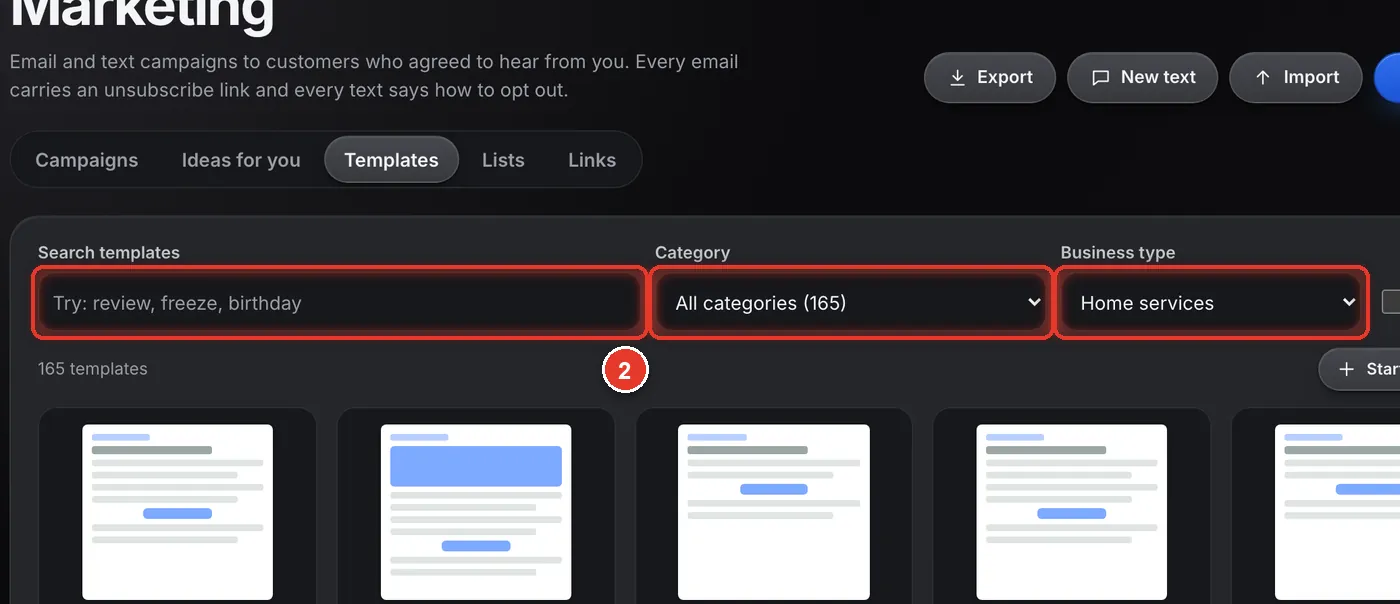
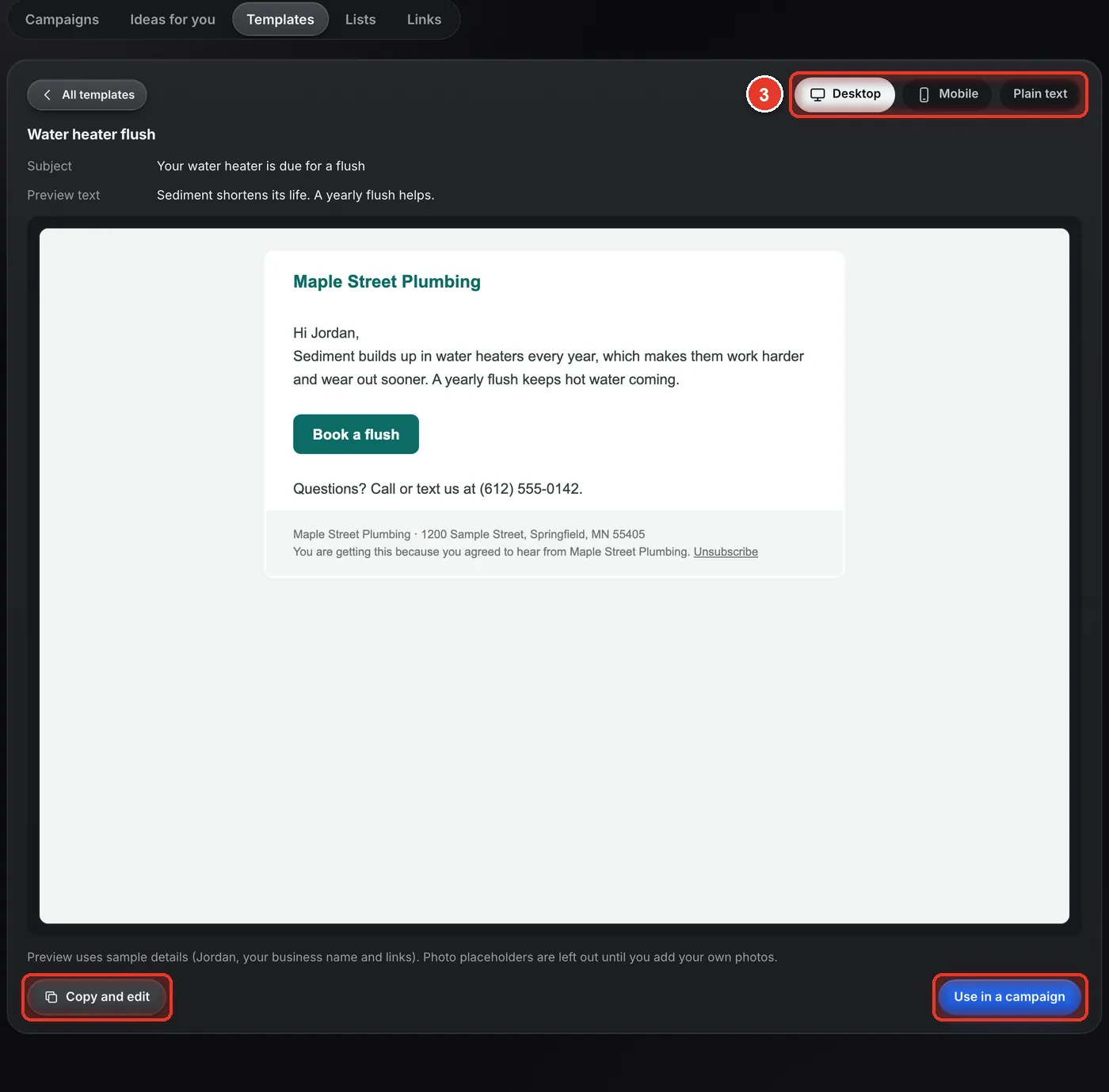
Newsletters, seasonal offers, reminders, review requests and win-backs. Search, or pick a category and business type, then preview on desktop or mobile.

  • 220+ templates, 25 categories
  • Desktop and mobile preview
  • Copy and edit, or use in a campaign

A builder anyone can use

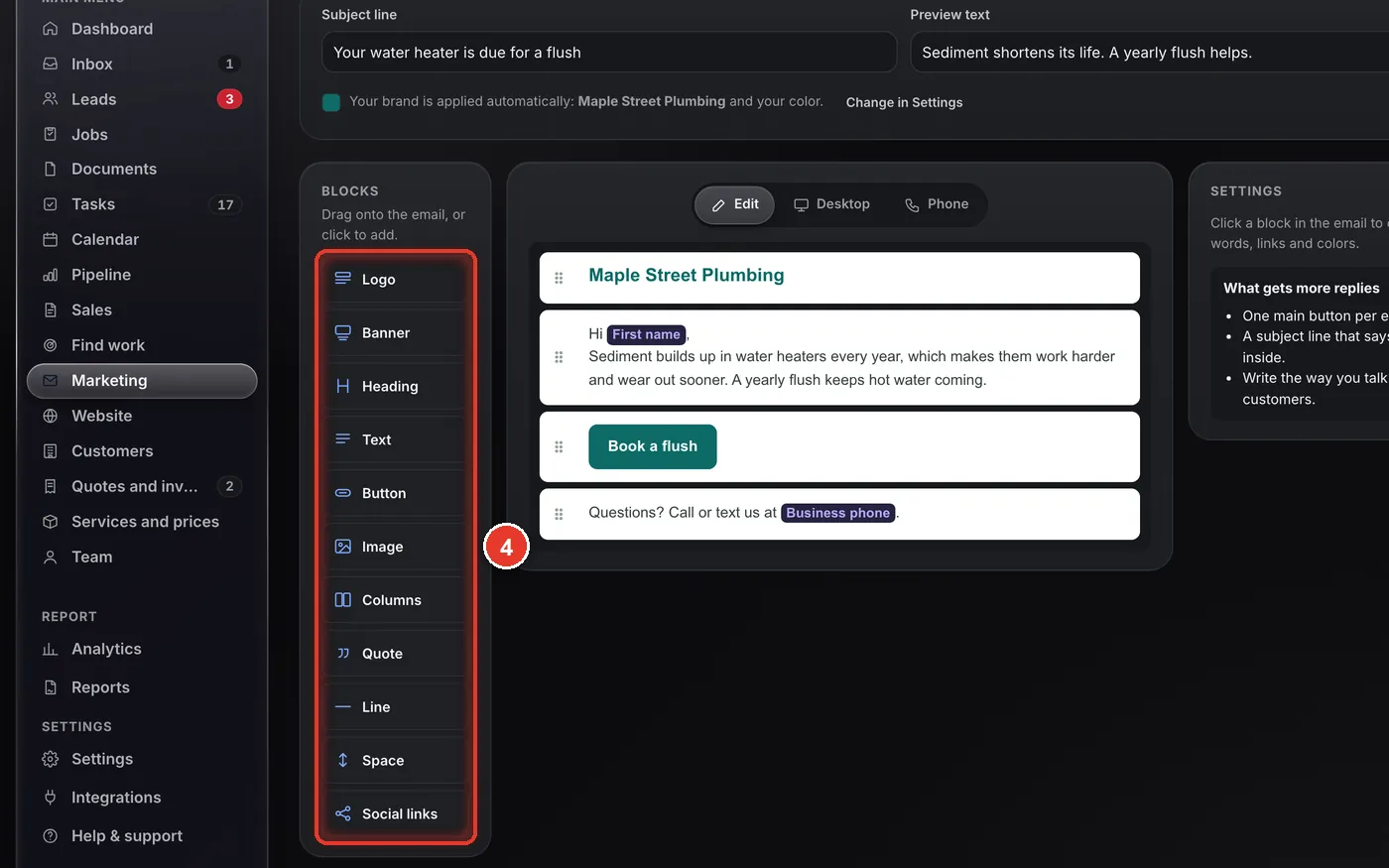
Add blocks from the list: logo, banner, heading, text, button, image, columns, quote, line, space and social links. Click a block to change its words, links and colors. Your brand kit goes on automatically.

  • 11 kinds of blocks
  • Send test to me
  • Fields like first name fill in for each person

The right people, on the right day

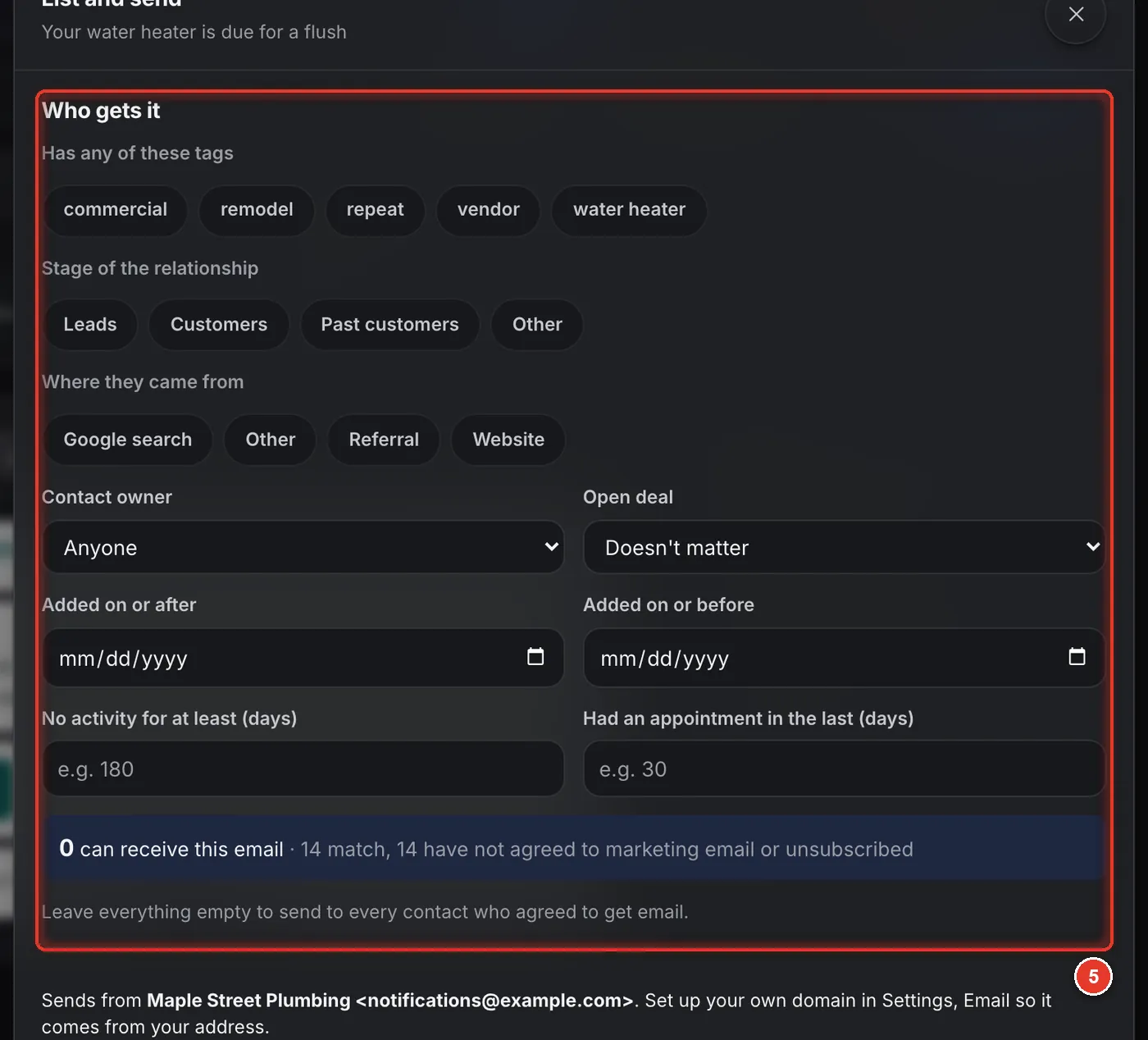
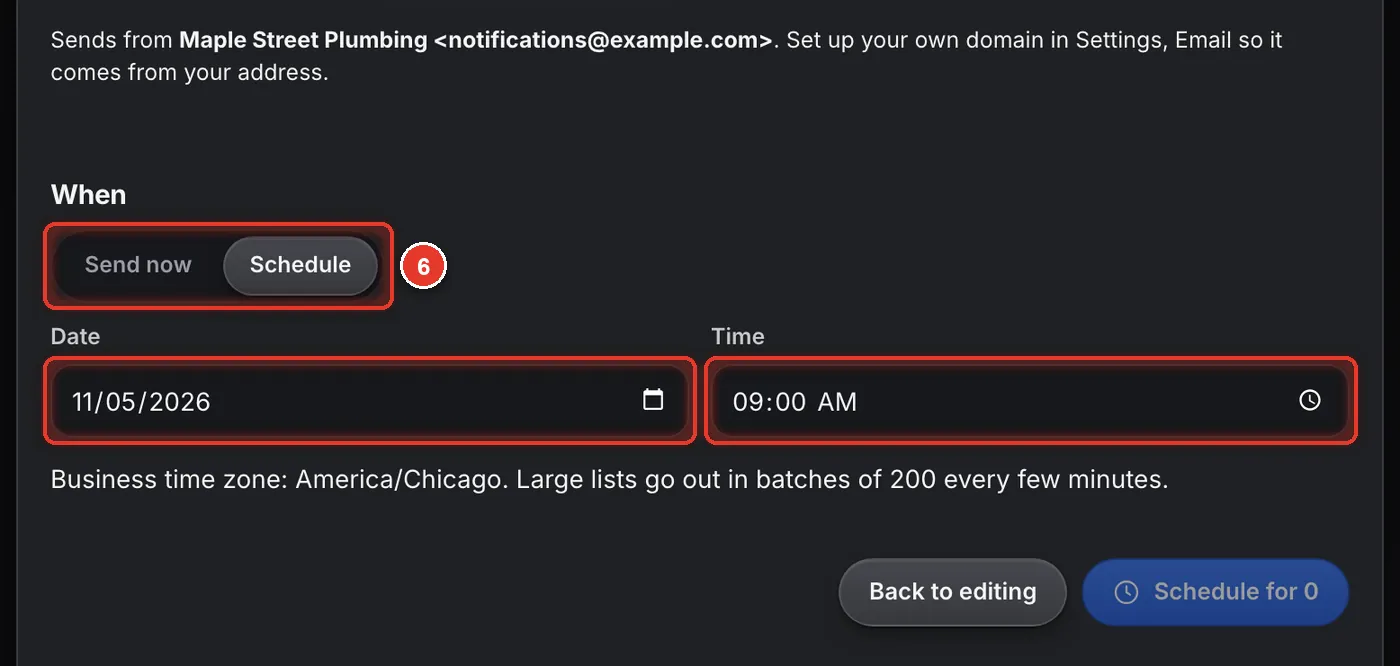
Narrow who gets it by tags, stage, source, owner, open deal, dates or activity, or send to everyone who opted in. Send now or schedule a date and time, and cancel a scheduled send.

  • Saved audiences
  • Send now or schedule
  • Only people who agreed to marketing email
The right people, on the right day. Sample data in LoonStack CRM.

Unsubscribes and your address, handled

Every marketing email carries a one-click unsubscribe link and your business name and postal address, added for you. A campaign cannot go out until your mailing address is filled in.

  • One-click unsubscribe
  • Postal address added
  • Unsubscribes stop right away

See it in action

Email marketing, step by step, in screenshots of the real app with a made-up sample business. Use the buttons to move through it.

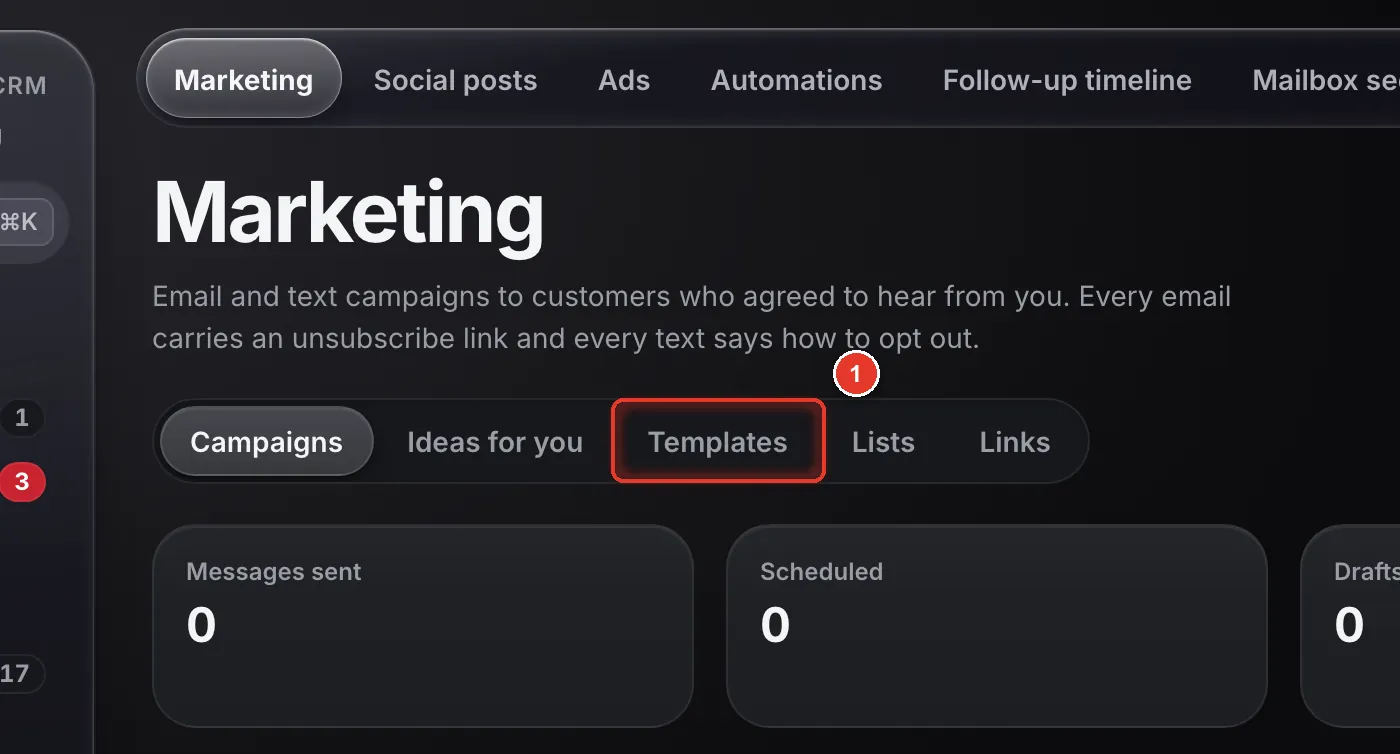
  1. Email marketing, Templates tab.
    Step 1 of 6 Email marketing, Templates tab.
  2. Search by category and business type.
    Step 2 of 6 Search by category and business type.
  3. Preview on desktop or mobile, then Copy and edit.
    Step 3 of 6 Preview on desktop or mobile, then Copy and edit.
  4. The builder and its blocks.
    Step 4 of 6 The builder and its blocks.
  5. Who gets it: tags, stage, source, owner and more.
    Step 5 of 6 Who gets it: tags, stage, source, owner and more.
  6. Send now or schedule.
    Step 6 of 6 Send now or schedule.

Email marketing in the how-to guide, step by step

Why it helps

  • Ready in minutes

    Start from a template written for your kind of business.

  • Looks like your business

    Your logo and colors go on every email.

  • Respectful by default

    Only people who agreed get marketing email, and unsubscribing works right away.

Everything in Email marketing

Every plan includes every line below.

  • Reach everyone in a storm's path

    From a storm alert, pick your customers and leads in its path and start a text campaign, an email campaign or a door-knock list in one step. Only your own contacts, with opt-in and STOP rules applied.

  • 220+ templates

    In 25 categories, for local businesses.

  • Drag-and-drop builder

    11 block types, no code.

  • Brand kit

    Logo and colors added for you.

  • Audiences

    Saved groups by tag, stage, source, owner and more.

  • Scheduled campaigns

    Send now or on a date, with Cancel send.

  • One-click unsubscribe

    Added to every marketing email.

  • Postal address

    Added for you; required before sending.

  • Desktop and mobile preview

    Before you send.

  • Send test to me

    Check it in your own inbox.

  • Results

    How many were sent, failed or skipped.

  • Tracked links

    Make a link once and type its code in any email, text or campaign. Each person gets their own link, so you see who clicked, and a click can add a tag or start an automation.

  • Review page with your sites

    Up to three review sites on one page, the same for every customer. Reminders stop once they tap one, and a customer is not asked again for 60 days to start.

  • Customer referral link

    Every customer gets a link to send friends to a short form. New people arrive as contacts with the source Referral, and you get a task to say thanks.

Email marketing is in every plan

Plans differ only in how many people can sign in. Month to month, no setup fee.

LoonStack CRM Solo

30-day free trial

$69/month

1 user

Every feature included, Email marketing too.

Start free trial of Solo

$0 today. Card required. 30-day free trial, then $69 a month, renewing automatically until you cancel. Cancel before day 30 in Billing and you pay nothing. To add a second person, switch to Crew in Billing.

LoonStack CRM Crew

Best for teams of 2 to 10

$129/month

Up to 10 users

Every feature included, Email marketing too.

Start free trial of Crew

$0 today. Card required. 30-day free trial, then $129 a month, renewing automatically until you cancel. Cancel before day 30 in Billing and you pay nothing. We remind you 7, 3 and 1 day before the trial ends.

LoonStack CRM Company

30-day free trial

$199/month

Unlimited users

Every feature included, Email marketing too.

Start free trial of Company

$0 today. Card required. 30-day free trial, then $199 a month, renewing automatically until you cancel. Cancel before day 30 in Billing and you pay nothing. We remind you 7, 3 and 1 day before the trial ends.

Switch between Solo, Crew and Company anytime from Billing in the CRM. Full pricing, website bundles and terms

See Email marketing with your business in it

Every plan has every feature. 30-day free trial, $0 today. Cancel before day 30 and you pay nothing.

Questions first? Email [email protected] or request a call. A written reply usually comes within one business day.